
TaskPremise: I am the owner of the website and I have full control of my web server (root righ 2021-06-08 03:00:00 Author: incolumitas.com(查看原文) 阅读量:97 收藏
Task
Premise: I am the owner of the website and I have full control of my web server (root rights). My web server is not behind a load balancer or some other mechanism that prevents me to hook into the incoming TCP/IP stream from the external IP address.
Goal: For each visitor of my site, I want to detect that this visitor is using some tunnel such as a Proxy Server (socks, https, ...) or a VPN provider or any other intermediate service.
Visually:
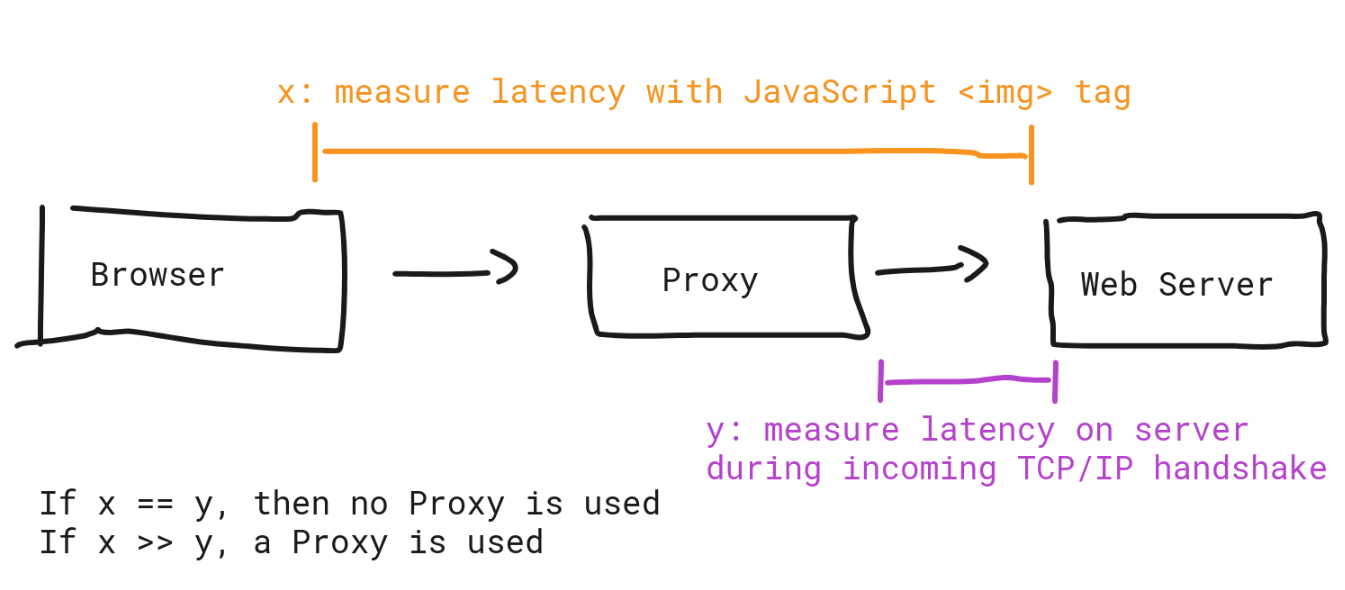
Put differently, I want to take two latency measurements and compare them.
- Latency from browser -> web server, measured with JavaScript from within the browser
- Latency from external IP -> web server, measured on incoming TCP/IP handshake
Obtain Browser -> Web Server Latency with JavaScript
Without much explanation, this is the JavaScript source code to obtain the latency from browser to web server. I make 10 measurements and I will use the median value.
let N = 10;

function ping(url) {
  return new Promise((resolve, reject) => {
    var started = performance.now();
    var http = new XMLHttpRequest();

    var cacheBuster = '?bust=' + (new Date()).getTime()
    url += cacheBuster;

    http.open("GET", url, /*async*/true);
    http.onreadystatechange = function() {
      if (http.readyState == 4) {
        var ended = performance.now();
        var milliseconds = ended - started;
        resolve(milliseconds);
      }
    };
    try {
      http.send(null);
    } catch(exception) {
      // this is expected
    }
  })
}

(async () => {
  let promises = [];
  for (var i=0; i <= N; i++) {
    promises.push(ping("https://incolumitas.com"));
  }
  Promise.all(promises).then((results) => {
    results.sort((a, b) => a - b);
    let median = null;
    let m1 = Math.floor(results.length / 2);
    let m2 = Math.ceil(results.length / 2);
    if (results.length % 2 == 0) {
      median = (results[m1] + results[m2]) / 2;
    } else {
      median = results[m1];
    }
    console.log('median', median);
    console.log('measurements', results);
  });
})()
The above code gives me the following result on incolumitas.com:
median 126.5
measurements [41.5, 91.5, 108.70000000298023, 121.19999999925494, 124.89999999850988, 126.5, 126.70000000298023, 130.09999999776483, 130.19999999925494, 145.10000000149012, 145.5]
Obtain External IP -> Web Server Latency with TCP/IP handshake RTT
This is a bit more complex, because I have to hook into the raw TCP/IP handshake. Without much explanation, the Python script below does the job:
from pypacker import ppcap
from pypacker.layer12 import ethernet
from pypacker.layer12 import linuxcc
from pypacker.layer3 import ip
from pypacker.layer3 import icmp
from pypacker.layer4 import tcp
from pypacker.layer4 import udp
from pypacker import pypacker
import pcapy
import getopt
import time
import sys
import traceback
import signal
import json

classify = False
interface = None
verbose = False
rtts = {}


def updateFile():
  print('writing RTTs.json with {} objects...'.format(len(rtts)))
  with open('RTTs.json', 'w') as fp:
    json.dump(rtts, fp, indent=2, sort_keys=False)


def signal_handler(sig, frame):
  updateFile()
  sys.exit(0)

signal.signal(signal.SIGINT, signal_handler) # ctlr + c
signal.signal(signal.SIGTSTP, signal_handler) # ctlr + z


def tcpProcess(pkt, layer, ts):
  """
  Understand this: https://www.keycdn.com/support/tcp-flags

  from src -> dst, SYN
  from dst -> src, SYN-ACK
  from src -> dst, ACK

  I want the time between SYN-ACK and first ACK
  """
  ip4 = pkt.upper_layer
  tcp1 = pkt.upper_layer.upper_layer

  # SYN (1 bit): Synchronize sequence numbers. Only the first packet sent from each
  # end should have this flag set. Some other flags and fields change meaning
  # based on this flag, and some are only valid when it is set, and others when it is clear.
  if tcp1.flags:
    label = ''
    key = '%s:%s' % (pkt[ip.IP].src_s, pkt[tcp.TCP].sport)
    if key not in rtts:
      rtts[key] = {}
    if (tcp1.flags & tcp.TH_SYN) and not (tcp1.flags & tcp.TH_ACK):
      label = 'SYN'
      if not label in rtts[key]:
        rtts[key][label] = time.time()
    if (tcp1.flags & tcp.TH_ACK) and not (tcp1.flags & tcp.TH_SYN):
      label = 'ACK'
      if 'SYN+ACK' in rtts[key] and 'ACK' not in rtts[key]:
        rtts[key][label] = time.time()
    if (tcp1.flags & tcp.TH_SYN) and (tcp1.flags & tcp.TH_ACK):
      key = '%s:%s' % (pkt[ip.IP].dst_s, pkt[tcp.TCP].dport)
      label = 'SYN+ACK'
      if not label in rtts[key]:
        rtts[key][label] = time.time()

    if "SYN+ACK" in rtts[key] and "ACK" in rtts[key] and not 'RTT' in rtts[key]:
      rtts[key]['RTT'] = '%sms' % round(((rtts[key]["ACK"] - rtts[key]["SYN+ACK"]) * 1000), 2)
      rtts[key]['RTT2'] = round(rtts[key]["ACK"] - rtts[key]["SYN+ACK"], 4)
      print("%d: %s:%s -> %s:%s [%s], RTT=%s" % (ts, pkt[ip.IP].src_s, pkt[tcp.TCP].sport,
          pkt[ip.IP].dst_s, pkt[tcp.TCP].dport, label, rtts[key]['RTT']))


def usage():
  print("""
    -i, --interface   interface to listen to; example: -i eth0
    -l, --log         log file to write output to; example -l output.txt (not implemented yet)
    -v, --verbose     verbose logging, mostly just telling you where/what we're doing, not recommended if want to parse output typically""")


def main():
  logger = pypacker.logging.getLogger("pypacker")
  pypacker.logger.setLevel(pypacker.logging.ERROR)

  counter = 0
  startTime = time.time()

  print('listening on interface {}'.format(interface))

  try:
    preader = pcapy.open_live(interface, 65536, False, 1)
    preader.setfilter('tcp port 80 or tcp port 443')
  except Exception as e:
    print(e, end='\n', flush=True)
    sys.exit(1)

  while True:
    try:
      counter = counter + 1
      (header, buf) = preader.next()
      ts = header.getts()[0]

      tcpPacket = False
      pkt = None
      layer = None

      # try to determine what type of packets we have, there is the chance that 0x800
      # may be in the spot we're checking, may want to add better testing in future
      eth = ethernet.Ethernet(buf)
      if hex(eth.type) == '0x800':
        layer = 'eth'
        pkt = eth

        if (eth[ethernet.Ethernet, ip.IP, tcp.TCP] is not None):
          tcpPacket = True

      lcc = linuxcc.LinuxCC(buf)
      if hex(lcc.type) == '0x800':
        layer = 'lcc'
        pkt = lcc

        if (lcc[linuxcc.LinuxCC, ip.IP, tcp.TCP] is not None):
          tcpPacket = True

      if tcpPacket and pkt and layer:
        tcpProcess(pkt, layer, ts)

    except (KeyboardInterrupt, SystemExit):
      raise
    except Exception as e:
      error_string = traceback.format_exc()
      print(str(error_string))

try:
  opts, args = getopt.getopt(sys.argv[1:], "i:v:c:", ['interface=', 'verbose'])
  proceed = False

  for opt, val in opts:
    if opt in ('-i', '--interface'):
      interface = val
      proceed = True
    if opt in ('-v', '--verbose'):
      verbose = True

  if (__name__ == '__main__') and proceed:
    main()
  else:
    print('Need to provide a pcap to read in or an interface to watch', end='\n', flush=True)
    usage()
except getopt.error:
  usage()
Save the above script on your server as lat.py and run it with:
My RTT measurement tool will produce the following output. The sample was taken from someone from South America visiting my blog:
1623092439: 192.123.255.204:65238 -> 167.99.241.135:443 [ACK], RTT=231.72ms
1623092439: 192.123.255.204:65237 -> 167.99.241.135:443 [ACK], RTT=239.88ms
1623092439: 192.123.255.204:65240 -> 167.99.241.135:443 [ACK], RTT=239.9ms
1623092440: 192.123.255.204:65243 -> 167.99.241.135:443 [ACK], RTT=239.88ms
1623092440: 192.123.255.204:65244 -> 167.99.241.135:443 [ACK], RTT=231.86ms
1623092441: 192.123.255.204:65248 -> 167.99.241.135:443 [ACK], RTT=240.3ms
1623092441: 192.123.255.204:65251 -> 167.99.241.135:443 [ACK], RTT=244.61ms
1623092441: 192.123.255.204:65253 -> 167.99.241.135:443 [ACK], RTT=239.75ms
1623092442: 192.123.255.204:65254 -> 167.99.241.135:443 [ACK], RTT=241.58ms
1623092444: 192.123.255.204:65258 -> 167.99.241.135:443 [ACK], RTT=239.84ms
1623092444: 192.123.255.204:65259 -> 167.99.241.135:443 [ACK], RTT=240.11ms
如有侵权请联系:admin#unsafe.sh