IntroductionIntroductionRequirementsLog typesDNS Stager toolAnalysis & DetectionLAB Ove 2022-3-10 22:8:28 Author: c99.sh(查看原文) 阅读量:27 收藏
Introduction
Adversaries are continuously developing techniques to reduce the detection rate of their malicious activities on an enterprise network; for example, they utilize stenography for data exfiltration, malicious software delivery, and covert C2 communications.
This article provides an overview on detecting and hunting suspicious DNS connections in an enterprise network.
Requirements
In order to be able to analyze & detect malicious DNS traffic, we need to make some preparations for our environment.
Log types
Good hunting requires good insight into the environment, and this includes (host-based logs, command line logs, DNS logs, firewall logs, EDR logs..etc.). For this scenario, the following log types are needed and collected from endpoints by the SIEM agent.
- Windows event logs
- Sysmon event logs
- DNS logs
DNS Stager tool
Adversaries may use the DNS protocol as a communication channel for command & control, or data exfiltration. One technique which I found to be interesting is delivering a malicious code in AAAA DNS query responses, this technique is implemented into the tool DNSStager by @mohammadaskar2
The following image shows the process of malicious bytes delivery in DNS AAAA records in chunks after running the DNS Stager agent on a Windows machine. The chunks are composed together to build the full payload, then get executed in memory.
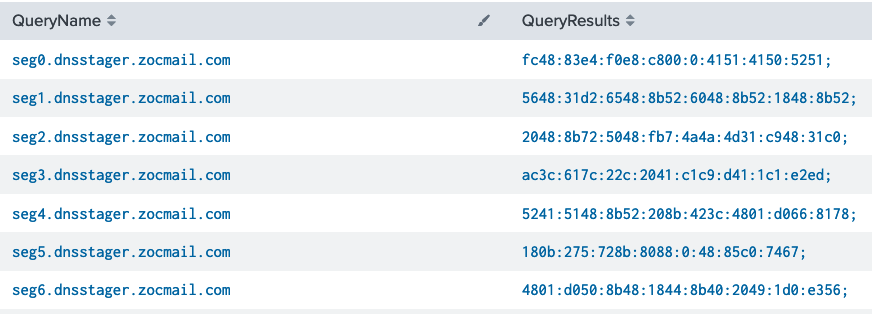
The “DNSStager” tool serves one purpose: Fetch a malicious code from the internet through the DNS protocol and execute it in memory.
It’s composed of two main components: the agent (Windows) and the server (Linux), the server will acts as a DNS server and will serves the malicious code.
Analysis & Detection
The detection of malicious DNS traffic can be performed by querying Sysmon event logs or DNS Server logs.
LAB Overview
Our LAB components consists of:
- Splunk SIEM
- Windows 10 (End-user)
- Sysmon driver with DNS logging config installed on Windows hosts
- Ubuntu 18 VPS for hosting the DNSStager tool
LAB Goal
The goal is to simulate malicious DNS Traffic using the DNS Stager tool. Then from the analyst & hunter perspective to analyze & determine suspicious traffic.
What to look for?
- Communications with unknown DNS Servers.
- DNS queries for resolving non-existed host names.
- DNS requests with invalid/abnormal response.
- Large number of DNS queries in short time
- Large number of abnormal DNS queries
- Long TXT value in request/response
Assuming we have already DNS requests and responses are monitored, we can analyze logs and look for abnormalities.
Sysmon DNS Events – Event ID 22
Sysmon driver can log various types of events including DNS queries and command lines. I’m using the SwiftOnSecurity Sysmon rules file; it’s updated regularly and available on GitHub.
https://github.com/SwiftOnSecurity/sysmon-config
Using the following search query, we can view DNS logs by process and computer
index=sysmon EventID=22 QueryResults !=- | stats count by _time, QueryName, QueryResults, Computer, user, process_path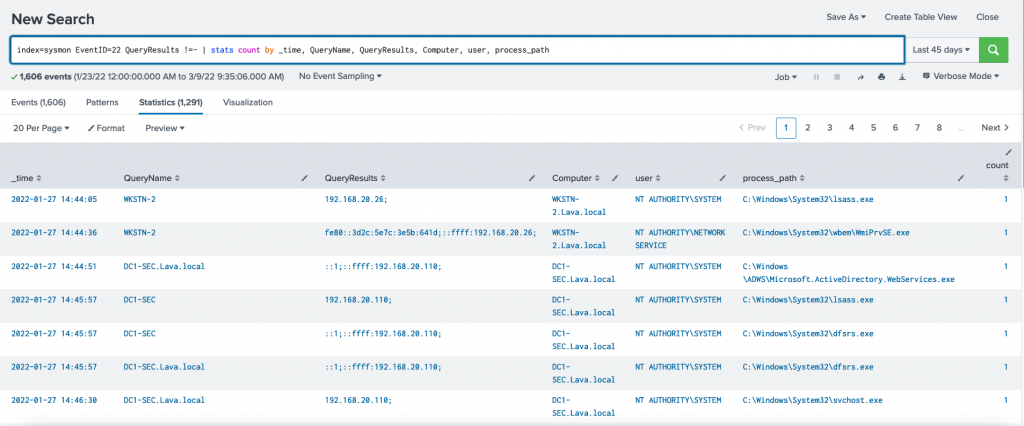
Image-2 Querying Sysmon DNS logs on Splunk
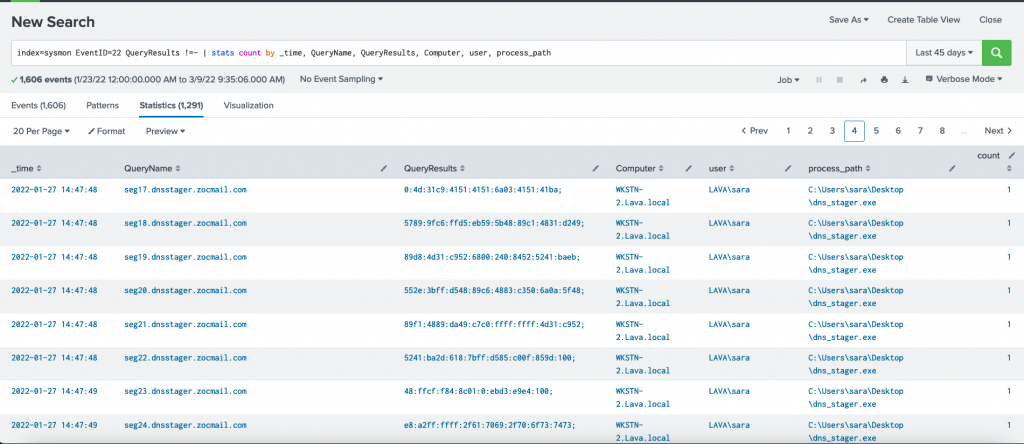
Looking at the above image from Splunk, There are 1,291 DNS log records within the last 45 days. We can manually analyze these records in a short time. However, this number can be hundreds of thousands to millions in real networks which makes it very hard and time-consuming; the threat actors may already reach more locations inside the network while we still analyze the traffic. Therefore, we need to deeper analysis and reduce the analysis time to the minimum; we can do so by writing some code to filter the results.
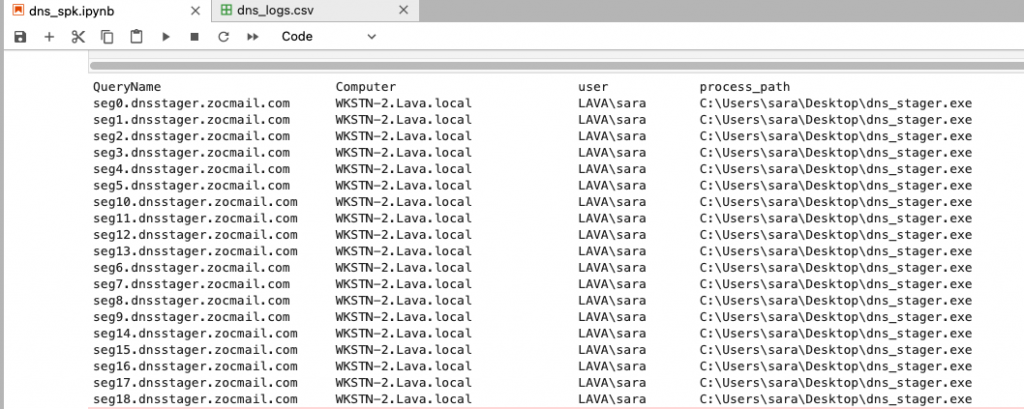
The process dns_stager.exe has made at least 8 DNS AAAA queries and received different responses. So how we can distinguish if this traffic is legitimate or suspicious?

So we have this DNS traffic which looks suspicious but we are not sure yet. Solving the following questions will help in determining wether it’s a legitimate or suspicious traffic:
A MYSTERY?
- Check the process hash if it’s listed on IOC; or if there’s useful information about it. VirusTotal; Google, Commercial Threat intel?
- When the file “dns_stager.exe” was created on the computer?
- How it was attached to the system?
- If there’s no information about it, grab a copy for in-depth analysis.
- Determine when the file is compiled
- Collect meta information if available: .PDB, language, compiler type (GO, Python..etc)
- Extract strings using the Strings tool
- Decompile: .NET Reflector, ILSpy ; Static analysis
- Dynamic analysis: Simulate on an isolated VM and observe the behavior.
- Check WHOIS & public information about the root & sub domains;
- Is the domain recently registered?
- What it’s risk score?
- Compare historical WHOIS information with the current record
- What is the IP Address the domain name resolves IP? Check the IP address for IOC
- Reverse IP/domain lookup. Is there any domains linked to the same IP address? What they do?
- Is the DNS response a valid response?
Of course, sometimes we may not need to solve all the questions. While analyzing the artifacts; we can side note and calculate some scoring based on our findings and that will provide us with more insight into the traffic and the executable process. This will ultimately help us in deciding whether it’s legitimate or malicious traffic and process.
For instance, some of the malicious indicators may look something like this:
- The domain name being queried is registered one month ago.
- The DNS responses are invalid or dose not resolve to a valid IP
- The Windows process generated the traffic is unsigned and compiled recently using Pyinstaller.
Example Risk Score: 7/10 (based on 4 answers / indicators)
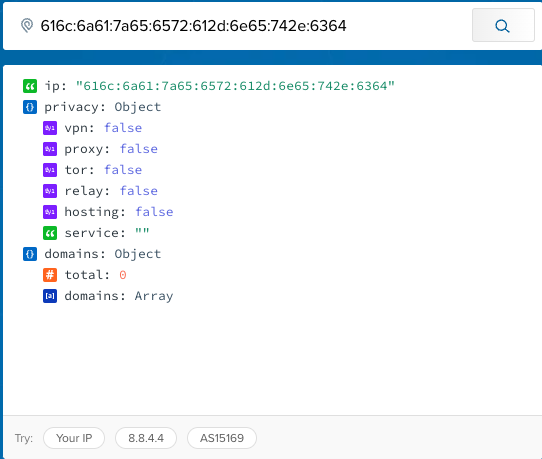
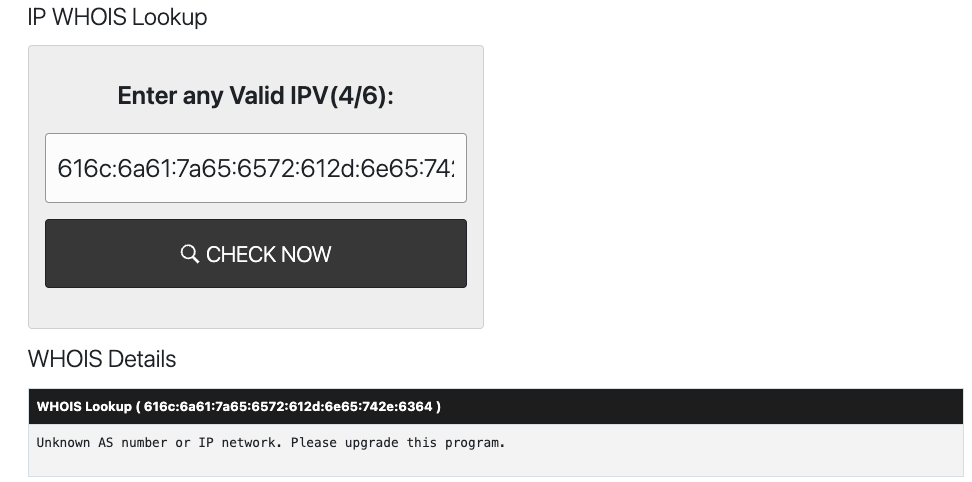
If we take the DNS responses for the AAAA queries and validate it using IPInfo.io or ; we get invalid IP addresses.
Using Pandas Library
Pandas is a powerful data analysis library that allows us to easily work and read different types of data. We can use Pandas to analyze CSV, Excel files.
We can take advantage of the features of Pandas and Python to perform complex operations on logs and automate the filtering to detect potential DNS Stager traffic.
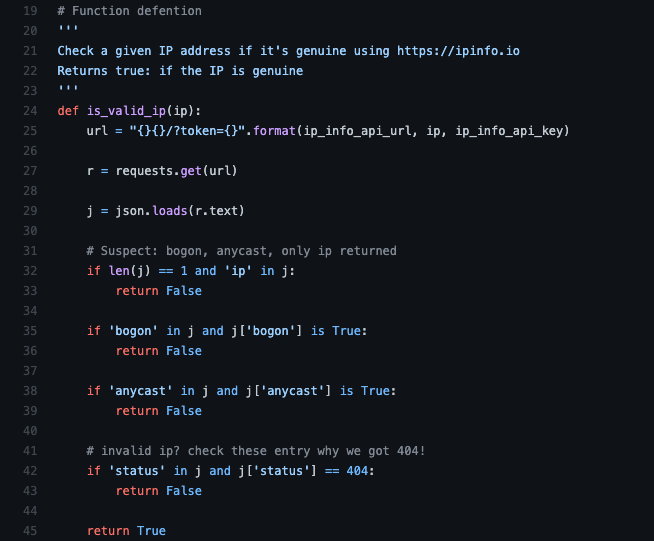
I wrote a basic code script to filter suspicious DNS traffic that should be investigated further. The script core logic is to determine possible traffic that the DNS Stager tool generate by analyzing every response of a DNS query and checking if the response is a valid IPv6 or not.
Pseudo-code
- Read DNS logs in CSV format (exported from Splunk)
- Filter the Logs based on the following criteria :
- AAAA query type
- At least 2-3 records (regardless the query/event creation time)
- The result of a DNS query contains invalid response (Check against online IP validation services such as ipinfo.io)
- Inspect the results
OUTPUT
The script used is available on my gist pages:
https://gist.github.com/iomoath/43f12fd423126eaa1913eccbeb930578
Final Recommendations
- Hunt on wide time frame. One of an adversary’s stealthy techniques is to deliver or execute a malicious activity in the long-term; for instance: fetching a payload chunk every one or three days and assembling all parts on day 10.
- Enable DNS Logging (request & response) if not enabled.
- Restrict connections to external DNS Servers. And allow connections only to internal & whitelisted DNS Server.
如有侵权请联系:admin#unsafe.sh