What Is a Robots.txt File?The robots.txt file is a simple text file located in the root directory 2025-1-7 09:49:30 Author: securityboulevard.com(查看原文) 阅读量:10 收藏
What Is a Robots.txt File?
The robots.txt file is a simple text file located in the root directory of a website domain. Web crawlers use the directives in the robots.txt file to determine what pages to index. The directives in a robots.txt file apply to all pages on a site, including HTML, PDF, or other non-media formats indexed by search engines.
The instructions in the robots.txt file determine how search engine crawlers analyze the pages, structure, and metadata of each page, such as keywords, titles, and descriptions. This information is then stored in a database called an index. Search engines use the index to locate content that relates to user queries. When a user inputs a search engine query, the search engine retrieves results from its indexed database. Algorithms determine the relevance of the results by evaluating factors such as keyword matches, page quality, and user engagement metrics. Indexing ensures that the search engine can deliver accurate and fast results based on its analysis of the crawled web pages.
Directing the search engine bots to relevant pages is a crucial aspect of search engine optimization (SEO). Doing so makes sure that only high-quality, up-to-date pages are indexed and can be ranked in search results. Pages that are not indexed are harder for users to find as search engines won’t link them to user queries via keywords.
For example, stopping a web crawler from indexing a page about an out-of-date offer will lower the rankings of it in search engine results.
The “disallow” directive in the robots.txt file is used to block specific web crawlers from accessing designated pages or sections of a website.
Optimizing robots.txt with the “disallow” directive can also help reduce the load on a website’s server. When web crawlers access a website too frequently, or all at once, they can generate a large number of requests in a short period. This can put significant strain on a server’s capacity.
Crawling resource-intensive pages such as videos, high-resolution images, or pages that update data in real-time also puts an added load onto the server. When crawlers are directed away from resource-intensive page, it preserves the server’s processing capacity allowing for faster site performance. This results in faster page loading, more responsive user interactions, and improved efficiency in managing dynamic elements like databases.
It’s important to note that this measure should only be applied if heavy web crawler traffic is causing slow performance for users. If web crawler traffic isn’t slowing down site performance, it’s not necessary to restrict access to these pages.
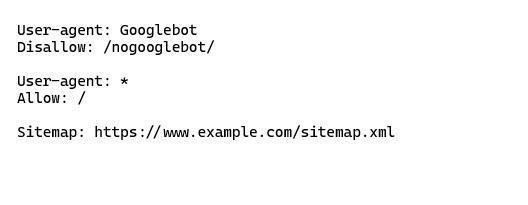
Here is an example of a simple robots.txt file using the “disallow” directive:

In this example, the robots.txt file is blocking Googlebot (the user-agent) from accessing URLs that begin with https://example.com/nogooglebot/.
A slightly more complicated robots.txt file might look like this:

In this example, robots.txt is blocking the user-agents Googlebot and Bingbot. It also disallows all web crawlers’ access to any pages with: /private.html or /special-offers.html. The asterisk character * acts as a wildcard in this case.
Good to know: What is a * wildcard?
A wildcard is a character that represents one or more unspecified characters in a search or pattern. In this case, all web crawlers are blocked from crawling pages with: /private.html or /special-offers.html by the use of the asterisk wildcard character.
In some cases, robots.txt can be configured with crawl-delay. The crawl-delay directive limits how often a bot can visit a site and request pages to index. Crawl-delay stops bots from overwhelming a site if it has limited server resources or a lot of resource-intensive pages. It ensures the server can handle the traffic without slowing down or crashing. To implement crawl-delay, add ‘Crawl-delay: 10’ in the robots.txt file. The number specifies the delay in seconds between bot requests.

如有侵权请联系:admin#unsafe.sh