In this mini-series I describe the solutions of my favorite tasks from this year’s Flare-On 2025-11-20 04:7:41 Author: hshrzd.wordpress.com(查看原文) 阅读量:35 收藏
In this mini-series I describe the solutions of my favorite tasks from this year’s Flare-On competition. To those of you who are not familiar, Flare-On is a marathon of reverse engineering. This year it ran for 4 weeks, and consisted of 9 tasks of increasing difficulty.
Task 9 was the last one, and it came with a significant increase in a difficulty level compared to the earlier tasks.
PE-bear
The file is a 64-bit Windows PE. Since the very first look we can see that it is quite big: 1.07 GB. When we run it from command-line, we get:

I started by opening it in PE-bear. We can spot that the .rsrc section takes the majority of space.

The natural next step in this situation would be to see the list of the resources. At first, PE-bear showed me only 50 entries in the resources directory (due to a hard-limit set in code, that is now removed; in reality there are 10000 of them). It is clear from the first look that the resources are compressed PE files. The pattern starting the header looked familiar to me from malware analysis: it is M8Z – which suggest compression with aPlib.

It can be decompressed with a Python script using malduck library (example here).
IDA
Before proceeding further I decided to take a look in IDA.
The PE files from the resources are indeed loaded, and manually mapped:

The function that loads the PEs (renamed to pass_Buffer1_and_load_libs) occurs in the function responsible for checking the license, and is called in the loop 10000 times.

This shed a light on why the executable is named 10000.exe : it carries inside 10000 of different DLLs.
Extracting DLLs
After removing the hardcoded limit PE-bear was able to see all the DLLs, and dump them into a selected directory. Decompressed the full directory content with the help of the following script:
As a result I obtained 10000 DLLs, with the export tables similar to the following:

Each DLL has a long list of entries with mangled names. Two distinct types appear. There are multiple functions with a name like _Z21f00155255799705906783Ph ( format: _Z21f{number}Ph) – for simplicity, they will be referenced as “f” functions. In addition to it, each DLL has exactly only one “check” function (_Z5checkPh) .
The real names of the DLLs are stored in the Export Table, so, with the help of another script, using pefile I renamed them the the stored names.
The DLLs are not just independent units. They may import each other:

As we can see, they use for it simplified version of their names – without the “.real.” part. So, in order to keep it consistent, I made a little cleanup script, that walks though all the DLLs and rename them accordingly:
As a result we have all DLLs: from 0000.dll to 9999.dll stored in a directory. That is total around 4,0 GB of data.
As the initial overview already revealed, the task is about checking some license file. At this point we have several questions to answer:
- What is the expected format of the license file?
- What is the condition that makes the license correct?
- How does it connect to the DLLs that we just obtained?
The code of this challenge is not obfuscated, so it is relatively easy to follow. Most important actions happen in the function at VA = 0x140001e87 denoted as verify_license.

Analyzing the code of the following function, few things come to light.
- The license is supposed to be stored in the file license.bin, in the same directory as the task
- Its size is exactly 0x53020 bytes
- the content is read into a buffer, and SHA256 hash is calculated first. This hash will be used at the end.
- The license consists of 10000 chunks. Each of them is 34 bytes long. The first WORD of the chunk must be not greater than 9999. It is an index, used to decide what DLL should be used for the verification of that chunk. The appropriate DLL is fetched from the resources, and manually loaded. Then, the function “check” (mangled _Z5checkPh) is called, with the current chunk passed as an argument. If the chunk verification failed, the loop exits with an error.
- Each iteration causes an update of another, global buffer. This buffer is then compared with the hardcoded one using simple
memcmp. If the comparison fails, the application exits with an error. - If all the steps passed, the license is accepted. The previously calculated SHA256 of the license is used to decrypt the flag.
There are still some more details to figure out, but at this point we can answer the 3 basic questions:
1. What is the expected format of the license file?
- The license is expected to be exactly 0x53020 bytes long. It consists of 10000 chunks. Each chunk contains (1+16) WORDs, meaning it is 34 bytes long.
- The first WORD of the chunk denotes the ID (0–9999) of the DLL that will be used for its verification. The remaining 32 bytes are the content passed to the “
check” function. The chunk is correct if the “check” function returned TRUE.
2. What is the condition that makes the license correct?
- The license must be filled with chunks that pass verification with each of the 10000 DLLs. However, the order in which the verification is performed also matters, and is unknown so far. The order of the DLLs depends on the first WORD of the chunk – so it is not just the index of the loop iteration.
3. How does it connect to the DLLs that we just obtained?
- Each DLL is used to verification of a single chunk of the license. The “check” function from the DLL is fetched and called on the buffer, and is supposed to return TRUE.
I decided that it will be easier if I divide the problem on sub-problems, and make a loader that can run a selected “check” function from an individual DLL. At first, it looked straight-forward: just use the LoadLibrary function to load a particular module, then GetProcAddress to select the “check” function, and run it on a buffer with the data…
But something was clearly wrong – in some cases, the DLL was crashing instead of giving the output. Following execution under the debugger I found the reason. The “check” function calls multiple “f” functions – it may be from itself, or other DLLs. At the beginning of each “f” function, a global buffer is referenced, and the first DWORD of the input buffer is XORed with the DWORD pointed.

I realized that it points to DLL_base + [some offset]. The offset is different for each DLL, and sometimes goes beyond the size of one page (0x1000) – so it was clearly not intended to read from the module header. This looked weird at first, unless I checked how the original DLL is actually initialized.
In the original executable of the task, each DLL is loaded manually. So, the DllMain is also called in a custom way:

In case of a normal DLL load, the first argument passed is the DLL base – but here, the passed buffer was always the same (which I denoted as g_Buf1), located inside the main executable. That means it is a shared global buffer, used to exchange some information across different DLL runs.
This buffer is 10000 bytes long, and initially empty.

This fact disrupts loading the DLL by LoadLibrary – we have no influence on the parameters that are passed to DllMain along the line.
We could of course still load the DLL by a custom loader, for example using libraries such as libPEconv – but it doesn’t really give the same benefits during debugging. The DLL will be loaded in a private space, and not treated as a module, so we can’t i.e. set breakpoints at particular functions relative to the module base.
Then I came up with a much simpler idea, and decided to call the DllMain of all the relevant DLLs for the second time. First, I load the DLL of my interest by LoadLibraryA. This causes all the dependencies to load automatically – some of which are other DLLs belonging to the challenge. Once the loading completed, I walk through all the modules in memory (using Module32FirstW – Module32NextW ), and check if the module name matches the numerical pattern. If so, I fetch its DllMain (using Entry Point in the header), and call it manually, this time passing the pointer to my own buffer instead of DLL_base. Thanks to this, the internal pointers to the g_Buf1 in each DLL get updated, no longer pointing the DLL_base, but the buffer of my choice. And the DLL is ready to be used as a standalone unit.
Full code of the used loader is available in the relevant Github repository [here]
Plugging the custom g_Buf1 into the loader allowed me to run DLLs independently, and check how the input is transformed:

Of course it is not enough to pass the check, but it will be very helpful in testing the correctness of the further steps that we will implement, without always needing to run the bulky EXE.
By analyzing how the DLL is loaded we noticed that some information between each check is passed by a global buffer (renamed to g_Buf1). A value from this buffer, at offset relevant to the particular DLL name, is used in the chunk processing – so, it order to have the chunk check resolved properly, we need to know what exactly was passed.
The buffer is initially empty. But at the end of processing, if all chunks are verified properly, it is compared by memcmp with another, non-empty, hardcoded buffer (referenced as a Validation Buffer: g_ValidBuf). That means that we need to recreate the conditions, under which, during the processing of all chunks, the Global Buffer will be filled with the same content as Validation Buffer. That leads to another question: how and when is this buffer filled?
The Global Buffer is referenced in 4 places:

First, reference, that we already saw earlier, is in the function that manually loads the DLL. At that point, the buffer is just passed to the manually called dll_main. Another known reference (the first from the bottom) is in the verify_license function – where the comparison with Validation Buffer is made. There are two middle references that we didn’t explore yet, inside the function that I denoted as add_stuff_to_Buffer1. This function is called in the loop that is responsible for checking a single chunk of the license. It has one argument, that is an index of the iteration (not to be confused with the index of the DLL).

This function iterates over a vector, and uses it to resolve at what position the current index will be added.

This vector is created at the DLL load, and contains all the manually loaded DLLs that are available at the current time. It contains elements of the structure that is used to keep track on the manually loaded buffers. Each element contains the DLL id (that is the same as the ID of the resource from which the DLL was loaded: resID). Fragment of this logic presented below:

Now, this resource ID is mapped to the DWORD in the g_Buf1. This means: the currently checked DLL and all its recursive dependencies are representing fields of the g_Buf1 where the index of the current iteration will be added.
This knowledge will be helpful in reconstructing the order of the DLL loads. Once we know the proper order, that allows to recreate Validation Buffer, we know how to fill the first DWORD of each chunk.
But before we dive into this part, let’s have a look how the rest of the chunk is validated.
The prototype of the “check” function is very simple. It takes the pointer to a 32-byte long chunk.
The “check” function in each DLL is structured following the same template. Let’s start by getting a general overview of what is going on. Our goal is to use what we learned by analysing this function to reconstruct the corresponding chunk in a way that it will pass the verification.
First, there are multiple calls to the “f” functions. The referenced functions can be from the current DLL, or from any of the imported ones. Each call to the “f” function transforms a chunk in some way.

The detailed analysis of this part will be described further in this blog.
After this preprocessing, there comes the part of the task that requires more advanced math knowledge.
Matrix exponentiation and its inverse
The second part of the check seems complicated. I decided to use AI to get the explanation of what exactly is going on. It turns out that this is a key verification, using modular matrix exponentiation.
The pseudocode that I obtained from one of the analyzed DLLs:
/***************************************************************
 *  check(chunk : byte *)  →  bool
 *
 *  Validates ‟chunk” against a baked-in public key / signature.
 *  The code is heavily obfuscated, but when cleaned up it becomes:
 *
 *      Step 0  – run a pipeline of reversible scramblers on chunk
 *      Step 1  – build a 16-element vector  V  from chunk
 *      Step 2  – ensure every element of V is < P               (P is a 127-bit prime)
 *      Step 3  – compute a long chain of modular operations     (lots of   a·b  mod P)
 *      Step 4  – if the final scalar  s  is 0   ⇒  reject
 *      Step 5  – raise a 4×4 matrix  M  to a 64-bit exponent e  (again mod P)
 *      Step 6  – compare the resulting 4×4 matrix with a baked
 *               constant reference; return true when equal.
 *
 *  That is exactly what RSA-PKCS-1 style “textbook signature
 *  verification” looks like once flattened by a compiler and
 *  obfuscated by a packer.
 ****************************************************************/

function check(chunk : pointer to uint8) returns bool
{
    /********************  STEP 0 – scramble the input  ********************/
    for  f in HUGE_PILE_OF_HELPERS                      // 200+ calls
        f(chunk)                                        // reversible mixers / S-boxes

    /********************  STEP 1 – build initial vector  ******************/
    V[0‥15]  ← read16BigEndianQwords(chunk)             // two qwords per limb

    /********************  STEP 2 – range-check against prime P  ***********/
    P  ← 0xDC37C0E3 04978087 594B7F91 F11228E5          // 127-bit prime
    for i in 0‥15
        V[i]  ← V[i]  xor  chunk_qword[(i mod 4)]       // small secret tweak
        if V[i] ≥ P                                     // any limb ≥ P  ⇒  reject
            return false

    /********************  STEP 3 – massive modular arithmetic  ************/
    /*
       From here to the next comment the code is nothing but
       sequences like

          tmp   = (A * B) mod P
          A     = (tmp * C) mod P
          …
       where P is always the same prime and  A,B,C are 128-bit
       intermediates.  The compiler emitted calls to the helper
       “unsigned_modulus()” we reverse-engineered earlier.

       The net effect is:
           s =  complicated_function(V, built-in constants)  mod P
     */
    s = complicatedScalarComputation(V, P)              // ≈400 lines in IDA listing

    /********************  STEP 4 – reject when s == 0  ********************/
    if s == 0
        return false                                    // invalid input

    /********************  STEP 5 – modular-matrix exponentiation  *********/
    /*
       A 4 × 4 matrix  M  (elements mod P) is assembled from the
       current scratch area.  Then a classic square-and-multiply
       is performed with exponent e = 0x594B7F91F11228E5.

       Only the bit positions set in e trigger a matrix multiply,
       hence the ‟if ((e >> k) & 1)” branch inside two nested 4×4
       loops you saw in the disassembly.
     */
    M      ← matrixFrom(V)          // 4×4, limbs are 128-bit ints mod P
    e      ← 0x594B7F91F11228E5
    Result ← IdentityMatrix(4)

    for bit = 0 .. 63
        if (e >> bit) & 1
            Result = (Result × M) mod P
        M = (M × M) mod P           // always square (Montgomery ladder)

    /********************  STEP 6 – compare with golden reference  ********/
    Golden[4][4] =
    [
      0x65DE31EF76B34C5E, 0xBF9224AA780960BA, 0x944C61FE664D8A46, 0x85FFAACD31F816D1,
      0x5FE739DE69B61B49, 0x4362AB9DFD8274E5, 0xC90B9E6AC29A84EC, 0x661807122A7615D7,
      0x2367A1BF2B936D7C, 0x289E160527983DEF, 0xB0E4B274464C4BFD, 0x5222046DFEF7B826,
      0x6158769ED8530622, 0x056EABD584B51A70, 0xA5B7C08151FFACE8, 0xC7B8D0A6D71A6E00
    ]

    /*
       The SIZE[] table you saw (1,0…0,1,0…0…) is just the list
       of ‟valid” bytes in Golden that must be compared; the rest
       is padding turned to zero by memset().
    */
    if memcmp_masked(Result, Golden, Size) == 0
        return true
    else
        return false
}

/****************************************************************
 * Helper  – compares only the bytes whose corresponding Size[i]
 *           entry is 1.  (Exactly what the memset/Size[] dance
 *           in the assembly achieves.)
 ****************************************************************/
function memcmp_masked(a, b, Size[]) returns int
{
    for idx = 0 .. (sizeof(Size)-1)
        if Size[idx] == 1 and a[idx] ≠ b[idx]
            return ‑1
    return 0
}
To understand it better I reimplement this part in C/C++. Snippet here.
Because the exponent e and modulus P are known constants, and the operations are deterministic, this transformation can be inverted: meaning that given the final matrix, we can compute the required pre-image. So this is how we will further approach solving this part.
To implement the inverse, once again I used the power of AI, and this time Python (because the solution requires access to bigint library, and it works seamlessly in Python).
The snippet that I used for testing the compete reverse of a single chunk is available here.
The “f” functions
In order to revert the whole check, and obtain the initial buffer, we still need to understand the first part of the check function, which is a block of calls to different “f” function. Although their volume may be intimidating, in fact there are only 3 types of “f” functions. What differs between them are the hardcoded arguments.
I started by reimplementing each type, and making their arguments external rather than internal.
Example:

Reimplemented:
BYTE* f_type2(BYTE* arg1, size_t dll_id, const uint64_t kQargs[33])
{
    DWORD* arg1_d = (DWORD*)arg1;
    DWORD* verif = (DWORD*)g_Buffer1;
    arg1_d[0] ^= verif[dll_id];

    for (size_t i = 0; i <= 31; ++i)
    {
        arg1[i] = *((BYTE*)kQargs + arg1[i]);
    }
    return arg1;
}
The snippet illustrating all types is available in the relevant Github repository, here.
I passed my reconstructed code to GPT Chat, and prompted it to invert those functions. The result that I’ve got worked very well. It can be found here.
Summing up, we reached the conclusion that all operations done in the “check” can be fully inverted, and the buffer that is used at the end for the chunk verification, can be used for chunk reconstruction.

The biggest problem to solve now is, how to extract all the needed arguments from each function, to make chunk recovery at scale?
This is one of the most tedious part of this task, but it can’t be avoided. We have to parse all the 10000 DLLs, one by one, extract their arguments, and store for further use.
Since this task will require parsing massive amount of data I decided that Instead of doing it with Python script, I can use a native compiled application.
I already have a utility that could easily become a base. It is a simple, multiplatform commandline disassembler based on bearparser and capstone. It can be found here. The utility loads a given PE file, and dumps disassembly of the function with a supplied name. It automatically applies information found in the PE structure. For example, it resolves imported functions. This is important in our case – we will not only operate on a raw assembly. We also have to make a list of all “f” functions needed for each “check” function, and their sequence.
I decided to divide the task of parsing into two stages.
Dumping arguments of the “f” functions
In the first stage, I refactored the disasm-cli, and made a version optimized for this task only. It is available here.
Instead of loading a single DLL at the time, and dumping a single function, it walks through a directory, and loads sequentially DLLs that match the pattern of the numeric names, in the defined range. Then, once it loaded the DLL, it walks through all the exports from the given DLL, and filters out all the entries that don’t match the pattern of the “f” function name. Now we can focus on extracting the needed arguments from the “f” function, as well as its type.
Since the functions of each type has distinct length, we can guess the type simply by looking how many lines of disassembly they produce. This is how I implemented the type recognition:
int get_func_type(size_t count)
{
    if (count == 172 || count == 173)
        return 1;
    if (count == 98 || count == 99)
        return 2;
    if (count == 56 || count == 57)
        return 3;
    return 0;
}
The arguments are always loaded by "movabs" and they are always put in a known order. Example:
; 0000.dll._Z21f38236877289593244403Ph
[...]
22415f6a9 : mov byte ptr [rax], dl
22415f6ab : movabs rax, 0x22f130e6fafe934b
22415f6b5 : movabs rdx, 0x777fd23eb0b83b25
22415f6bf : mov qword ptr [rbp - 0x60], rax
22415f6c3 : mov qword ptr [rbp - 0x58], rdx
22415f6c7 : movabs rax, 0xf605c9124bc28c77
22415f6d1 : movabs rdx, 0x59263089104bc46b
[...]
So once we have the “f” function’s start and end, we can simply parse all the movabs lines and store their values.
The cli program produces CSV files, logging arguments of all the found “f” functions from all the parsed DLLs.
Format:
dll_name,func_name,func_type,[ arg0 arg1 ...]
Example of the output:
0000.dll,_Z21f92961177136248183669Ph,1,[ 0x4424e37bb62cc35f 0xc1bc82578497fd19 0xd183214321ad80c1 0xfb1788c5e6d0b56e ]
0000.dll,_Z21f47243230667592677056Ph,2,[ 0xa0d8041e1fd3377a 0xc77ea7007b565897 0x149a47dfd54ef22d 0xc3fa2520f95a59f 0x95f77b9a8db2a26 0x6baebf39803325a3 0x538719f9d1f5af8a 0x2710983692826288 0x914184e8b76f05c2 0x6915cfc4f0c9900a 0xe075bdac8b3bb383 0xf186de7307ff1724 0x8cf47dc6a1b29c4f 0xd22b504d3d9dbb21 0x5cd7cafb302e641d 0xc8ad893c79205e48 0xb6ef599b40fa43dc 0x6ec0b4b44c37813 0x66816c605a18d649 0x168d8e961c8522e4 0x93354ad401e1fe9e 0x1a724cdde3f6b52c 0xcc236acdc1ab1b94 0x707faafdb0ed7165 0xbae93ae629f36367 0xe245a612618fea08 0x5d340338f776fc31 0x68a955d9dabcb4ce 0xebd054be0d99f8c0 0xb1ee4232b82fcb74 0x5b116e7ca40ee751 0x3ee56d465702c528 ]
[...]
Those results will be then loaded to the next parser, that will reconstruct all the input needed to reverse a single “check” per DLL.
Dumping arguments per DLL
The real goal to achieve in this part is to dump all the arguments that will let us solve a single chunk. That means. we will walk thought the set of the DLLs, parse the “check” function of each DLL, and reconstruct the data needed to resolve it, including:
- An ordered list of “f” functions, along with the arguments of each, and along with the ID of the DLL where the function comes from (the DLL ID is the same as the offset of the value in g_Buf1 with which the first DWORD of the chunk is XOR-ed at the beginning of the “f” function).
- All the arguments used for the second part of the “check”. That means the definition of the matrix, e, and P, that will be used to its exponentiation, as well as the result that is expected. At this point we can also do the matrix inverse, and precaclulate the content of the buffer that was expected at the beginning of this part (incorporating the script created earlier).
The previously generated CSV files with arguments mapped per particular “f” function will be used as lookup tables in the first part of the resolution.
For the convenience of parsing, I decided to first convert the CSV file into a pickle format. The used script is available here. This parsing transforms the simple list (where each line represents as single “f” function along with its list of arguments) into a mapping of objects.
rec = parse_line(line)
key = f"{rec.dll}.{rec.func}"
mapping[key] = rec
The generated pickle file is then use in a new script, that resolves the “check”.
The second script makes use of the original disasm-cli utility from the beardisasm repository. Since we are interested in disassembling one function at the time, the basic functionality will be sufficient, and we don’t have to extend it. The Python script will be a wrapper calling the original executable whenever the disassembly is needed.
def dump_check(dll_name, fmapping, out_dir):
    func_name = "_Z5checkPh"
    wrapper = DisasmCLIWrapper(DISASM_PATH)
    lines = wrapper.disasm(DLLS_PATH + dll_name, func_name)

    values = extract_values(lines)
    cfunc = CheckFuncWrapper(dll_name, values)
    cfunc.solve()

    raw_func_list = extract_dll_and_func(lines)
    for dll_func in raw_func_list:
        if not dll_func in fmapping.keys():
            print(f"Function not found: {dll_func})")
            dll, func = dll_func.split(".dll.", 1)
            # fail-safe: resolve if not found:
            dump_func(dll + ".dll", func, cfunc.funcs_list)
            continue
        rec = fmapping[dll_func]
        cfunc.funcs_list.append(rec)

    out_file = out_dir + "//" + dll_name + ".resolved.txt"
    pkl_file = out_dir + "//" + dll_name + ".pkl"
    save_cfunc_as_pickle(cfunc, pkl_file)

    with open(out_file, "w", encoding="utf-8") as f:
        m0_hex = [f"0x{v:x}" for v in cfunc.m0]
        f.write(f"Precalculated: {m0_hex}\n")

        for func in cfunc.funcs_list:
            f.write(f"{func}\n")
    print(f"{dll_name} -> {m0_hex}")
The implementation contains also a fail-safe option, to cover the possibility if some “f” function was not found in the previously loaded lookup. In such case, the script will call the basic disasm-cli tool to dump this function from the specific DLL, and parse to the same format as it was used by the original lookup:
def dump_func(dll_name, func_name, funcs_list): #0000.dll
    wrapper = DisasmCLIWrapper(DISASM_PATH)  # or just "disasm-cli" if on PATH
    lines = wrapper.disasm(DLLS_PATH + dll_name, func_name)
    ff = FFuncWrapper(dll_name, func_name, get_func_type(lines), extract_int_values(lines))
    funcs_list.append(ff)
    print(ff)
    if ff.type == None:
        print("WARNING: %s : %d" % (func_name, len(lines)))
As a result, we get a completed report, one per DLL, that has all the data required to resolve the relevant chunk. Preview (0000.dll_listing.txt):
Precalculated: ['0x5a4e7d2f5af00585', '0x73e25c25e161d3e6', '0x57c73d52ba18cb4', '0x47ae048873095840']
CheckFuncWrapper(dll=0000.dll, p=0xdc37c0e304978087, e=0x594b7f91f11228e5, xor=['0x264f1c2a310e43aa', '0x6f62577ddb8f7c8', '0x2f5eef5c62186c64', '0x3b278b1ea0e08e88', '0x30b6b0678e48aee', '0x5857a70651b71bd1', '0x11328681bbf8806a', '0x46a52df6f08b2685', '0x5b5746a4910ca7fd', '0x4fce2f265662e21', '0x32a013dc0e0f538a', '0xfffec7ae2c6f8f79', '0x3b0ad6e24be21f00', '0xd285721394b26b6f', '0x49ff24112a0c1a2e', '0xf3a55fbbc4837e78'], m0=['0x5a4e7d2f5af00585', '0x73e25c25e161d3e6', '0x57c73d52ba18cb4', '0x47ae048873095840'], m1=['0x7c0161056bfe462f', '0x751479523cd9242e', '0x2a229c8949b9e0d0', '0x7c898f96d3e9d6c8', '0x5945162922148f6b', '0x2bb5fb23b0d6c837', '0x144ef55490590cde', '0x10b297e83827ec5', '0x1193b8bcbfca278', '0x771ebed78407fdc7', '0x37dc600925aedf3e', '0xb850c3265f66d739', '0x6144abcd11121a85', '0xa1672e3675d3b889', '0x4c8357c401ad969a', '0xb40b5b33b78a2638'], m2=['0x65de31ef76b34c5e', '0xbf9224aa780960ba', '0x944c61fe664d8a46', '0x85ffaacd31f816d1', '0x5fe739de69b61b49', '0x4362ab9dfd8274e5', '0xc90b9e6ac29a84ec', '0x661807122a7615d7', '0x2367a1bf2b936d7c', '0x289e160527983def', '0xb0e4b274464c4bfd', '0x5222046dfef7b826', '0x6158769ed8530622', '0x56eabd584b51a70', '0xa5b7c08151fface8', '0xc7b8d0a6d71a6e00'])
[...]
Link to the full report here.
This report will be loaded in another tool, that will finally help us regenerate the full license. But still one thing is missing to reconstruct the chunk. As mentioned earlier, at the beginning of each “f” function, there is an additional XOR with a DWORD. That DWORD comes from the global buffer (DWORD xor_key = g_Buf1[DLL_id]). The problem is, the value of g_Buf1 changes on each iteration of the loop that verifies chunks. And the way in which it changes depends on the DLL order. This leads us to another problem of this task: figuring out the proper order.
In the part “The role of Global Buffer (g_Buf1)” I described how on each iteration of the chunk verification loop, the shared global buffer is updated. The list of all the manually loaded DLLs that are present at current point, is iterated over (that means: the DLL immediately assigned to check the sample, plus its direct and indirect dependencies). Indexes of those DLLs point a specific DWORD in the g_Buf1 where the index of the current iteration will be added.
That’s why, to really map all the positions that changed when the particular DLL was used, we first need to have a complete list of dependencies for each DLL.
Mapping dependencies
To map those recursive dependencies, I used a simple tool based on libPEConv (the full code is here). One of the basic features of libPEConv is its ability to define a custom DLL resolver. For the current task, I created the following one:
class my_func_resolver : peconv::t_function_resolver{
public:
    my_func_resolver(dll_deps& _my_deps)
    : my_deps(_my_deps)
    {
    }

    FARPROC resolve_func(LPCSTR lib_name, LPCSTR func_name)
    {
        WORD num = (-1);
        if (!getDllId(lib_name, num)) {
            return nullptr;
        }
        if (!isNumericDLL(lib_name)) return nullptr;
        my_deps.deps.insert(num);
    }
    dll_deps& my_deps;
};
This resolver is plugged into the custom PE loading function implemented in libPEConv. Loading one DLL, will cause a mapping of its immediate imports.
Once we have such mapping for each of the 10000 DLLs, we can recursively populate it. So, for example if the DLL 1 imports 2,7,9 as immediate imports, we will include to its final list of imports also the imports of 2,7,9, and so on (of course not allowing duplicates) – till we collect the complete list.
Reconstructing the DLL order
Even having the full DLL dependency mapping, reconstructing the order is still not so straight-forward. We know which positions have the index added when the DLL is loaded – but how can it help?
The key to solve it lies in the observation, that there are some DLLs in the set that have been loaded exactly once during the whole execution. That means, at their corresponding position in the g_Buf1 there is the actual index of the iteration where this DLL was used (and not a sum of multiple indexes).
The following listing shows the DLLs that are not dependencies of any:
DLL: 675 : 0
DLL: 788 : 0
DLL: 933 : 0
DLL: 1657 : 0
DLL: 1678 : 0
DLL: 2016 : 0
DLL: 2356 : 0
DLL: 2704 : 0
DLL: 2735 : 0
DLL: 2861 : 0
DLL: 2921 : 0
DLL: 3214 : 0
DLL: 3927 : 0
DLL: 5046 : 0
DLL: 6115 : 0
DLL: 6547 : 0
DLL: 6976 : 0
DLL: 7041 : 0
DLL: 7326 : 0
DLL: 7982 : 0
DLL: 8373 : 0
DLL: 8470 : 0
DLL: 9888 : 0
Counter: 23
The final stage of the g_Buf1 is saved in the hardcoded buffer, that I denoted as Validation Buffer. That means, we can retrieve those indexes from there.
The above listing with the DLL position appended:
DLL: 675 : 0 pos: 738
DLL: 788 : 0 pos: 498
DLL: 933 : 0 pos: 3302
DLL: 1657 : 0 pos: 2222
DLL: 1678 : 0 pos: 1539
DLL: 2016 : 0 pos: 5736
DLL: 2356 : 0 pos: 4567
DLL: 2704 : 0 pos: 3882
DLL: 2735 : 0 pos: 8186
DLL: 2861 : 0 pos: 3606
DLL: 2921 : 0 pos: 6060
DLL: 3214 : 0 pos: 9696
DLL: 3927 : 0 pos: 608
DLL: 5046 : 0 pos: 2383
DLL: 6115 : 0 pos: 5903
DLL: 6547 : 0 pos: 3890
DLL: 6976 : 0 pos: 1842
DLL: 7041 : 0 pos: 1817
DLL: 7326 : 0 pos: 1007
DLL: 7982 : 0 pos: 1301
DLL: 8373 : 0 pos: 4892
DLL: 8470 : 0 pos: 5365
DLL: 9888 : 0 pos: 4732
Counter: 23
Those DLLs are not dependencies of any other – so they have been loaded only once. However, during their load, their dependencies has been loaded. That means, at the index in g_Buf1, that represents each of their dependencies, there is a value representing: previous_sum + current_index .
If we subtract the current_index from the appropriate records in the Validation Buffer, what remains is the previous_sum. And in some cases, the previous_sum is just one value (if the DLL represented by it was not a dependency of any BUT the last processed DLL). So, we can repeat the whole subtraction method recursively, in each round obtaining more load indexes.
The program reconstructing the complete order is available here.
At this point, we have all the ingredients to prepare the correct license.
- Arguments to reverse the “check”:
- full sequence of the “f” functions, their arguments, and the output they produced (that we obtained by calculating the inverse of the matrix from the final comparison).
- the order of the DLLs that allow us to reconstruct the content of the g_Buf1 at the point where the DLL was loaded, and therefore, the correct XOR value.
- The inverted version of each “f” function
The full program recreating the license based on the supplied data is available here.
The beginning of the valid license demonstrated here:

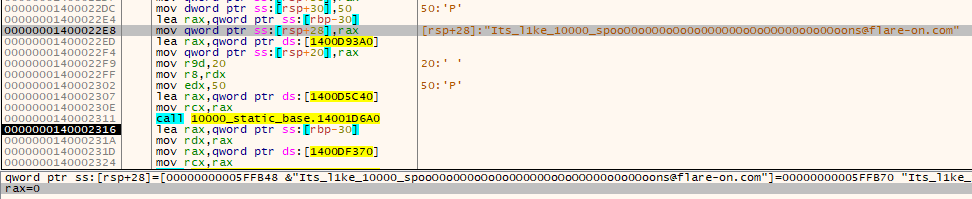
I decided the simplest way to decrypt the flag would be by using the original executable. However, we will skip the part that does the license verification, since it takes too much time.
I loaded the original executable in X64dbg, and simply patched it to jump over the part of code responsible for checking each chunk in the loop.

I earlier checked some chunks individually using my custom loader, so at this point I am quite confident that the obtained file is valid.
I allowed the original program to calculate the SHA256 of the file, and then to use it as an AES key, to decrypt the buffer. This is how I’ve got the final flag!

"Its_l1ke_10000_spooO0o0O0oOo0o0O0O0OoOoOOO00o0o0Ooons@flare-on.com"
如有侵权请联系:admin#unsafe.sh