Mar 02 2026
There has been a method that’s been around for many years which changes the password last set date but not the actual password. This is what I call a “fake password change” since the account appears to have a recent password when scanning for old passwords based on password last set, but the underlying password hasn’t actually changed.
I spoke about this in my 2015 BSides Charm talk which was my first conference talk.
Why does this happen?
There are times where service account (or admin accounts) need to have password changes, but someone doesn’t want to do the work to change them. The ability to fake a password change requires modify rights on the pwdLastSet attribute which provides the ability to check/uncheck the setting “User must change password at next logon”. This setting is enabled when you want the user to change their own password when they logon.
The attribute pwdLastSet controls both:
- Whether the user is forced to change their password at next logon (pwdLastSet = 0)
- Whether the flag is cleared (pwdLastSet = -1 or any non‑zero timestamp)
How does this work?
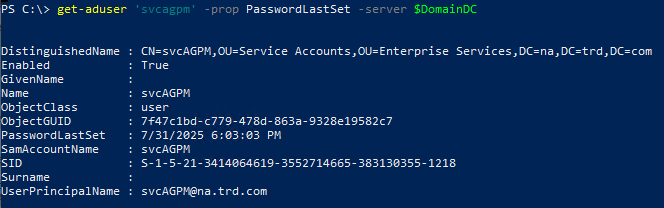
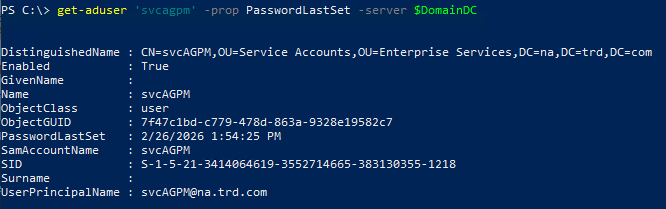
To see how this works, we’ll focus on the service account “svcAGPM” in my lab. This account last changed its password on July 31st in 2025.
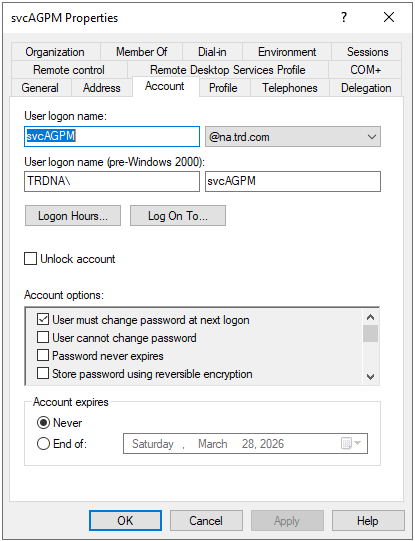
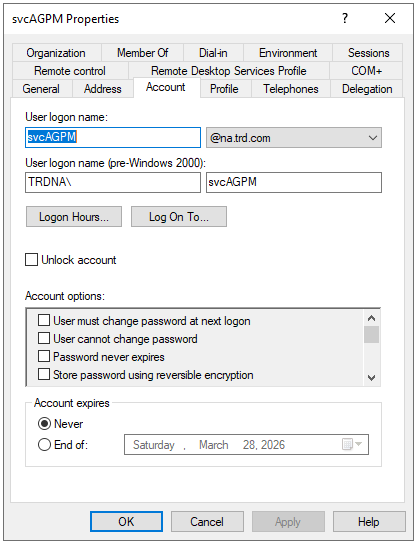
We open up Active Directory Users and Computers (ADUC), double-click on it to open up the account properties and then click on the Account tab.
From here we check the box for “User must change password at next logon” and click Apply.
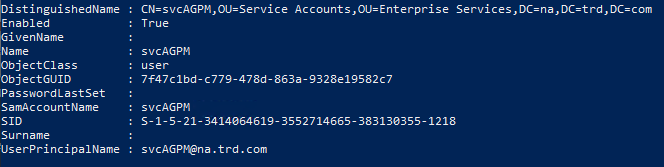
What happens to the PasswordLastSet date when this happens?
It is now blank. Which makes it seem like the account has never had a password set.
We continue with our process where we uncheck the box we checked and then click Apply.
After performing this action, we can see that the password change date has now been set to the current date and time even though the password itself hasn’t been changed since July 2025.
Why does this happen?
This happens because the “User must change password at next logon” option is used to force a user to change their password at next logon. With it checked, Active Directory is waiting for the user to attempt to logon which is when the user is directed to change their password. During this time the PasswordLastSet value is blank since it is waiting for a new password. Once the user changes their password, the checkbox is effectively removed and the current date and time are set for the user’s passwordlastset property (technically this is the “pwdlastset” attribute, but the AD PowerShell cmdlets use that property).
How can we detect a fake password change?
In order to detect a fake password change we need to figure out how this works on a Domain Controller. We have already identified that the pwdlastset attribute is what shows the date the password is last set. We have to look at another attribute called unicodePwd which is used to store the account’s password on the Domain Controller.
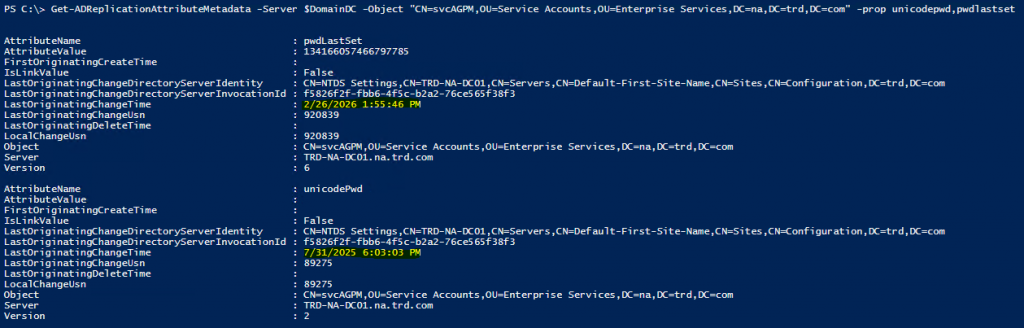
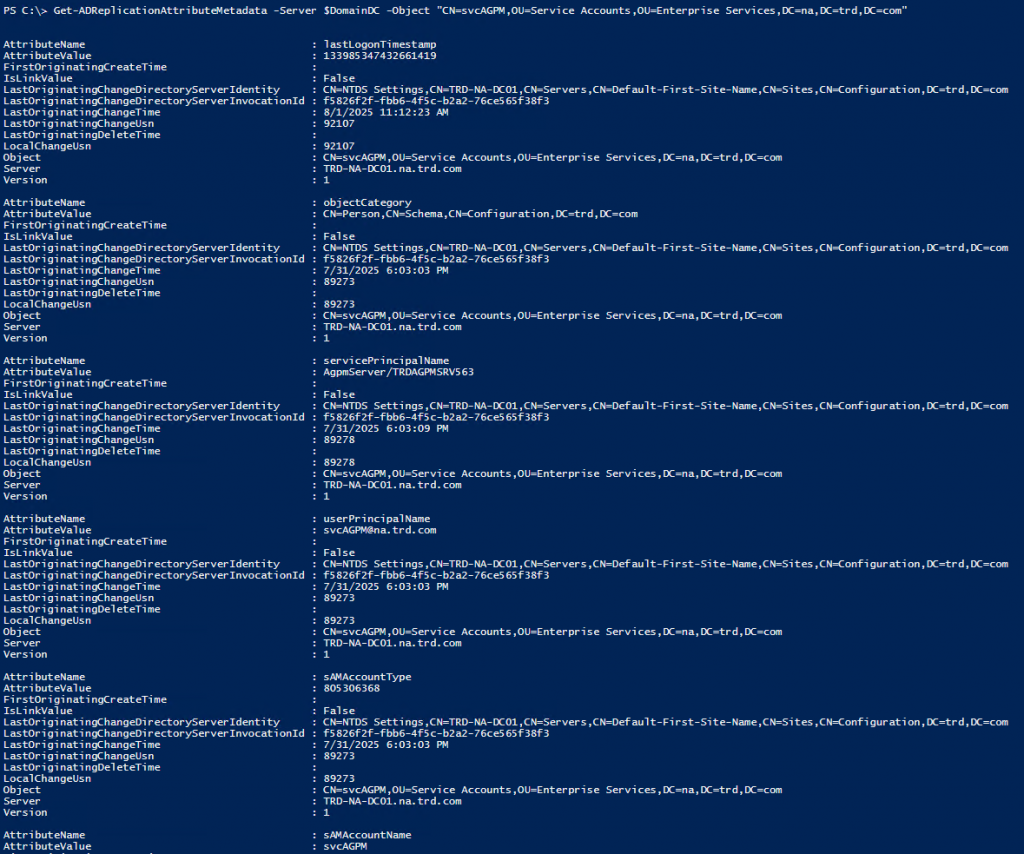
We can use the Active Directory PowerShell module cmdlet “Get-ADReplicationAttributeMetadata” to get AD replication metadata about the account. Running this cmdlet provides the following replication metadata about the account that continues beyond the screenshot.
Let’s scope this down to the 2 attributes that we care about, unicodepwd and pwdlastset.
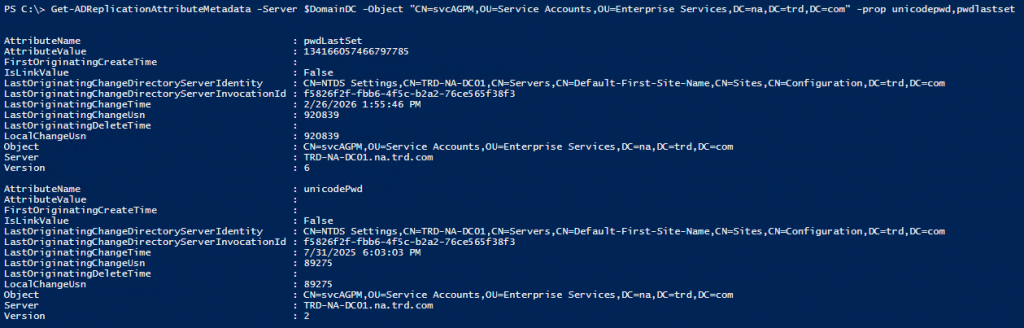
The attribute we care about in this output is “LastOriginatingChangeTime”. I have highlighted the values for this attribute in the following screenshot.
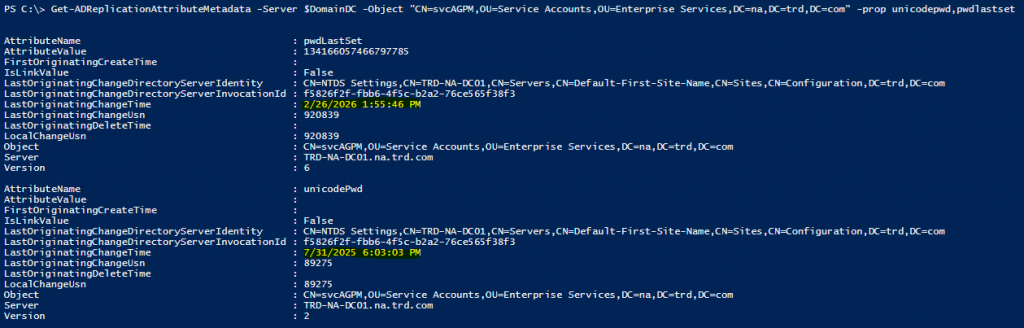
Here we can clearly see that while the pwdlastset date is 2/26/2026, the date for unicodepwd remains 7/31/2025. This means that the password hasn’t changed, only the value that’s supposed to show when it has last changed.
Detect fake Active Directory password changes at scale
I wrote a PowerShell script that will scan either the Active Directory Admins or all users in the domain to see if there’s a fake password change that has been performed on them.
https://github.com/PyroTek3/ActiveDirectory/blob/main/Get-FakePWChanges.ps1
Note that there may be scenarios where an account could be flagged but an admin wasn’t responsible for faking the password change. This does identify when a password shows it changed, but actually has not.
(Visited 31 times, 31 visits today)

Sean Metcalf
I improve security for enterprises around the world working for TrustedSec & I am @PyroTek3 on Twitter.
Read the About page (top left) for information about me. :)
https://adsecurity.org/?page_id=8