Home > Jamf Pro, Jamf Pro API, Jamf Pro Classic API, Scripting > Reporting on Jamf Pro API c 2026-5-22 21:6:21 Author: derflounder.wordpress.com(查看原文) 阅读量:35 收藏
Home > Jamf Pro, Jamf Pro API, Jamf Pro Classic API, Scripting > Reporting on Jamf Pro API clients and assigned API roles
Reporting on Jamf Pro API clients and assigned API roles
While working with Jamf Pro’s API options, I’ve started using API clients more often for my authentication needs. The reason is that I can control how long an API client’s authentication token is valid for, which is very useful from a security point of view.
My practice has been to set them up on a per-task basis, which I’ve found can lead to an increasing number of API clients. At the same time, for auditing purposes, it’s useful to know which API clients are using which API roles as API roles determine the permissions that the API clients have.
To help me keep track of this, I’ve written a script which reports the following:
• The current list of the enabled and disabled API clients on a Jamf Pro server
• Which API roles are being used by the API clients.
For more details, please see below the jump.
The script is named API_Client_Role_Reporting.sh and is available via the link below:
This script connects to the Jamf Pro API on a Jamf Pro server and reports which API clients are assigned to which API client roles.
Three items are required to use this script:
- The URL of the appropriate Jamf Pro server.
- An API client on the Jamf Pro server with sufficient privileges to read the necessary information from the Jamf Pro API.
- The client secret for the relevant API client on the Jamf Pro server.
If setting up an API client with limited rights, here are the required API role privileges for the API client on the Jamf Pro server:
- Read API Integrations
- Read API Roles
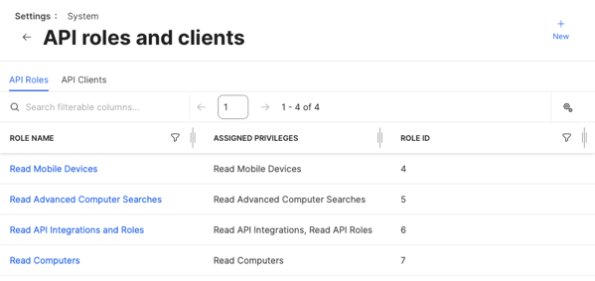
In this example, I have the following API roles set up on a Jamf Pro server:

In turn, the following API clients have been also set up and assigned to those API roles:

With the example conditions, you should see similar output to what’s shown below when using the API_Client_Role_Reporting.sh script to generate a report:
This file contains hidden or bidirectional Unicode text that may be interpreted or compiled differently than what appears below. To review, open the file in an editor that reveals hidden Unicode characters.
Learn more about bidirectional Unicode characters
| username@computername ~ % /Users/username/API_Client_Role_Reporting.sh | |
| Please enter your Jamf Pro server URL : https://jamf.pro.server.here | |
| Please enter your Jamf Pro API client ID : ab087cea-f1f3-4953-a452-21454713da5f | |
| Please enter the API client secret for the ab087cea-f1f3-4953-a452-21454713da5f API ID client: | |
| Report being generated. File location will appear below once ready. | |
| Report available here: /var/folders/ps/2_yw29gj711c9d7c5w5jhyv80000gp/T/tmp.G1KXv6fEpZ.tsv | |
| Client Name Client ID Enabled Assigned Role | |
| ReadComputerSearches 3e8ca82c-b4c2-48f3-90fc-fcb637a6c845 false Read Advanced Computer Searches | |
| ReadMobileDevices 605c3677-7c46-46e9-9c91-10e99a7f296c true Read Mobile Devices | |
| API_mapping ab087cea-f1f3-4953-a452-21454713da5f true Read API Integrations and Roles | |
| ReadComputers 5789b2e1-6f70-41b8-8ec2-65a478c53aef true Read Computers | |
| username@computername ~ % |
As part of the script’s run, a report will be generated and you’ll be notified of where it is stored. The report will be in TSV format and appear similar to what’s shown below:
This file contains hidden or bidirectional Unicode text that may be interpreted or compiled differently than what appears below. To review, open the file in an editor that reveals hidden Unicode characters.
Learn more about bidirectional Unicode characters
| Client Name | Client ID | Enabled | Assigned Role | |
|---|---|---|---|---|
| ReadComputerSearches | 3e8ca82c-b4c2-48f3-90fc-fcb637a6c845 | false | Read Advanced Computer Searches | |
| ReadMobileDevices | 605c3677-7c46-46e9-9c91-10e99a7f296c | true | Read Mobile Devices | |
| API_mapping | ab087cea-f1f3-4953-a452-21454713da5f | true | Read API Integrations and Roles | |
| ReadComputers | 5789b2e1-6f70-41b8-8ec2-65a478c53aef | true | Read Computers |
如有侵权请联系:admin#unsafe.sh