Strata Identity’s AI Identity Gateway has emerged as the leading runtime solution for securing a 2026-5-29 20:7:21 Author: securityboulevard.com(查看原文) 阅读量:30 收藏
Strata Identity’s AI Identity Gateway has emerged as the leading runtime solution for securing agentic workflows with full visibility in the enterprise. Built on our battle-tested Identity Fabric — already deployed across many of the Fortune 100 — we’ve worked closely with early adopters and design partners to address the use cases that matter most as AI moves into production. Protecting agent workloads that reach the data layer is now at the top of that list, and Snowflake’s managed MCP server is the cleanest way to give Claude and other workforce AI clients first-class access to enterprise data. What follows is the runnable lab that wires the two together under a federated, auditable identity — so the question “which human asked which agent to run this query?” has an answer that ships in the audit log, not a service-account ticket.
TL;DR. Snowflake shipped managed MCP servers in October 2025. Claude is on every desk. The two are one OAuth handshake away from each other — but the handshake every team reaches for first is “give the MCP server a personal access token tied to a service account,” and that audit trail will not pass review. This post wires a third party in: a Maverics-issued JWT, validated by Snowflake’s EXTERNAL_OAUTH_INTEGRATION against published JWKS, with agent identity claims injected by a Go Service Extension. Snowflake never sees a shared credential. Every query runs under a federated identity. The companion repo is connect-snowflake-to-maverics — clone it, run make snowflake-demo, and watch the chain land in Snowflake’s LOGIN_HISTORY.
This is a runnable lab against Snowflake’s managed MCP, JWT to JWT, audit log to audit log. It walks you from “Claude wants data” to “Snowflake’s LOGIN_HISTORY names the human and the agent” — no shared service account in the chain, no handwritten MCP code, just Snowflake’s EXTERNAL_OAUTH_INTEGRATION on one side and Maverics issuing short-lived, claim-rich JWTs on the other.
The shortcut that ends every audit badly
When a workforce AI client wants data and a warehouse holds it, the shortest line between them is an over-permissioned shared secret. Someone provisions a service account so Claude can connect. Someone generates a personal access token and drops it into the MCP client config. Someone tells thirty analysts to share the same warehouse credential because building per-user controls felt like a six-week project nobody budgeted.
This works. For a while.
Then the query log gets pulled in an audit and every read came from svc_claude_prod_01. Then someone exfiltrates a token from a laptop and it’s good across the entire workforce. Then a compliance team asks for role-based access reviews and you realize there are no roles — there’s one account that thirty people share, doing whatever any of them ask of it.
The shortcuts aren’t the problem. The accumulation is. Each one moves the human one step further from the query running on their behalf. By the time a real incident shows up, the audit trail is a dead end.
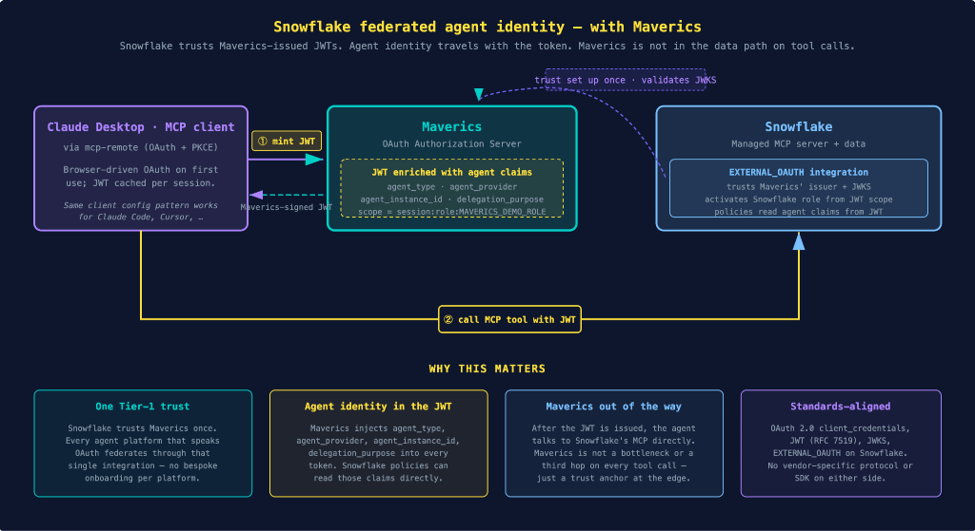
This tutorial replaces the shared secret with federated trust. The MCP client (Claude Desktop, Claude Code, Cursor — anything that speaks the standard OAuth + MCP flow) authenticates against your identity provider. Maverics issues a short-lived JWT enriched with agent identity claims. Snowflake validates the JWT against Maverics’ published JWKS via EXTERNAL_OAUTH_INTEGRATION, activates a least-privilege role from the scope claim, and runs the query under the federated identity. Maverics is not in the data path on the actual query — it’s the trust anchor at the edge.
What an identity-governed Snowflake call looks like
The lab in this tutorial puts three pieces on the wire:
- A Maverics OIDC Provider with a new OAuth client (
mcp-client-cli-snowflake) bound to the Snowflake audience. - A Go Service Extension (
buildAccessTokenClaimsSE) that fires on every token mint. It injectsagent_type,agent_provider,agent_instance_id,delegation_purposeinto the JWT — and, when the grant is a workforce flow, also lifts the user’s email and Keycloak sub out of the session and into the access-token JWT. (Maverics’ declarative claimsMapping populates ID tokens and userinfo by OIDC convention; it does not write the access-token JWT. Resource servers like Snowflake that match identity off access-token claims need the SE to put them there.) - A Snowflake EXTERNAL_OAUTH_INTEGRATION that trusts Maverics’ issuer (
https://auth.orchestrator.lab) and JWKS URL (the public Cloudflare-tunneled/oauth2/jwksendpoint), maps email (falling back to sub) to LOGIN_NAME, and pre-provisions a managed MCP server with a SYSTEM_EXECUTE_SQL tool.

The chain:
- Claude Desktop opens
https://auth.orchestrator.lab/oauth2/authin the browser, the user authenticates via Keycloak with PKCE, the Maverics OIDC Provider issues an access token. - The Service Extension fires during token mint and adds the four agent claims.
- Claude Desktop holds the JWT and calls Snowflake’s managed MCP directly.
- Snowflake validates the JWT against Maverics’ JWKS, maps the email claim (or sub if no email match) to a Snowflake user via LOGIN_NAME, and activates MAVERICS_DEMO_ROLE from the
session:role:MAVERICS_DEMO_ROLEscope. - The query runs under that role. QUERY_HISTORY records the user, the role, the SQL.
That’s it. No service account. No shared secret. The trust anchor (MAVERICS_EXTERNAL_OAUTH) is a SQL object in your Snowflake account, owned by your admin, scoped to your account. The signing key is in Maverics. Snowflake validates every token itself.
Why this is the right pattern (and what it’s not)
This tutorial uses plain OAuth 2.0 issuance from Maverics plus Snowflake’s EXTERNAL_OAUTH_INTEGRATION. The architectural family is what the Strata docs call Federated Exchange — one issuer, one JWKS, the upstream trusts your signature, no per-platform credential provisioning.
We’ve built this against Snowflake because the path from “Claude wants data” to “audit-ready federation” is short and concrete here. Snowflake’s EXTERNAL_OAUTH_INTEGRATION handles JWT validation against published JWKS, which leaves Maverics free to do what it does best: issue short-lived tokens, inject agent-identity claims through a Go Service Extension, and keep the policy decision out of the resource server’s hands.
Two things this tutorial is not doing, on purpose:
- No Maverics gateway in the data path. Snowflake’s MCP doesn’t go through Maverics on every tool call. Maverics issues the JWT once, then the agent talks to Snowflake directly. Maverics’ AI Identity Gateway (which fronts the enterprise-ledger and employee-directory MCP backends in the same lab) is a separate path — useful when you want per-call OPA enforcement against backends you control, less applicable when the upstream is a managed SaaS that owns the policy decision.
- No bespoke connector code. The whole integration is a one-time SQL CREATE SECURITY INTEGRATION on Snowflake’s side and one OAuth client config on Maverics’ side. Two open standards meet at the JWT signature.
Prerequisites
- Docker Desktop or Docker Engine + Compose v2.
- mkcert for local TLS certificate generation.
- Node.js — required by mcp-remote for the Claude Desktop connection.
- A Maverics Orchestrator image from Strata loaded via
docker load. - A Snowflake account. The 30-day trial is sufficient — EXTERNAL_OAUTH_INTEGRATION TYPE = CUSTOM is available on every edition.
- snowsql for the bootstrap DDL. Alternatively, the SQL in
apps/snowflake/setup.sqlcan be pasted into a Snowflake worksheet. - A publicly-reachable hostname for Maverics’ JWKS endpoint, because Snowflake fetches the JWKS from the public internet. Cloudflare Tunnel is free and works well for a lab; ngrok or any other public reverse proxy works too.
Production caveat. The Cloudflare Tunnel here is a local-lab convenience — it lets docker-compose expose a port to the public internet without provisioning real infrastructure. Don’t run production this way. In a real deployment, publish JWKS from a hardened public origin: a static jwks.json on a CDN, a managed cloud function (Cloud Run, Lambda, Cloudflare Workers), or your existing API gateway / edge proxy in front of Maverics. The signing key never leaves the Orchestrator; only the public JWKS is exposed. The tutorial uses a tunnel because the focus here is the federation mechanics, not the JWKS publication topology.
Get the example
git clone https://github.com/nickgamb-strata/connect-snowflake-to-maverics.git
cd connect-snowflake-to-maverics
cp .env.example .env
# Edit .env:
#   MAVERICS_IMAGE=<the tag you loaded via docker load>
#   SNOWFLAKE_ACCOUNT_URL=https://<your-account>.snowflakecomputing.com
#   SNOWFLAKE_ADMIN_USER=<your account admin>
#   SNOWSQL_PWD=<that admin's password — ephemeral, only used for setup>
Bring up the local lab:
make init       # generate TLS certs and OIDC signing keys, configure local DNS
make up         # docker compose up -d --build
make smoke-test
make smoke-test checks Keycloak health, OIDC Provider discovery, the gateway requires auth, and the Protected Resource Metadata is served. Four OK lines and you’re ready.
Walk the wiring
Three files do the work. Each one is short.
The OAuth client
orchestrator/oidc-provider/maverics.yaml adds the Snowflake-bound client alongside the existing mcp-client-cli from the prior Claude tutorial:
- name: mcp-client-cli-snowflake
  type: oidc
  clientID: mcp-client-cli-snowflake
  credentials:
    secrets:
      - <mcp_client_cli_snowflake.client_secret>
  authentication:
    idps:
      - keycloak
  grantTypes:
    - authorization_code     # Claude Desktop / PKCE
    - refresh_token
    - client_credentials     # demo script / CI
  redirectURLs:
    - http://localhost:19876/callback
    - http://localhost:3334/oauth/callback
  accessToken:
    type: jwt
  allowedAudiences:
    - https://<your-account>.snowflakecomputing.com/
  customScopes:
    scopes:
      - name: session:role:MAVERICS_DEMO_ROLE
      - name: snowflake:cortex_analyst
      - name: snowflake:cortex_search
      - name: snowflake:sql_execution
  claimsMapping:
    email: keycloak.email
    sub: keycloak.sub
  authorization:
    allowAll: true
    tokenMinting:
      accessToken:
        policies:
          - name: snowflake-token-minting
            file: /etc/maverics/policies/snowflake-token-minting.rego
  buildAccessTokenClaimsSE:
    funcName: BuildAccessTokenClaims
    file: /etc/maverics/service-extensions/agent-claims.go
Two pieces on this client that the existing mcp-client-cli doesn’t have: an OPA tokenMinting policy that gates which scope can mint a Snowflake-bound token, and the buildAccessTokenClaimsSE hook that points at the Service Extension below.
The Service Extension
orchestrator/oidc-provider/service-extensions/agent-claims.go:
func BuildAccessTokenClaims(api orchestrator.Orchestrator, req *http.Request) (map[string]interface{}, error) {
    // Agent-identity claims, derived from request context, on every grant.
    clientID := /* … from PostForm or BasicAuth … */
    claims := map[string]interface{}{
        "agent_type":         deriveAgentType(clientID),
        "agent_provider":     deriveAgentProvider(clientID),
        "agent_instance_id":  /* X-Agent-Instance header or generated UUID */,
        "delegation_purpose": /* delegation_purpose param or "snowflake-read" */,
    }

    // Workforce identity: on authorization_code grants there's a user session
    // bound to the request with the Keycloak attributes loaded by the OIDC
    // connector. claimsMapping fills ID tokens / userinfo by OIDC convention
    // but NOT the access-token JWT — so we lift `email` + `keycloak.sub` out
    // of the session here and let resource servers (Snowflake EXTERNAL_OAUTH,
    // anything else that reads access-token claims) match the workforce user.
    if sess, err := api.Session(session.WithRequest(req)); err == nil {
        if email, e := sess.GetString("keycloak.email"); e == nil && email != "" {
            claims["email"] = email
        }
        if ksub, e := sess.GetString("keycloak.sub"); e == nil && ksub != "" {
            claims["keycloak_sub"] = ksub
        }
    }
    return claims, nil
}
This fires on every grant type — authorization_code, client_credentials, refresh_token, token_exchange. The map it returns gets merged into the access token before signing. Snowflake’s session sees the agent claims in CURRENT_OAUTH_ACCESS_TOKEN_INFO() and they’re available to row-access policies, masking policies, and QUERY_HISTORY audit. The workforce branch is the bridge between OIDC convention (the email scope authorizes /userinfo) and resource-server reality (Snowflake reads identity off access-token claims).
The Service Extension is loaded as Go source mounted into the container at runtime — no plugin compilation, no separate build step. The Maverics OIDC Provider runs it through its embedded Go runtime. See the Service Extensions reference for the full hook catalog.
The Snowflake side
apps/snowflake/setup.sql does six things:
USE ROLE ACCOUNTADMIN;

CREATE WAREHOUSE IF NOT EXISTS MAVERICS_WH
  WAREHOUSE_SIZE = 'XSMALL' AUTO_SUSPEND = 60 AUTO_RESUME = TRUE;
CREATE DATABASE IF NOT EXISTS MAVERICS_DEMO;
CREATE ROLE IF NOT EXISTS MAVERICS_DEMO_ROLE;
GRANT USAGE ON WAREHOUSE MAVERICS_WH TO ROLE MAVERICS_DEMO_ROLE;
GRANT USAGE ON DATABASE MAVERICS_DEMO TO ROLE MAVERICS_DEMO_ROLE;
GRANT IMPORTED PRIVILEGES ON DATABASE SNOWFLAKE_SAMPLE_DATA TO ROLE MAVERICS_DEMO_ROLE;

-- Service user for the unattended demo (client_credentials grant — `sub` =
-- client_id = "mcp-client-cli-snowflake").
CREATE USER IF NOT EXISTS MAVERICS_AGENT
  TYPE = SERVICE
  LOGIN_NAME = 'mcp-client-cli-snowflake'
  DEFAULT_ROLE = MAVERICS_DEMO_ROLE
  DEFAULT_WAREHOUSE = MAVERICS_WH;
GRANT ROLE MAVERICS_DEMO_ROLE TO USER MAVERICS_AGENT;

-- Workforce users — LOGIN_NAME matches the Keycloak email claim Maverics
-- forwards onto access-token JWTs (via the buildAccessTokenClaimsSE hook
-- shown earlier). Replace with `CREATE USER` statements per real workforce
-- identity in production.
CREATE USER IF NOT EXISTS JOHN_MCCLANE
  TYPE = SERVICE
  LOGIN_NAME = '[email protected]'
  DEFAULT_ROLE = MAVERICS_DEMO_ROLE
  DEFAULT_WAREHOUSE = MAVERICS_WH;
GRANT ROLE MAVERICS_DEMO_ROLE TO USER JOHN_MCCLANE;

CREATE OR REPLACE SECURITY INTEGRATION MAVERICS_EXTERNAL_OAUTH
  TYPE = EXTERNAL_OAUTH
  ENABLED = TRUE
  EXTERNAL_OAUTH_TYPE = CUSTOM
  EXTERNAL_OAUTH_ISSUER = 'https://auth.orchestrator.lab'
  EXTERNAL_OAUTH_JWS_KEYS_URL = 'https://<your-public-jwks-host>/oauth2/jwks'
  EXTERNAL_OAUTH_AUDIENCE_LIST = ('https://auth.orchestrator.lab',
                                  'https://<your-account>.snowflakecomputing.com/')
  EXTERNAL_OAUTH_TOKEN_USER_MAPPING_CLAIM = ('email', 'sub')
  EXTERNAL_OAUTH_SNOWFLAKE_USER_MAPPING_ATTRIBUTE = 'LOGIN_NAME'
  EXTERNAL_OAUTH_ANY_ROLE_MODE = 'DISABLE'
  EXTERNAL_OAUTH_ALLOWED_ROLES_LIST = ('MAVERICS_DEMO_ROLE')
  EXTERNAL_OAUTH_SCOPE_MAPPING_ATTRIBUTE = 'scope'
  EXTERNAL_OAUTH_SCOPE_DELIMITER = ' ';

CREATE OR REPLACE MCP SERVER MAVERICS_DEMO.MCP.MAVERICS_AGENT_MCP
  FROM SPECIFICATION $$
tools:
  - name: "run_snowflake_query"
    type: "SYSTEM_EXECUTE_SQL"
    title: "Run Snowflake SQL"
    description: "Execute a read-only SQL query."
$$;
GRANT USAGE ON MCP SERVER MAVERICS_DEMO.MCP.MAVERICS_AGENT_MCP TO ROLE MAVERICS_DEMO_ROLE;
make snowflake-setup runs this with your .env values substituted in. The full file in the repo has comments explaining each block.
Two details worth flagging for additional context as you read alongside Snowflake’s documentation:
- Issuer vs JWKS hostname asymmetry. EXTERNAL_OAUTH_ISSUER is a string compare against the JWT’s
issclaim — Maverics signs with the internal hostnamehttps://auth.orchestrator.lab, so that’s the value. EXTERNAL_OAUTH_JWS_KEYS_URL is fetched over the network and needs to be your public hostname (e.g. the Cloudflare tunnel URL). - Scope parsing. Snowflake’s defaults read the
scpclaim with comma delimiter; Maverics emitsscopewith space delimiter. The EXTERNAL_OAUTH_SCOPE_MAPPING_ATTRIBUTE and EXTERNAL_OAUTH_SCOPE_DELIMITER overrides above align them. Without those overrides, the JWT validates, the user maps, the session opens — and then Snowflake reports The role requested in the connection … is not listed in the Access Token because it couldn’t find a role to activate.
Run the demo
Once the lab is up and Snowflake is configured, one command exercises the full chain:
make snowflake-demoExpected output:
==> 1. Minting JWT from Maverics OIDC Provider (mcp-client-cli-snowflake)

==> 2. JWT payload (agent claims injected by the Service Extension)
  iss: https://auth.orchestrator.lab
  sub: mcp-client-cli-snowflake
  aud: https://auth.orchestrator.lab
  scope: session:role:MAVERICS_DEMO_ROLE snowflake:cortex_analyst snowflake:cortex_search snowflake:sql_execution
  exp: 1777670586.0
  iat: 1777666986.0
  agent_type: mcp-client
  agent_provider: anthropic
  agent_instance_id: snowflake-demo-1777666986
  delegation_purpose: snowflake-read

==> 3. Snowflake SQL API call with the Maverics JWT
    sql: SELECT C_NAME, C_NATIONKEY, C_ACCTBAL FROM SNOWFLAKE_SAMPLE_DATA.TPCH_SF1.CUSTOMER ORDER BY C_ACCTBAL DESC LIMIT 5
  Columns: ['C_NAME', 'C_NATIONKEY', 'C_ACCTBAL']
  Row: ['Customer#000061453', 15, 9999.99]
  Row: ['Customer#000069321', 15, 9999.96]
  Row: ['Customer#000144232', 7, 9999.74]
  Row: ['Customer#000122485', 14, 9999.55]
  Row: ['Customer#000040766', 16, 9999.51]
In a Snowflake worksheet, the federation shows up in real time:
USE ROLE ACCOUNTADMIN;
SELECT EVENT_TIMESTAMP, CLIENT_IP, FIRST_AUTHENTICATION_FACTOR, IS_SUCCESS
FROM TABLE(INFORMATION_SCHEMA.LOGIN_HISTORY_BY_USER(
  USER_NAME => 'MAVERICS_AGENT',
  TIME_RANGE_START => DATEADD('hour', -1, CURRENT_TIMESTAMP())
))
ORDER BY EVENT_TIMESTAMP DESC;
Each demo run adds a row with FIRST_AUTHENTICATION_FACTOR = 'OAUTH_ACCESS_TOKEN' and IS_SUCCESS = 'YES'. That’s Snowflake confirming it accepted a Maverics-issued JWT.
In a second terminal, tail Maverics’ OIDC Provider logs to see the Service Extension firing per mint:
docker compose logs -f oidc-provider 2>&1 | grep agent-claims-seYou’ll see one line per token with client_id=mcp-client-cli-snowflake, the four agent claims, and the structured-log key-value pairs Maverics emits natively.
Connect Claude Desktop for the production flow
make snowflake-demo uses client_credentials for unattended testing — perfect for CI and the first end-to-end smoke test. For a real workforce flow, point Claude Desktop at the Snowflake managed MCP via mcp-remote:
{
  "mcpServers": {
    "snowflake": {
      "command": "/opt/homebrew/bin/npx",
      "args": [
        "-y",
        "mcp-remote",
        "https://<your-account>.snowflakecomputing.com/api/v2/databases/MAVERICS_DEMO/schemas/MCP/mcp-servers/MAVERICS_AGENT_MCP",
        "3335",
        "--host", "127.0.0.1",
        "--transport", "http-only",
        "--static-oauth-client-info", "{\"client_id\":\"mcp-client-cli-snowflake\"}",
        "--static-oauth-metadata", "{\"issuer\":\"https://auth.orchestrator.lab\",\"authorization_endpoint\":\"https://auth.orchestrator.lab/oauth2/auth\",\"token_endpoint\":\"https://auth.orchestrator.lab/oauth2/token\"}"
      ],
      "env": {
        "NODE_EXTRA_CA_CERTS": "/path/to/connect-snowflake-to-maverics/certs/rootCA.pem"
      }
    }
  }
}
Restart Claude Desktop. The first time you ask a question that needs Snowflake, a browser window opens for Keycloak authentication. The Maverics-issued JWT will carry the user’s Keycloak email and sub. The EXTERNAL_OAUTH_INTEGRATION provisioned by setup.sql is configured to map either claim — EXTERNAL_OAUTH_TOKEN_USER_MAPPING_CLAIM = ('email','sub') — so workforce users are normally onboarded by creating a Snowflake user whose LOGIN_NAME matches their stable IdP email. setup.sql ships with two test users (JOHN_MCCLANE and SARAH_CONNOR) wired this way; for your own workforce, replace those with CREATE USER statements per human and grant them MAVERICS_DEMO_ROLE. From that point forward, Claude’s queries against Snowflake run under the human’s identity, with the agent identity attached via the Service Extension’s claims.
mcp-remote doesn’t auto-discover Snowflake’s OAuth setup because Snowflake’s managed MCP doesn’t (yet) publish RFC 9728 Protected Resource Metadata. That’s why we pass --static-oauth-metadata to tell mcp-remote where Maverics is. When Snowflake adds PRM, this becomes one less config line.
If tools/call fails — front Snowflake’s REST API with mcpBridge (optional)
Skip this section if everything above works. If make snowflake-demo succeeds and your MCP client runs queries against Snowflake’s managed MCP cleanly, you don’t need any of what follows. Jump to “The audit chain a reviewer can follow”.
At the time of writing, Snowflake’s managed MCP server has a server-side bug where every tools/call against SYSTEM_EXECUTE_SQL returns MCP Server tool error: Error parsing response, even for a trivial SELECT 42. tools/list works fine through the same Maverics-issued JWT, and that same JWT runs the same SQL successfully against /api/v2/statements. We’ve filed a report with Snowflake; until it lands, here’s how to keep the agent flow working without giving up any of the federated-identity properties this tutorial gives you.
The fix in one sentence: bypass the managed MCP endpoint, put your own MCP-speaking front end in front of Snowflake’s REST API, and let Maverics’ mcpBridge generate the MCP tool surface from an OpenAPI spec — zero handwritten MCP code. The federated JWT still lands in Snowflake the same way; only the wire path between MCP client and Snowflake changes.
What you’d build
Three pieces, each small:
1. A tiny REST shim that fronts /api/v2/statements. ~50 lines in any language. It accepts POST /sql with {sql, warehouse, role}, passes the inbound Authorization header through verbatim, adds the X-Snowflake-Authorization-Token-Type: OAUTH header Snowflake’s REST API requires, and returns the rows. Run it on the same Docker network as the Maverics gateway. Python sketch:
@app.route("/sql", methods=["POST"])
def run_sql():
    auth = request.headers["Authorization"]
    body = request.get_json()
    req = urllib.request.Request(
        f"{SNOWFLAKE_ACCOUNT_URL}/api/v2/statements",
        data=json.dumps({
            "statement": body["sql"],
            "warehouse": body.get("warehouse", "MAVERICS_WH"),
            "role":      body.get("role",      "MAVERICS_DEMO_ROLE"),
            "timeout":   30,
        }).encode(),
        method="POST",
        headers={
            "Authorization": auth,
            "X-Snowflake-Authorization-Token-Type": "OAUTH",
            "Content-Type": "application/json",
        },
    )
    return jsonify(json.loads(urllib.request.urlopen(req).read()))
2. An OpenAPI spec describing that POST /sql endpoint with a bearerAuth security scheme. mcpBridge reads it and auto-generates a runQuery MCP tool with input schema derived from your request body. Full file under 100 lines.
3. An mcpBridge app on the existing Maverics AI Identity Gateway (the same Orchestrator that already proxies enterprise-ledger and employee-directory in this repo). It mounts the OpenAPI spec, baseURL’s the shim, and does delegation tokenExchange with audience = https://<your-account>.snowflakecomputing.com/ and scope = session:role:MAVERICS_DEMO_ROLE:
apps:
  - name: snowflake-bridge
    type: mcpBridge
    mode: openapi
    toolNamespace:
      name: snowflake_
    openapi:
      spec:
        uri: file:///etc/maverics/apps/snowflake-shim/openapi.yaml
      baseURL: http://snowflake-shim:5000
    authorization:
      outbound:
        type: tokenExchange
        tokenExchange:
          type: delegation
          idp: oidc-provider
          audience: https://<your-account>.snowflakecomputing.com/
          tools:
            - name: runQuery
              ttl: 60s
              scopes:
                - name: session:role:MAVERICS_DEMO_ROLE
                - name: snowflake:sql_execution
The MCP client (Claude Desktop, Cursor, …) now points at https://gateway.orchestrator.lab/mcp instead of Snowflake’s managed-MCP URL. The user signs in through Keycloak once; every subsequent tool call rides on a Snowflake-audience JWT that Snowflake validates against the same EXTERNAL_OAUTH_INTEGRATION you already configured. Same MAVERICS_DEMO_ROLE, same audit chain, same LOGIN_HISTORY / QUERY_HISTORY reconciliation, same Service Extension claims riding through on the exchanged token.
See the mcpBridge reference and the AI Identity Gateway MCP Bridge guide for the full configuration surface — tokenExchange.tools[] is where per-tool TTL and per-tool scopes get bound. The existing employee-directory-bridge app in this same Orchestrator config is a direct template; the only differences for Snowflake are the OpenAPI spec, the baseURL, and the audience/scope on the exchange. When Snowflake’s tools/call lands a fix, delete the shim and the bridge stanza and point your MCP client back at the managed-MCP URL — no other changes.
The audit chain a reviewer can follow
Three logs capture the same handshake:
- Maverics writes a structured log line at every mint: client_id, all four agent claims, traceID. That’s the “who asked for a token, on whose behalf, for what” record.
- Snowflake’s LOGIN_HISTORY records the OAuth authentication: which user mapped in, which IP, success or failure.
- Snowflake’s QUERY_HISTORY records every statement: who ran it, which role activated, the SQL text, rows returned.
Join them on user + timestamp and you get the chain end-to-end without writing any glue. A SOC team can pivot from a Snowflake query row back to the Maverics mint that authorized it. A platform team can search for agent_instance_id across the Maverics log to trace one logical agent session across multiple tool calls. A compliance team can show that every row read under MAVERICS_DEMO_ROLE came from a known agent acting on behalf of a known human.
That’s the property a CISO wants. Not “we have an audit log” — every system has one of those. “We have an audit log that reconciles with our identity system.” This is what reconciliation looks like when the identity system is in the middle.
What’s not yet shipping (and what comes next)
Two callouts before you ship this to production.
Maverics-side polish. The Service Extension that injects agent claims is forty lines of Go because Maverics doesn’t yet expose a declarative accessToken.customClaims block on OIDC apps. Same outcome either way, but a YAML version would skip the Go entirely. Token Brokering’s Federated Exchange (which is what you’d use if Snowflake adds a Stage-4 compounded-mint endpoint that takes a partner-signed assertion and returns a Snowflake-flavored JWT) is in private preview today. See apps/snowflake/GAPS.md in the repo for the full list.
Snowflake-side polish. The managed MCP server’s SYSTEM_EXECUTE_SQL tool returns Error parsing response on every tools/call under EXTERNAL_OAUTH (see the optional workaround section above for the mcpBridge pattern that gets you full MCP semantics today). Federation mechanics, identity governance, and the audit chain are unaffected regardless of which path you use.
Every workforce AI client plugs in the same way
The interesting detail in this whole walkthrough isn’t “Maverics issued a JWT and Snowflake validated it.” It’s that Snowflake didn’t have to know Maverics existed before your admin provisioned the integration. There’s no Maverics SDK on the Snowflake side, no Snowflake plugin in Maverics. Two implementations of RFC 7519 (JSON Web Tokens) and RFC 9728 met at the trust anchor your admin configured, on top of Snowflake’s published EXTERNAL_OAUTH semantics. That’s the difference between a federation pattern and a vendor integration — the federation outlasts both vendors’ release cycles, and you don’t pay a new integration tax every time either side ships a feature.
The same standards posture pays off on the client side. Today this lab pairs Snowflake’s managed MCP with Claude Desktop. Swap Claude Desktop for ChatGPT, Cursor, Claude Code, or whichever MCP-aware client your workforce adopts next — the picture doesn’t change. One federation policy on the Snowflake side. One brokering policy on the Maverics side. Every workforce AI client your CIO approves inherits the governance you set up today, with no per-client Snowflake project behind it.
Further reading
Strata docs
- AI Identity Gateway overview
- OIDC Service Extensions — including buildAccessTokenClaimsSE
- Token Brokering (experimental) — Federated Exchange and the other two brokering flows
- MCP Provider
- MCP Bridge App — REST→MCP tool generation from an OpenAPI spec (used in the optional workaround above)
Snowflake docs
- External OAuth Custom
- CREATE SECURITY INTEGRATION (EXTERNAL_OAUTH)
- Managed MCP servers
- CREATE MCP SERVER
Standards
- RFC 7519: JSON Web Tokens
- RFC 8693: OAuth 2.0 Token Exchange
- RFC 8707: OAuth 2.0 Resource Indicators
- RFC 9728: OAuth 2.0 Protected Resource Metadata
- MCP specification: Authorization
Maverics blog
- Connect AWS Bedrock AgentCore to an OAuth-Protected MCP Server. The parallel path — same pattern, different agent platform, no Snowflake.
- Your MCP Server Is a Resource Server Now. Act Like It. The first post in this series; introduces the Maverics-fronted MCP gateway pattern.
The post Connect Snowflake Managed MCP to Maverics: Federated Identity for Workforce AI Clients appeared first on Strata.io.
*** This is a Security Bloggers Network syndicated blog from Strata.io authored by Nick Gamb. Read the original post at: https://www.strata.io/blog/agentic-identity/connect-snowflake-managed-mcp-to-maverics-federated-identity-for-workforce-ai-clients/
如有侵权请联系:admin#unsafe.sh