

Model Context Protocol (MCP) deployment security is a critical topic in an age when artificial intelligence (AI) can be used to rapidly spin up new services and integrations without in-depth security knowledge or experience. Read on to find out how GuidePoint Security found over 2,000 open MCP servers in the wild, leaving them publicly accessible and ripe for exploitation.
TL;DR – Are your MCP deployments secure? We found thousands that are wide open. Go check your MCP deployment security right now. If they are publicly accessible without authentication and authorization controls, fix that today.
Key takeaways:
- An open, internet-facing MCP server lets anyone enumerate capabilities, discover connected resources and interact with integrated systems in ways you never intended.
- MCP servers that lack strong authentication and authorization controls are easily discoverable with the right AI-assisted searches.
- You can use the information provided by the GuidePoint Security DFIR team to quickly improve your MCP deployment security.

In case you are wondering, I am Portuguese, but yes, this post is about Artificial Intelligence (AI). And fair warning: AI helped me conduct research and craft charts and graphs for it, too.
Like most security teams these days, we have been leaning on AI for day-to-day work here at GuidePoint Security. The Digital Forensics and Incident Response (DFIR) team is no exception. We have been experimenting with MCP (Model Context Protocol) servers to plug into tools we use daily – Modat, Splunk, SentinelOne, CrowdStrike and others.
Some of these MCP servers require authentication, some make it optional and others rely on a third party for it. Most need API keys to reach the backend systems where the data lives. Long story short, this got us thinking: how many MCP servers out there are sitting wide open on the internet?
Quick caveat before we dive in: this is preliminary research. We are publishing it now because we think it is important to raise awareness. If you are running MCP servers, you need to make sure they are not accidentally exposed.
Starting the Search for Open MCP Servers
While setting up a few MCP servers ourselves, we noticed that uvx (part of the uv Python package manager) is commonly used to deploy them. It is an alternative to npx, which is also popular. For now, this research focuses exclusively on uvx-based deployments.
A quick curl against one of our own servers revealed some telltale HTTP headers:
					GET / HTTP/1.1
> Host: xxx.xxx.x.xx:8000
> User-Agent: curl/8.5.0
> Accept: */*
>
< HTTP/1.1 404 Not Found
< date: Tue, 02 Jun 2026 15:13:41 GMT
< server: uvicorn
< content-length: 9
< content-type: text/plain; charset=utf-8
<
Not Found
					> GET /mcp HTTP/1.1
> Host: xxx.xxx.x.xx:8000
> User-Agent: curl/8.5.0
> Accept: */*
>
< HTTP/1.1 406 Not Acceptable
< date: Tue, 02 Jun 2026 15:13:57 GMT
< server: uvicorn
< content-type: application/json
< mcp-session-id: 65b3188a3b84497cad141bce331bc35d
< content-length: 126
<
{"jsonrpc":"2.0","id":"server-error","error":{"code":-32600,"message":"Not Acceptable: Client must accept text/event-stream"}}
So uvicorn, an open-source Python web server, is what is running under the hood for these MCP servers.
Using Modat’s Magnify tool (one of our recent partners), we built a search to find these servers in the wild. Worth noting, not everything running uvicorn is an MCP server. It is used for plenty of other things too.
Here is the search we used:
same_service(web.headers~"server: uvicorn" and web.headers~"mcp-session-id:") or same_service(service="http" transport="tcp" banner.sha256=7af2fbb1f51c923e05d890b009183e7ae8fb2a5569fb9b0665cd77b6425f7c7f)
Finding the Exposed MCP Servers in the Raw Data
We exported all the results to JSON. But not everything in there would be an MCP server and not all MCP servers would be accessible to us. So the next question was:
How do we validate which ones are actually MCP, what they expose and what we can learn from them?
This is where AI really shines for quick research projects. Yes, we got AI to write the scanning code.
Using Cursor with its Composer 2.5 Fast agent, we knocked out a Python script that connects to each candidate via the FastMCP Client module. It collects Tools, Resources and Prompts from anything that responds. A positive handshake confirms it is an MCP server and tells us what it can do.
Here is a snippet of the core logic. We are not publishing the full script since it is AI-generated and has not been hardened, but it should give you enough to replicate the approach:
					    async def _do_mcp_handshake() -> ProfileResult:
        transport = StreamableHttpTransport(
            url,
            headers=req_headers if req_headers else None,
            verify=TLS_VERIFY,
        )
async with Client(
            transport,
            timeout=timeout,
            init_timeout=timeout,
            verify=TLS_VERIFY,
        ) as client:
            tools = await client.list_tools()
            resources = await client.list_resources()
            prompts = await client.list_prompts()
With just over 8,400 hosts (many with multiple ports) and at least two URL paths to probe (“/” and “/mcp”), the result set got large quickly.
We used Claude (Sonnet 4.6) to summarize the results. Where you see AI-generated content quoted or shown in screenshots below, it is Claude’s output – sometimes with minor tweaks. We are being transparent about this: partly to show what is possible, partly to show where it falls short.
Analysis of the Initial Search Results
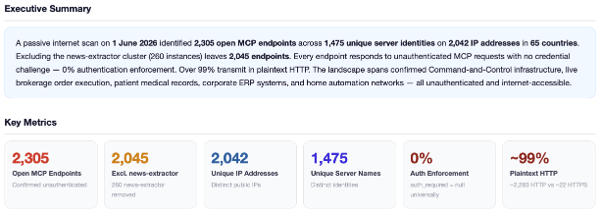
Out of nearly 62,000 endpoints probed, we found 2,305 open MCP servers spread across 2,042 IP addresses, reporting 1,475 unique server names (which typically reflect what the server does).
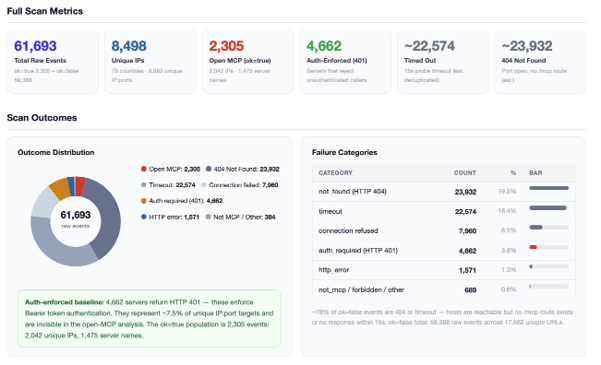
Some results were skewed by a familiar scanning artefact: certain IP ranges respond identically across every address, returning 250+ duplicate entries within a single /24 CIDR block.
After cleaning that up, we were left with 2,045 MCP server instances:
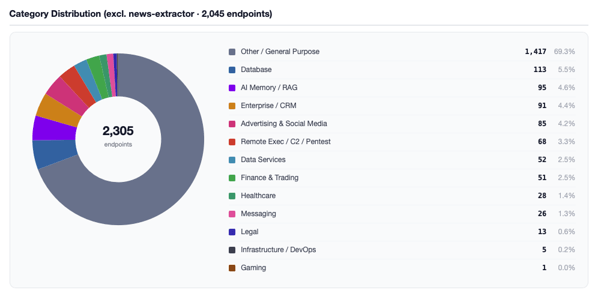
We had Claude categorize the results. We spot-checked and can confirm the categories exist and some entries are correct, but we cannot vouch for the accuracy of every classification.
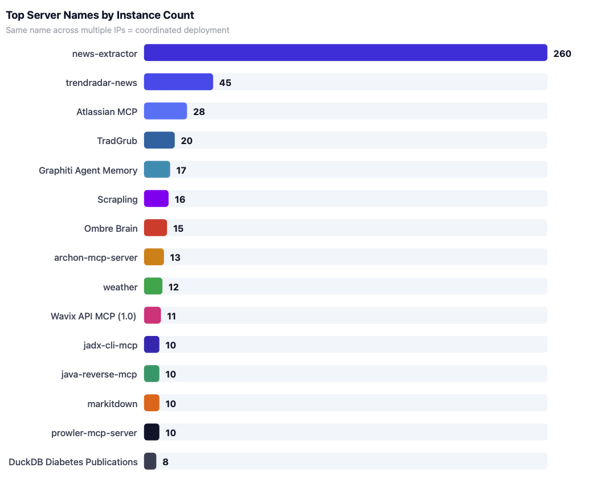
The top server names are shown below. The outlier is “news-extractor”. It appeared 260 times, but 258 of those were on the same ASN (POWER LINE DATACENTER), mostly in the 23.231.135.* range with 5 more on 103.49.248.*. We excluded these from the deeper analysis.
A word on what follows: we did not validate these servers by using them, that would mean accessing data we are not authorized to see. Just because something’s open does not mean it is public or fair game. We are also keeping details vague because identifying owners is difficult and the point of this post is awareness, not exposure.
What Were the Key MCP Server Security Issues Discovered?
We found several Atlassian MCP servers offering access to Jira and Confluence. The affected servers spanned verticals including Finance, Healthcare, Legal and ERP systems and presented open access to SaaS applications such as ServiceNow, Salesforce, SAP. We are not going into detail on most of these for privacy reasons, though Legal and Healthcare get a brief mention below.
We also found offensive tooling:
- An AdaptixC2 post-exploitation framework with 75 tools covering the full intrusion lifecycle.
- Three pen testing servers (Recon/Exploit/Ops) co-hosted on a single IP at VMISS Inc.
- A hexstrike-ai-mcp instance (150 tools) on Azure Hong Kong.
- 10 sequential IPs in a /24 running jadx-cli-mcp (Android APK decompiler, 39 tools) alongside java-reverse-mcp (Java RE, 31 tools).
Then there were the servers that straight-up allow remote code execution – either directly or through shell tools:
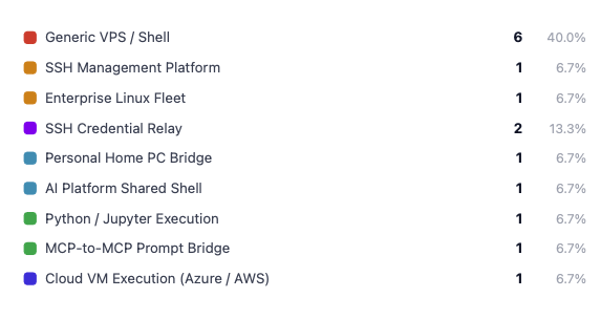
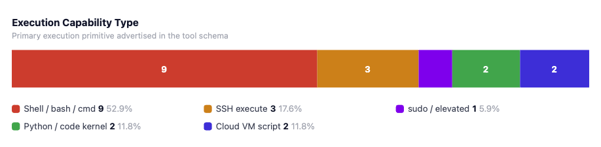
A Breakdown of the RCE-capable servers Discovered
Direct Shell & Terminal Access
|
Server Name |
Tool Name |
Tool Description |
|
ReelStream Shell |
bash |
Run a shell command on the server. |
|
SSH MCP Server |
run_command |
(执行命令)在服务器上执行任意 Shell 命令(需确认) – Execute arbitrary shell commands on the server (requires confirmation). |
|
Open Terminal DCI |
run_command |
Run a shell command in the background and return a command ID. This system is running Linux 6.17.0-1015-azure (x86_64) on dci-test-vm as user ‘dust’ with /bin/bash. Python 3.12.3 is available. |
|
terminal-tools-server |
sudo_execute |
Execute a command with sudo privileges on a connected remote server. Password is cached after first successful use. |
|
Linux Command Server |
linux_command_run |
Execute an arbitrary shell command on one server or an entire server-group. When instance_name is a group (e.g. ‘EU’), the command runs concurrently on all group members. |
|
Server Name |
Additional Details |
|
ReelStream Shell |
Several servers in this category expose a single tool with no description at all – tool names include execute_command, run_shell and execute_terminal_command. |
|
SSH MCP Server |
47 tools total: tmux session control, filesystem read/write with base64 exfiltration, docker_exec (shell inside containers), SSH auth log access, fail2ban status, firewall rules. |
|
Open Terminal DCI |
The tool description voluntarily discloses the hostname, OS version, username and shell. Also exposes send_process_input (write to stdin) and kill_process (SIGTERM / SIGKILL). |
|
terminal-tools-server |
ssh_connect: ‘When the user enters credentials for any one [pending server], all pending servers are connected automatically with the same credentials.’ FreeIPA credentials are cached in Docker container memory across sessions. |
|
Linux Command Server |
16 tools including linux_user_create (OS account creation with sudo/docker group membership) and linux_user_password_reset. Appears to manage an SAP environment. |
|
Server Name |
Tool Name |
Tool Description |
|
python-executor-safe |
execute_code |
Execute Python code in a persistent Jupyter kernel session. Variables and functions persist across calls within the same session. All code and output are saved to a .ipynb notebook file. |
|
shell-mcp |
cc_execute |
Send a task to Claude Code for execution. Args: prompt: The task/instruction to send to Claude Code; session_id: Optional session ID to continue a previous conversation. |
|
Shell MCP Server |
run_shell |
Ubuntu shell access for running usual shell commands and following CLI tools: OfficeCLI, DuckDB, Lit, jq, yq. |
|
Server Name |
Additional Details |
|
shell-mcp |
Forwards natural language prompts to a Claude Code execution environment. An adversary controlling the prompt causes downstream shell execution without invoking an execution tool directly. |
|
Shell MCP Server |
DuckDB availability provides a direct path to file-backed SQL queries and structured data exfiltration. |
Cloud Infrastructure - Remote Execution Inside Cloud Compute
|
Server Name |
Tool Name |
Tool Description |
|
Cloud-Commander |
execute_azure_vm_script |
Executes code inside an Azure VM. ‘os_type’: ‘linux’ (runs bash) or ‘windows’ (runs powershell). Args: vm_name, script, os_type, resource_group. |
|
Cloud-Commander |
execute_aws_ec2_command |
Runs a command on AWS EC2 via SSM. ‘os_type’: ‘linux’ or ‘windows’. Args: instance_id, command, os_type, region. |
|
Server Name |
Additional Details |
|
Cloud-Commander |
The same server also exposes list_azure_vms, list_azure_storage_accounts and list_azure_sql_servers – enabling full enumerate-then-execute workflows against an entire Azure subscription. |
|
Cloud-Commander |
Paired with list_ec2_instances, list_s3_buckets and kill_remote_process (cross-platform: pkill / Stop-Process). 60 tools total including full ServiceNow ITSM read/write access. |
As the above, the sections below were largely generated by Claude with minor formatting adjustments and some redactions. They cover additional details across a few notable categories.
Non-English-Language Patterns Discovered in the Data
|
Region |
Count |
Notable Findings |
|
🇨🇳 CN – Chinese (Mandarin/Traditional) |
125+ |
● Boss直聘 MCP Server – job platform, exposes session cookies (3 IPs) ● Finance MCP Server – A-share + US stocks, Chinese prompts (60 tools, Alibaba SG) ● CO-HEALTH-MCP – patient health data, clinic financials (50 tools) ● Ethereum MEV Searcher – Chinese-language tool descriptions, MEV arbitrage ● Tencent Ads API (38 tools, AWS) ● Lanhu Axure Extractor – design tool, 8 IPs across US/HK/SG/KR |
|
🇷🇺 RU – Russian (Cyrillic) |
57 |
● Yandex.Direct Agent – Yandex Direct ad management (43 tools, Yandex.Cloud) ● wishclaw – wishlist/crowdfunding, Telegram auth, payment collection (64 tools) ● 1C MCP Toolkit Proxy – ERP arbitrary code execution (7 IPs) ● MCP server for weather forecasting – weather server (Yandex.Cloud) ● FastMCP cluster – 8 instances, Russian hosting |
|
🇧🇷 BR – Portuguese (Brazilian) |
~10 |
● litigation_tracker_mcp – Brazilian CNJ court case tracking via PDPJ/JusBrasil ● mcp-brasil – Brazilian public services MCP ● Prompt templates: bacen_analise_economica, camara_analise_votacao |
|
🇯🇵 🇩🇪 🇨🇿 JP / DE / CZ – Japanese · German · Czech |
~15 |
● jp-stock – Japanese market data (Tencent Japan) ● Apex V2 Trading Bot – Czech descriptions, live trading bot with run_command ● AHHP6 MCP-Server Rhein-Neckar, gki-wissenskorpus – German knowledge corpus |
Category Deep-dives: A Close Look at the Risks
|
⛏ Gaming — Minecraft Server MCP | 1 server · 29 tools · Vietnam |
|
Full-stack Minecraft server management with remote panel control and AI bot injection. • Pterodactyl panel_write_file (two-phase config write), panel_send_command, panel_power, panel_backup — unauthenticated remote server admin • bot_spawn: injects an LLM-driven Minecraft bot that joins the live Minecraft server, performs tasks and returns Qwen3-VL vision-analyzed screenshots • ML-based config recommendation and semantic wiki search across Paper/Spigot/Fabric/Forge |
|
📑 Legal — Court & Docket Intelligence | 5 servers · US/PL/DE/FR |
|
US federal court docket search (PACER/RECAP), Brazilian civil litigation tracking and legal practice management. |
|
📈 Finance & Trading — Live Order Execution | 59 servers · US/VN/FI/JP/IN |
|
Live brokerage order placement, crypto exchange operations and an exposed trading bot database. • Alpaca MCP Server: place_stock_order, place_crypto_order, place_option_order, close_all_positions — live brokerage with no auth • Binance MCP (Japan/Google): create_order, get_deposit_address, get_liquidation_history • Ethereum MEV Searcher (Finland): dedaub_decompile (bytecode decompiler), get_approvals_given/received, Uniswap V4 pool analysis, Chinese-language descriptions • Apex V2 Trading Bot (India, Czech): supervisor_command, run_command on live bot process • 59 servers total: stock data (US/JP/KR/HK/VN), DeFi (Uniswap V2/V3), banking (Open Bank Project, Qonto, BFS Bank), payment gateways |
|
🧬 Healthcare — Patient PII & Clinical Data | 28 servers · US/Kenya/ES/FR |
|
Direct SQL on patient databases, FHIR resource write, managed care claim submission and personal health data tracking. |
|
🔌 IoT / Smart Home — Home Assistant | 3 instances · 83–84 tools · ES/PL/RO |
|
Full Home Assistant API exposed on residential ISP ranges in Spain, Poland and Romania. • 83–84 tools per instance: device control, automation triggers, entity state management, scene activation, energy monitoring • Residential ISPs: home lab deployments with no network segmentation • Any unauthenticated caller can control smart locks, lighting, thermostats and trigger home automations remotely |
|
🧪 Science & Bioinformatics | 5 servers · US/CH |
|
Physics simulators, molecular dynamics and protein databases — legitimate research tooling. • LAMMPS Molecular Dynamics (Google US, 16 tools): molecular simulation control • MuJoCo Physics Simulator (Google US, 25 tools): robotics physics • STRING Database MCP (Switzerland, 17 tools): protein-protein interactions • BioMCP Biomedical (2 IPs): PubMed, clinical trials, genomic variant databases |
Security Advisory - What You Can Do Now to Ensure MCP Deployment Security
If you are running MCP servers, take a hard look at your environment. Make sure nothing is unintentionally internet-facing. Anything that is externally accessible needs proper auth, least-privilege controls and monitoring. An open MCP server lets anyone enumerate your capabilities, poke at connected resources and interact with integrated systems in ways you never intended.
- Find all your publicly accessible MCP servers.
- Enforce authentication on every client connection.
- Audit authorization policies and what resources are connected.
- Restrict network exposure – if it does not need to be public, it should not be.
- Monitor for unexpected access patterns.
- Regularly test your MCP configs for weaknesses and new vulnerabilities.
With AI making it faster and cheaper to find exposed services and misconfigurations, expect both researchers and threat actors to discover these kinds of things faster than ever.
Final Thoughts on the State of MCP Deployment Security
We pulled all this together in under a day, with AI doing a lot of the heavy lifting. That is the point – this kind of research does not require deep specialist knowledge anymore. AI bridges the gaps.
That is a double-edged sword. The same tools that help defenders also help attackers. Faster PoC development, faster vuln discovery, faster exploitation. The barrier to entry is dropping on both sides.
The takeaway is simple: as AI makes it trivially easy to spin up new services and integrations, security cannot be an afterthought. It must be baked in from the start.
For more information related to MCP server vulnerabilities or for help defending against threats, please Contact Us.


The Identity Security Crisis: What the Data Tells Us

The CRQ Mandate: Why Financial Risk Insight Is the Future of Cybersecurity