Most people turn on a VPN and assume that's the end of it. The IP changes, the traffic encrypts, and 2026-7-1 14:57:37 Author: hackernoon.com(查看原文) 阅读量:9 收藏
Most people turn on a VPN and assume that's the end of it. The IP changes, the traffic encrypts, and whatever site they visit sees a stranger.
I assumed the same thing until one Friday night. I opened a streaming site with the kill switch enabled and connected to a New York server. Three seconds later, a “Proxy error” popped up.
The site never touched my encryption; instead, it looked at my IP, checked it against a database of known VPN addresses, and decided I wasn't welcome.
Here's what I learned: Websites don't need to crack encryption or run complex algorithms. They just need to recognize what a VPN looks like. And detection services like IPQualityScore maintain blocklists of over 30 million VPN IPs. and check them constantly.
A VPN hides your IP from websites and encrypts your traffic, but it leaves breadcrumbs everywhere else. Traces of DNS queries, IPv6 addresses, WebRTC signals, and browser fingerprints.
The good news? Once you understand how detection works, you can do something about it.
That's what we're covering here. Stick through to the end, and you’ll know exactly how websites catch VPNs, what you can do to be harder to track (not impossible to track), and how IPVanish helps with the detection methods that actually matter.
How websites flag your IP in milliseconds
When your traffic hits a website, one of the first things that happens is an IP lookup—an automated query against commercial databases, like MaxMind, IP2Proxy, and IPQualityScore.
These systems have already tagged hundreds of millions of IPs as residential, data center, proxy, or known VPN. The check takes milliseconds.
And if your IP is flagged, boom! You're blocked before the page even renders. These detection systems are constantly updated with new VPN IP ranges, and that’s why they work. It's a dedicated commercial operation of databases updated hourly, with millions of IPs tracked.
That's the infrastructure behind the proxy errors you see.
But here's what makes it almost embarrassingly easy to detect: Your IP doesn't just tell websites "I'm a VPN." It tells them where you're coming from. Every IP belongs to an Autonomous System Number (ASN). You can think of it as a network operator.
Consumer ISPs use residential ASNs. VPN servers almost always sit on data center ASNs like DigitalOcean or M247. Names so strongly associated with VPN traffic that their presence alone triggers flags.
Honestly, most websites don't need to know your VPN provider. They just need to see you're coming from a data center instead of someone's living room. That's usually enough.
The density problem
A single VPN server routes hundreds or thousands of users through a single IP address. When a fraud detection system sees hundreds of logins from the same address, it assumes it is a VPN rather than a very popular person. This is why premium VPN providers invest in residential IP pools, actual ISP-assigned IPs that blend in like normal home connections.
The catch? They're expensive to maintain. They’re the ones that drain your pockets. That’s why most providers don't bother. It's a pure cost-benefit calculation, with better infrastructure and the obvious higher detection rates.
As a result, detection accuracy against residential IPs drops. So if a premium VPN invests in residential pools, they're harder to catch. If they don't, they're not.
The core insight: Your VPN provider isn't anonymous. Your server's infrastructure is a fingerprint. And websites learned a long time ago that fingerprinting infrastructure is easier than tracking individual users.
What's leaking while your VPN thinks it's protected
Your VPN connection can be working perfectly and still expose you. Not because the encryption failed, but because of what slips out around it. These three leak types are responsible for more real-world exposure than any sophisticated detection system.
DNS Leaks: Your ISP still sees every domain you visit
When you type a URL, your device sends a DNS query to translate it into an IP address. If your VPN is configured correctly, that query travels through the encrypted tunnel and gets resolved by your VPN's own DNS servers.
If it's not configured correctly, the query goes straight to your ISP's DNS resolver. It goes outside the tunnel completely unencrypted.
This means your ISP can still see every single domain you visit, even though your actual traffic is encrypted. It's like having a locked front door while your ISP reads your mail on the way in.
Windows makes this worse with “Smart Multi-Homed Name Resolution,” which queries multiple DNS resolvers simultaneously and can accidentally send requests outside your VPN tunnel without notifying you.
How to check: Go to IPLeak.net or DNSLeakTest.com with your VPN connected. If your ISP's servers appear in the results, you're leaking. (Most people do on their first test.) But with a VPN like IPVanish, you get a built-in feature for DNS leak protection, so you don’t have to go elsewhere.
IPv6 leaks: The older problem most VPNs forgot to fix
Most VPNs were built around IPv4, which still carries the majority of internet traffic. IPv6 is the newer standard, and your device probably has IPv6 connectivity enabled by default.
But the problem is that most VPNs tunnel IPv4 traffic correctly, but completely ignore IPv6.
If your device has an active IPv6 address and your VPN doesn't cover it, that address is exposed to every website you visit, completely unprotected. The website sees two addresses at once (The VPN's IPv4 exit and your real IPv6). You're masked on one protocol and broadcasting your location on the other.
This is common precisely because so many providers never bothered to fix it. So, your real location could be leaking right now if your VPN doesn't explicitly handle IPv6.
How to check: Run the same DNS leak test. IPv6 addresses show up in the results. If you see one, your real IP is visible.
WebRTC Leaks: When your browser bypasses your VPN entirely
WebRTC is built into every modern browser to handle real-time communication, video calls, file sharing, and similar tasks. To connect devices directly, it uses STUN servers to reveal your real public IP address.
But it becomes an issue when those requests operate at a lower level in the browser and can bypass your VPN tunnel entirely.
Any website can trigger this with a bit of JavaScript.
The request goes out, the STUN server responds with your actual IP, and the website has it before you've even finished scrolling down the page.
The tradeoff: Disabling WebRTC stops this leak, but it also breaks Google Meet, Discord in the browser, and anything else that relies on peer-to-peer connections. You're trading one security hole for broken functionality.
Browser fingerprinting: The detection method your VPN can't touch
Your VPN is doing its job by hiding your IP and encrypting traffic, but your browser might cause you more trouble than you can anticipate.
Every website you visit gets a list of details about your browser:
- The fonts you have installed
- Your screen size and resolution
- Your timezone and language settings
- Your operating system (Windows, Mac, Linux)
- How your graphics card and audio hardware behave
When paired together, these details form a fingerprint that is unique to you. This means you are no longer anonymous, and your VPN does absolutely nothing to address it.
A RTINGS study tested multiple VPNs on the same machine. Same operating system, same screen size, same everything. As a result, the same fingerprint appeared every single time. Even when the VPN switched, the browser fingerprint stayed identical.
The easiest detection was a timezone mismatch.
Your IP says you're in Tokyo, but your browser timezone says New York. That contradiction alone is enough for websites to flag you instantly. It’s enough to catch you off guard. Even if your VPN is hiding your IP, but your browser is sharing your timezone, you're solving just half the problem.
How to fix this? To solve this, install an anti-fingerprint browser. Try something like Brave, which randomizes your fingerprint by default. Just install the browser, and it's ready to go. On the other hand, if you don't mind a bit of manual setup, you can also try Firefox, which is a more reliable option.
But the detection keeps evolving faster than VPNs can adapt
Let's take Netflix, for example. They run IP blacklisting, traffic pattern analysis, and proxy detection simultaneously, and they update constantly.
Here's the cycle: A VPN provider rotates to a fresh IP pool. Netflix identifies the new range within days and bans it. The process repeats. Smaller providers can't keep up, which is why the "Does this VPN work with Netflix?" answer changes week to week.
Government-level blocking is different.
China's Great Firewall uses machine learning trained on millions of real traffic samples to identify VPN usage based solely on statistical patterns, without decrypting a single packet. Standard Shadowsocks, once reliable, is now detected with over 90% accuracy.
As of April 2026, Russia has intensified its restrictions on VPNs. Major Russian websites and online services are now blocking users who try to access them with a VPN.
But for most people, though, this doesn't matter.
You're not fighting Netflix or the government, but rather dealing with ISP snooping, geo-restrictions on streaming, and public Wi-Fi sniffing. These are very different problems.
Can obfuscation really hide your VPN traffic?
Obfuscation is your VPN putting on a disguise. It helps, but it does not make you invisible.
Most VPN protocols have a recognizable “shape.” Tools that use Deep Packet Inspection (DPI) do not need to break encryption to flag that shape. They look at patterns, and standard OpenVPN or WireGuard traffic stands out more than most people expect.
Obfuscation works by reshaping that traffic so it blends in with regular HTTPS. Instead of looking like a VPN tunnel, it looks like normal, encrypted browsing.
Take Scramble from IPVanish. It modifies OpenVPN traffic just enough to avoid easy detection and routes it through port 443, the same port used for secure websites. To most basic inspection systems, it no longer appears to be a VPN connection.
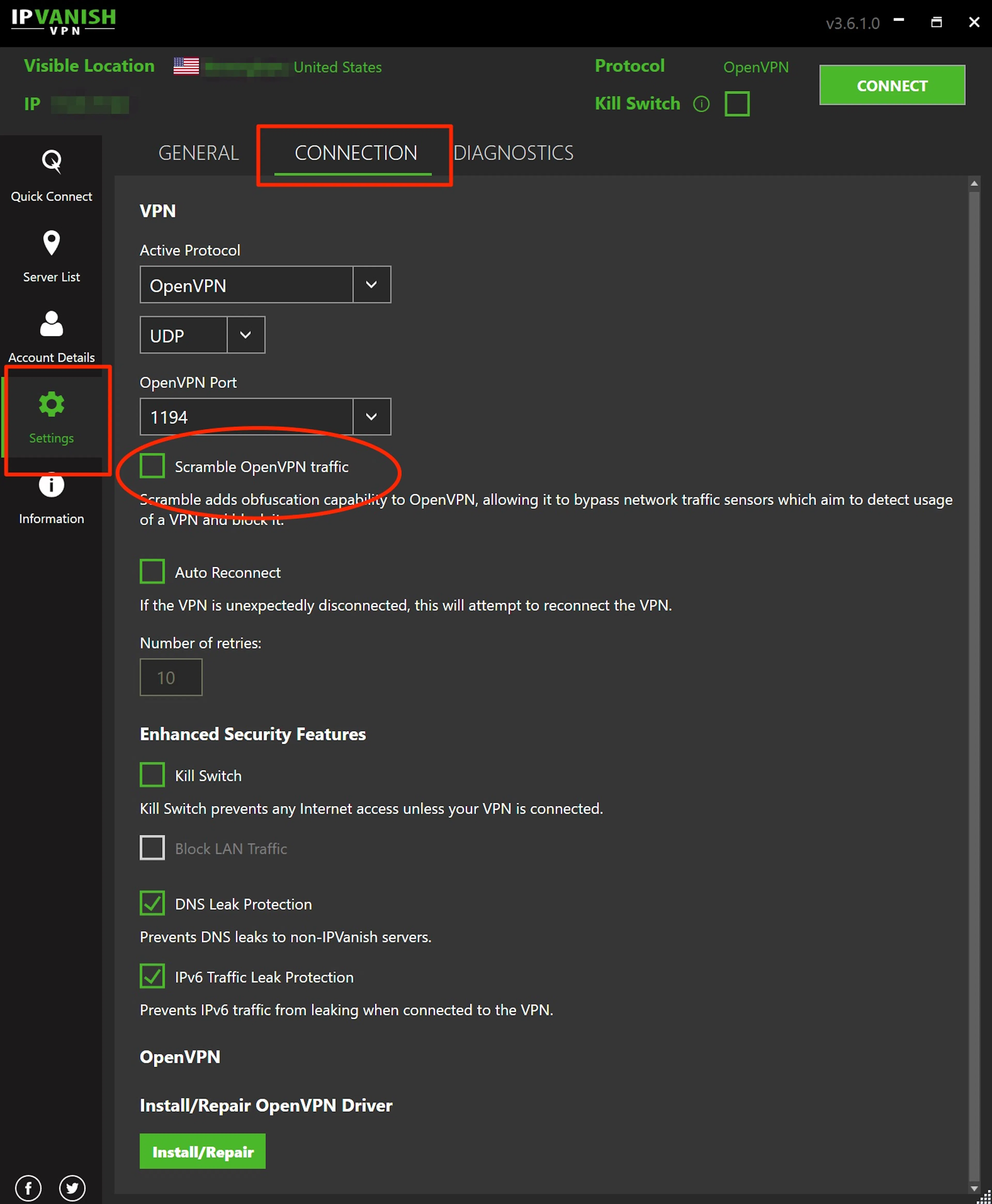
In everyday situations, that is often enough. It can get past ISP throttling, workplace filters, or university network blocks without much trouble. But this is also where the marketing starts to outrun reality.
Obfuscation comes with trade-offs.
For starters, it can slow your connection and, in many cases, is limited to specific protocols. So you can't blindly rely on it against more advanced censorship systems.
In stricter environments, people often turn to methods that wrap VPN traffic inside standard TLS connections. These are harder to detect but also slower and more difficult to set up.
7 things that actually make you harder to track
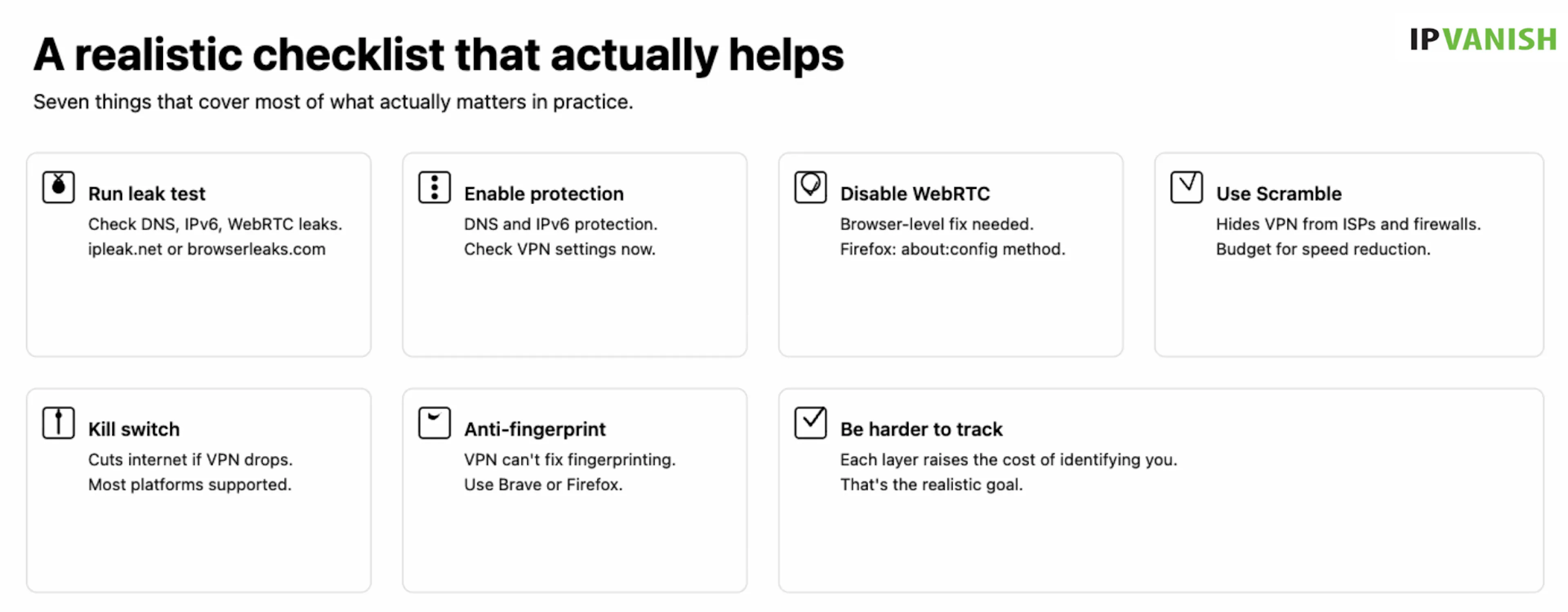
No single setting fixes everything, but these seven things cover most of what actually matters in practice, and most of them take under five minutes to set up.
Here is where to actually start:
- Run a leak test before you trust your setup. Go to IPLeak.net or BrowserLeaks.com with your VPN connected. DNS, IPv6, and WebRTC leaks all show up in seconds. Do this every time you switch networks or update the app, not just once during setup.
- Enable DNS and IPv6 leak protection. IPVanish has this built into every app. They are not always on by default, so go into settings and confirm they are actually enabled.
- Disable WebRTC in your browser. No VPN handles this automatically. In Firefox, go to about: config and set media.peerconnection.enabled to false. In Chrome, uBlock Origin with the right settings does the job.
- Use Scramble if your network blocks VPNs. It will not beat state-level censorship, but it reliably hides VPN usage from ISPs, workplace networks, and university firewalls. Budget for a speed hit.
- Turn on the kill switch. If the VPN drops, the kill switch cuts your internet connection before your real IP address is exposed. IPVanish has it on Windows, macOS, and Android. iOS does not have it yet.
- Deal with fingerprinting at the browser level. A VPN cannot touch this. Brave has anti-fingerprinting built in. Firefox gets you there with the right configuration. Pick one and use it consistently.
- Stop trying to be invisible and start trying to be harder to track. Detection exists on a spectrum. Every layer you add raises the cost of identifying you. That is the realistic goal, and it is achievable.
Go through these once, properly, and your setup will be meaningfully better than most people running a VPN and assuming it just works.
What IPVanish solves (and what it doesn't)
Given everything covered above, here is where IPVanish actually fits.
On the protection side, IPVanish handles the fundamentals well. DNS and IPv6 leak protection are built into every app, and the kill switch works on Windows, macOS, and Android.
Scramble adds a layer of obfuscation that is useful against ISP-level throttling and workplace restrictions. Plus, IPVanish’s network is fully owned, with over 3200 servers across 150 locations and a large pool of 56,000 IPs.
That matters more than it sounds.
No third-party host sits between you and your exit node, which means fewer intermediaries and a cleaner IP reputation when ranges are flagged.
Pricing starts at $2.19 per month on the two-year Essential plan, with a 30-day free trial, positioning it as an accessible, everyday option.
For everyday privacy concerns like ISP monitoring, public Wi-Fi exposure, geo-restrictions, and basic tracking, the coverage is solid. For state-level censorship, no consumer VPN is a complete answer right now, and IPVanish is no exception.
FAQs
Can websites see that I'm using a VPN?
Yes, most websites can detect VPN connections through IP reputation databases, ASN checks, and browser-level signals like timezone mismatches and WebRTC leaks. Detection services like IPQualityScore maintain blocklists of over 30 million IPs and update them hourly.
Does a VPN make me anonymous online?
No, a VPN doesn’t make you anonymous online. It hides your IP and encrypts your traffic, but does not prevent browser fingerprinting, cookie tracking, or account-level identification. It is one layer of privacy, not total anonymity. Pairing it with an anti-fingerprinting browser gets you meaningfully further.
What is a WebRTC leak?
A WebRTC leak occurs when your browser exposes your real IP address via its built-in real-time communication features, bypassing the VPN tunnel entirely. IPVanish does not block this automatically, so the fix needs to happen at the browser level.
Does IPVanish have obfuscation?
Yes, IPVanish's Scramble feature uses OpenVPN XOR encryption to disguise VPN traffic as regular HTTPS. Available on Windows, macOS, Android, and FireOS, it effectively bypasses ISP-level blocks but does not work in heavily censored countries such as China or Russia.
Can Netflix detect my VPN?
Yes, Netflix uses IP blacklisting and traffic pattern analysis to block most VPN connections. Providers constantly rotate IPs to stay ahead, but servers do get flagged regularly. IPVanish maintains over 56,000 IPs across its network, which helps, but no provider wins this fight every day.
如有侵权请联系:admin#unsafe.sh