Twelve shots left on episode two of Lost Garden, and the plan said zero credits. Not low. Zero.I ha 2026-7-22 12:34:32 Author: hackernoon.com(查看原文) 阅读量:0 收藏
Twelve shots left on episode two of Lost Garden, and the plan said zero credits. Not low. Zero.
I hadn’t miscounted shots. I’d never counted credits at all. I’d been treating generation cost the way you treat electricity: you use it, the bill shows up later, it’s fine. It is not fine when the bill arrives mid-scene, and the model you need for continuity is only available at the tier you just ran out of.
You budget AI video credits by converting your shot list into seconds and generations before you generate anything, pricing each shot at the model tier it actually needs, adding a regeneration buffer for the shots that will fail, and only then comparing that number to what your plan gives you. That’s the method that came out of the mess above, with the real numbers behind it.
Why credit budgets are harder to estimate than money budgets
A dollar budget is one number. A credit budget is at least three, because the same clip costs a different amount depending on the model and quality tier you pick for it.
Runway prices Gen-4 Video Turbo at roughly 5 credits per second, standard Gen-4 Video at about 12 credits per second, and Gen-4.5 at that same 12-credit rate, according to Runway’s own pricing page. Higgsfield runs its own separate scale entirely: Kling 3.0 costs around 14 credits for an 8-second, 720p clip, Nano Banana Pro image generations run about 2 credits each, and premium video models like Sora 2 or Veo 3.1 sit in the 40-70 credit range per generation on the Higgsfield pricing page.
That spread means a beginner mistake is treating “credits” as a single unit of cost, the way you’d treat dollars. It isn’t. A credit on a draft-tier model and a credit on a hero-shot model are not the same thing, and a budget built on the cheap number will fall apart the moment a scene actually needs the expensive one.
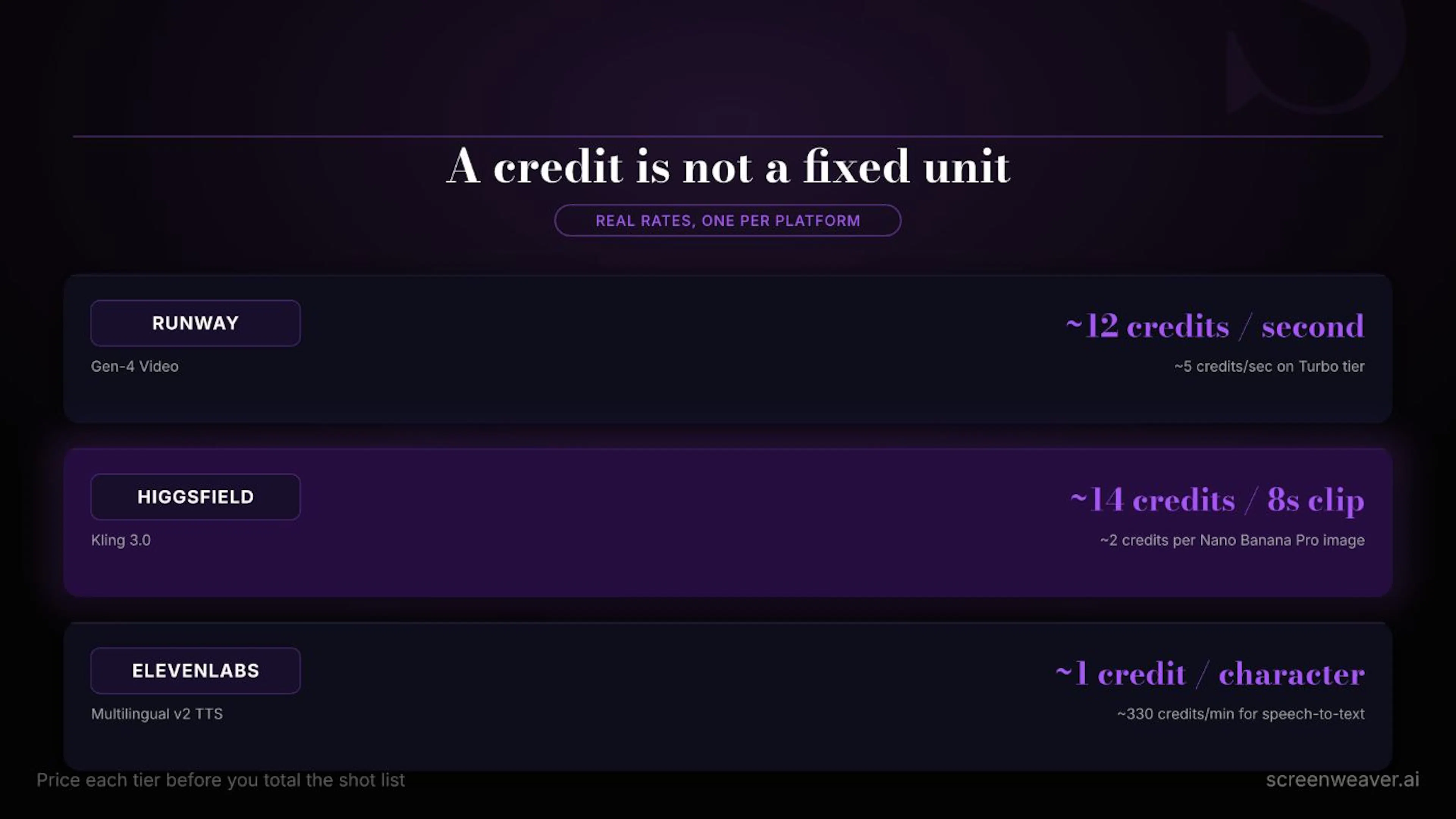 Real per-second and per-generation rates across three platforms, verified from their own pricing pages.
The five-step process I run before I generate anything
- Count shots and durations from the shot list, not from memory. If you already have a shot list built for AI generation with a duration field on every entry, this step is just addition. If you don’t, this is the step that forces you to build one, because you cannot price what you haven’t counted.
- Tier each shot by the model it actually needs. Not every shot needs your best model. A background plate or an establishing shot can usually run on a cheaper, faster tier; a hero close-up with a named character usually can’t. Sort the shot list into two or three tiers before pricing anything.
- Price each tier using the platform’s real per-second or per-generation rate, then multiply by shot count. This is where the numbers above go to work: a 40-shot episode at an average of 6 seconds a shot, split 70/30 between a cheap tier and a premium tier, gives you a real total instead of a guess.
- Add a regeneration buffer, and make it honest. I rebuilt one Lost Garden scene three times before it held together, and a different shot spent eight frames with six fingers before I caught it in review. Neither of those was rare. A 30 to 40 percent buffer on top of your raw shot total is closer to what actually happens than assuming every shot lands first try.
- Compare the total against your plan’s monthly allotment, not its marketing headline. Higgsfield’s tiers give roughly 200, 1,000, or 3,000 credits a month depending on plan; the top tier’s “unlimited” language applies to one chosen model, not every model in the catalog. Read the plan page like a contract, because that’s what it is.
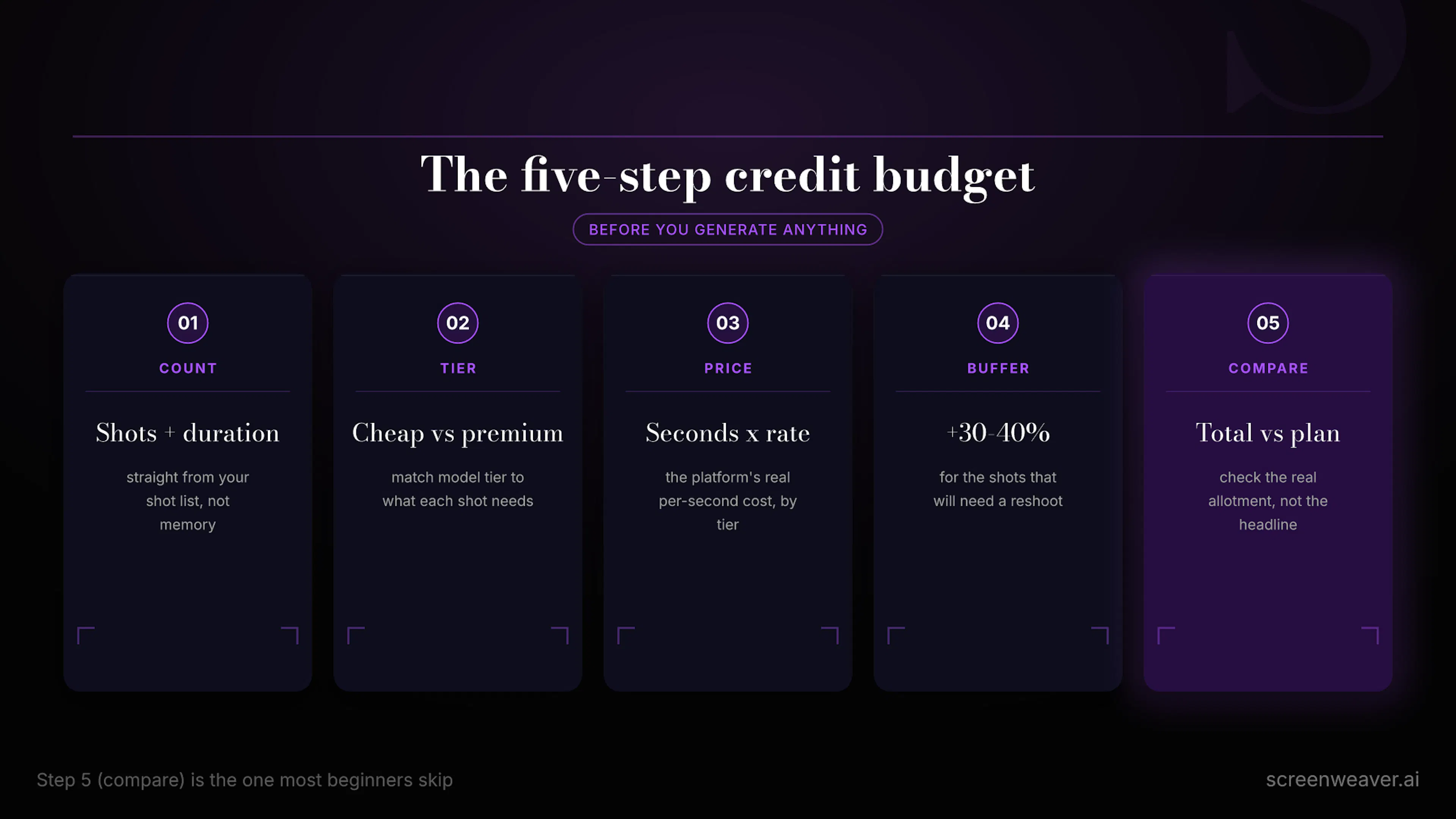 The five checks I run before a single credit gets spent.
A credit budget built on the cheap tier’s price and a 100 percent success rate isn’t a budget. It’s a hope with a spreadsheet attached.
Don’t forget the audio line
Video isn’t the only place credits disappear. If your workflow includes generated dialogue, sound design, or music, that’s a separate budget line with its own math. ElevenLabs prices standard text-to-speech at roughly 1 credit per character on its Multilingual v2 model, about half that on the faster Turbo and Flash models, with Speech to Text closer to 330 credits per minute and Eleven Music around 900 credits per minute, according to ElevenLabs’ pricing page. A dialogue-heavy short can burn through an audio allotment faster than the video allotment, and it’s an easy line to forget when you’ve only budgeted for shots.
Common mistakes I see (and made myself)
- Budgeting from the plan name instead of the fine print. “Unlimited” usually means unlimited on one model you pick, not your whole toolkit.
- Pricing every shot at the cheap tier just to make the total look smaller. The number only means something if the tiering matches what the scene will actually need later.
- Skipping the regeneration buffer entirely. If one shot in five needed a reshoot on your last project, expect roughly the same on this one.
- Forgetting that top-up credit packs can expire. Some platforms run purchased top-ups on a roughly 90-day clock, separate from the monthly plan reset, so a pack bought for a project that stalls can quietly run out before you touch it.
- Treating audio as free because it “usually just works.” It has its own credit meter, and a dialogue-heavy scene burns through it fast.
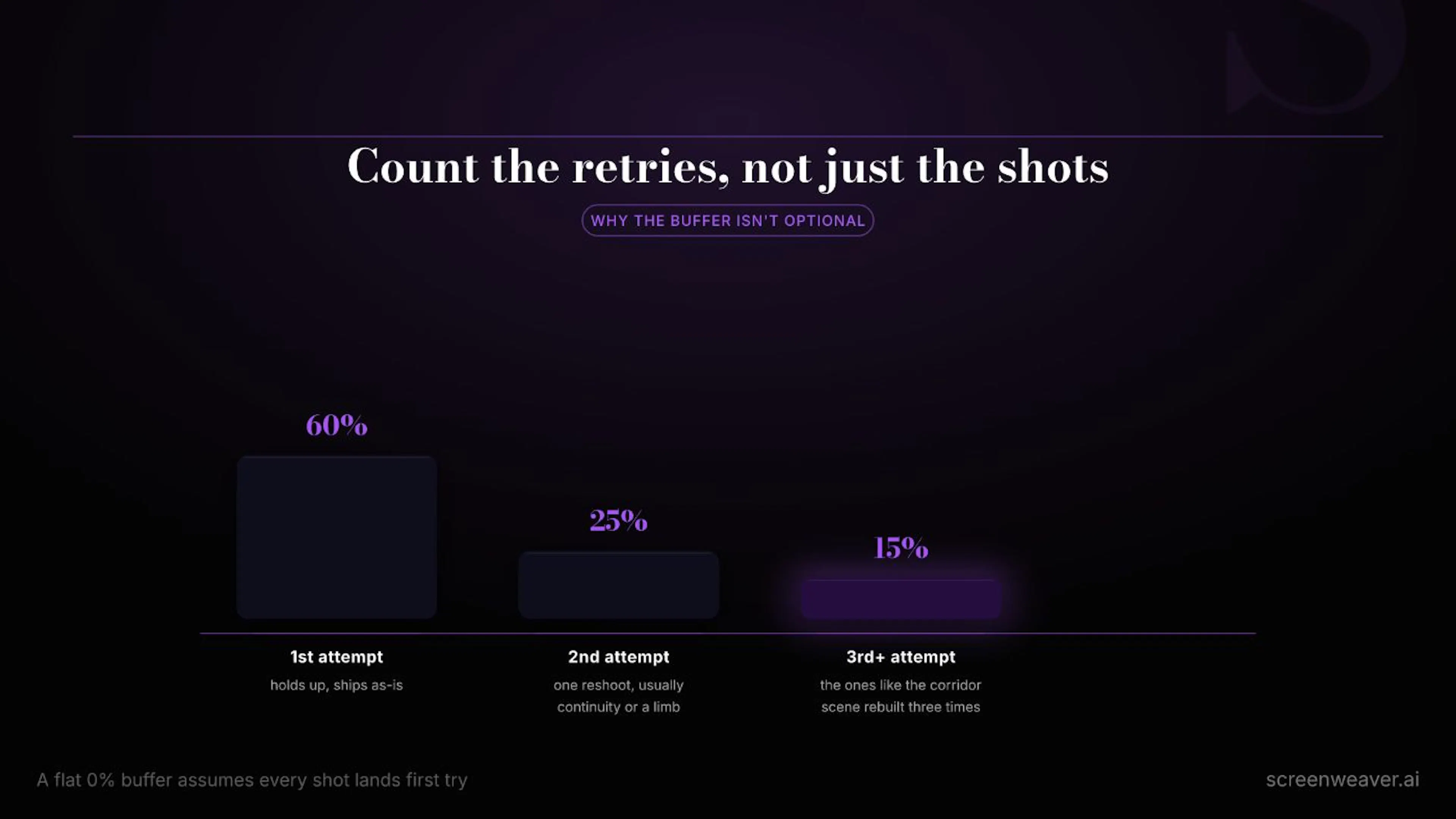 Rough distribution of first-try vs. reshot shots on a typical Lost Garden production run.
A better place to keep the number
Right now, most of this budget lives in a spreadsheet next to a shot list that lives somewhere else, which is exactly how I lost track of it on episode two. What I actually want, and what I’ve been building toward with ScreenWeaver, is a workspace where the shot list, the model tier assigned to each shot, and the running credit count sit next to each other, so the number updates as the plan changes instead of living in a file you forgot to open.
FAQ
How many credits do I need for a 3-minute AI short film?
It depends entirely on shot count, average duration, and model tier, which is the whole point of running the five-step process above instead of using a flat rule of thumb. A rough anchor: 30 shots averaging 5 seconds each on a mid-tier model, plus a 30 percent regen buffer, lands well into four figures of credits on most platforms, before audio.
Do unused monthly credits roll over?
This varies by platform and plan, and purchased top-up packs in particular often carry their own expiry window (commonly cited around 90 days) separate from the monthly plan reset. Check your specific plan’s terms before assuming a rollover.
Is it cheaper to buy a bigger plan or a one-time top-up pack?
Top-up packs are usually priced at a premium per credit compared to the equivalent amount inside a higher subscription tier, since you’re paying for flexibility instead of committing to a recurring cost. If you know you’ll need the credits again next month, the plan usually wins on unit price; if this is a one-off push to finish a project, the top-up avoids paying for a subscription tier you won’t use again.
I still keep a running number now, updated after every generation session, not just at the start of a project. It’s a small habit. It’s also the difference between finishing a scene and finding out how far short you were with twelve shots still on the board.
如有侵权请联系:admin#unsafe.sh